- Products
- Learn
- Local User Groups
- Partners
- More

What’s New in Identity and Trust?
11 November @ 5pm CET / 11am EST
What’s New in Agentic Network Orchestration
AI Security Masters
LGTM: Bypassing an LLM Build Gate
When Prompt Injection Fails
CheckMates Go:
Fun Ding
Hello guys,
How to prevent the user on the LAN internal network from connecting to the SSL VPN/Client itself. We come across this case, where the user should only be able to access an SSL VPN/Client when they are internal, not when they are internal.
I wouldn't want users to access our own SSL/Client VPN from the internal network.
Congrats,
Cristian Rosa
Yep - it is rather old and called Location Awareness:
SmartDashboard - go to Policy menu - click on Global Properties... - expand Remote Access - click on Endpoint Connect - in the Connectivity Settings section, refer to Network Location Awareness field - select Yes - click on Configure... button - enjoy the options...
Im not real sure what you are trying to achieve here. You dont want user thats internal to be able to access VPN client??
240 / 5,000
You can restrict it, but there is no need to do this from internal.
And how would I do?
Can you help me ?
Congrats,
Cristian Rosa
Dont you have the ability to select the interface its accesible from?
i got that on several things if you open the gateway properties
I don't know how to inform. I searched but couldn't find where to configure it.
Honestly, I never heard of a way to do this specifically from the firewall object itself or even global properties. There might be some way possible via gw file trac_client_1.ttm, but not 100% sure how. Maybe someone else will chime in and confirm for you. Personally, there would need to be some sort of mechanism that would recognize user being internal that would prevent them from even being able to connect, unless they come from external source.
Lets see if someone else may have an idea, Im also interested to see the suggestions/advice or if its even possible.
Yep - it is rather old and called Location Awareness:
SmartDashboard - go to Policy menu - click on Global Properties... - expand Remote Access - click on Endpoint Connect - in the Connectivity Settings section, refer to Network Location Awareness field - select Yes - click on Configure... button - enjoy the options...
Ah, yes, good point, totally forgot about that.
Hello Abrecht,
Your help resolved my case.
Thanks a lot...
Cristian Rosa
CCSA
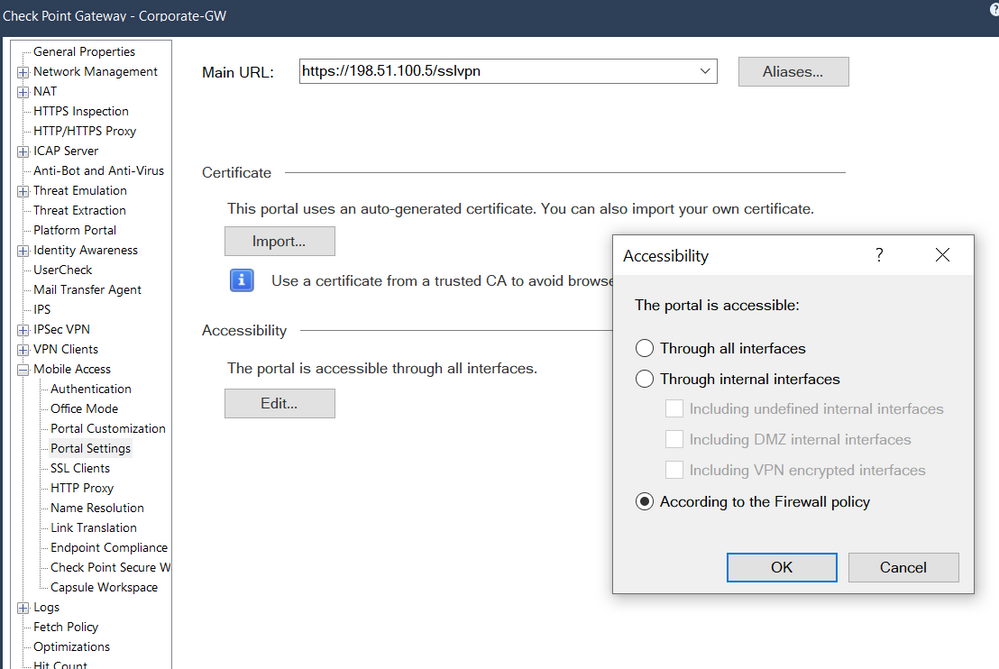
@Cristian_Rosa you can disable the implied rule for MOB access if you switch your gateway object configuration "Accessibility" to "According to the Firewall policy"
With these setting you have to define access rules for access to the MobileAccessPortal like this one
Leaderboard
Epsum factorial non deposit quid pro quo hic escorol.
| User | Count |
|---|---|
| 4 | |
| 1 | |
| 1 | |
| 1 |
Wed 28 Oct 2026 @ 10:00 AM (CET)
Peer Pressure for AI: What Happens When Agents Start Influencing Each Other? - EMEAWed 28 Oct 2026 @ 05:00 PM (IST)
Peer Pressure for AI: What Happens When Agents Start Influencing Each Other? - AMERThu 29 Oct 2026 @ 10:00 AM (CET)
Under the Hood: Check Point Security Management | From Intent to Automation with Agentic AIThu 29 Oct 2026 @ 11:00 AM (PDT)
Irvine, CA: Secure the Network, the App, and the Workforce: A Hybrid Mesh & SASE BriefingWed 28 Oct 2026 @ 10:00 AM (CET)
Peer Pressure for AI: What Happens When Agents Start Influencing Each Other? - EMEAWed 28 Oct 2026 @ 05:00 PM (IST)
Peer Pressure for AI: What Happens When Agents Start Influencing Each Other? - AMERThu 29 Oct 2026 @ 10:00 AM (CET)
Under the Hood: Check Point Security Management | From Intent to Automation with Agentic AIThu 29 Oct 2026 @ 03:00 PM (EDT)
Americas Deep Live: What's New in Check Point Firewall R82.20Tue 03 Nov 2026 @ 06:00 PM (CET)
Under the Hood: How to Secure Agentic AI on AWS with Check PointThu 29 Oct 2026 @ 11:00 AM (PDT)
Irvine, CA: Secure the Network, the App, and the Workforce: A Hybrid Mesh & SASE BriefingAbout CheckMates
Learn Check Point
Advanced Learning
WE SECURE YOUR AI TRANSFORMATION