- Products
- Learn
- Local User Groups
- Partners
- More

MVP 2026: Submissions
Are Now Open!
What's New in R82.10?
10 December @ 5pm CET / 11am ET
Announcing Quantum R82.10!
Learn MoreOverlap in Security Validation
Help us to understand your needs better
CheckMates Go:
Maestro Madness
Hello
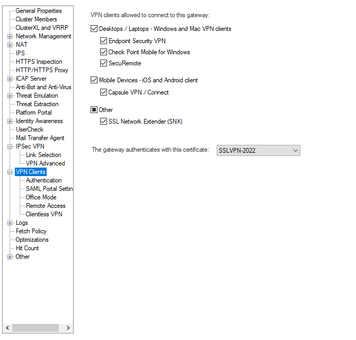
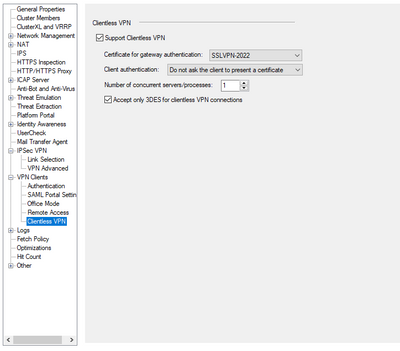
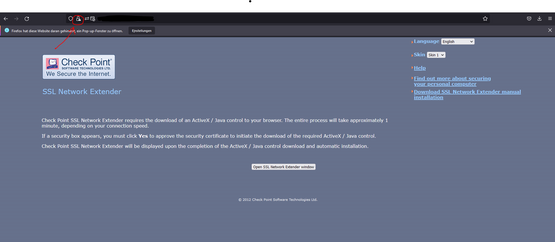
We recently changed the SSL Certificates for VPN on our Gateway. We use two certificate. One for internal use only issued by an internal CA and one for external use issued by EuropeanSSL. Our configuration looks correct on the first glimpse but if we connect to our SNX it shows the internal certificate which it should not use.
SSLVPN-2022 is our EuropeanSSL Certificate the internal one would be InternalCP
Is there any kind of database entry that did not override or did i miss anything?
Thanks in advance for your help
Silly question, did you push policy?
Sure! Its running since 2 weeks or so...
Got it. Look into sk177903 and let me know if it fixes things or not.
I dont think this is the right solution... The UserCheck Portal should use the internal CA Cert but when we want to access the SNX Web-Page (for example) from the public domain it should use the EuropeanSSL but it does'nt...
This page is accessed via the public domain name so it should use the EuropeanSSL cert but internally it shouldnt
I hope you understand what I mean
UserCheck and SNX are using the same certificate, which is different from VPN certificate. What is the issue for UserCheck to show your EuropeanSSL?
Also, to make sure which certificate is used where, you can look into $FWDIR/database/myself_objects.C file of your Security Gateway
Okay so i checked the File....
The UserCheck Portal is running following settings:
: (
:type (portal_settings)
:portal_name (UserCheck)
:ssl_certificate (ReferenceObject
:Uid ("{BE6C0102-E935-4917-8B3E-A81DEE2577D3}")
:Name (cert_9)
:Table (ssl_certificates)
)
:internal_port (8887)
:is_enabled (true)
:priority (1000)
:encrypted_connection (true)
:dmz_internal_interfaces (false)
:portal_access (internal_interfaces)
:is_any_host (false)
:ip_address (w.x.y.z)
:allow_additional_clear_port (false)
:main_url ("https://server.domain.net/UserCheck")
:undefined_internal_interfaces (false)
:certificate_mode (all_with_same_ip)
:is_encrypted (true)
:path_prefix ("/UserCheck")
:hostname (server.domain.com)
:external_port (443)
)
It references to the ceretificate cert-9 but in the certificates section there is only the certs EuropeanSSL_Intermediate-2 and internal_ca... could that be related? and am i allowed to add a certificate to the config of the snx portal?
: (
:type (portal_settings)
:portal_name (VPN_SNX)
:internal_port (444)
:is_enabled (true)
:priority (1000)
:encrypted_connection (false)
:dmz_internal_interfaces (false)
:portal_access (all_interfaces)
:is_any_host (false)
:ip_address (0.0.0.0)
:allow_additional_clear_port (false)
:main_url ("https://0.0.0.0/")
:undefined_internal_interfaces (false)
:certificate_mode (all_with_same_ip)
:is_encrypted (true)
:path_prefix ("/")
:hostname (0.0.0.0)
:external_port (443)
)
As I said, SNX uses the same infrastructure as UserCheck, so no, you cannot manually assign a different certificate to it by editing the file.
Leaderboard
Epsum factorial non deposit quid pro quo hic escorol.
| User | Count |
|---|---|
| 4 | |
| 3 | |
| 2 | |
| 1 | |
| 1 | |
| 1 | |
| 1 | |
| 1 | |
| 1 |
Fri 12 Dec 2025 @ 10:00 AM (CET)
Check Mates Live Netherlands: #41 AI & Multi Context ProtocolFri 12 Dec 2025 @ 10:00 AM (CET)
Check Mates Live Netherlands: #41 AI & Multi Context ProtocolTue 16 Dec 2025 @ 05:00 PM (CET)
Under the Hood: CloudGuard Network Security for Oracle Cloud - Config and Autoscaling!About CheckMates
Learn Check Point
Advanced Learning
YOU DESERVE THE BEST SECURITY