- Products
- Learn
- Local User Groups
- Partners
- More

Stop Babysitting Rules.
Go Agentic
Step Into the Future of
AI-Powered Cyber Security
The State of Ransomware Q1 2026
Key Trends and Their Impact
AI Security Masters E8:
Claude Mythos: New Era in Cyber Security
Blueprint Architecture for Securing
The AI Factory & AI Data Center
Call For Papers
Your Expertise. Our Stage
CheckMates Go:
CheckMates Fest
Scenario
Notebook With client Endpoint Security --> Checkpoint Quantum Spark 1530 Appliance
Notebook connect to Checkpoint all fine, he can see the entire LAN network, i used office mode. All fine.
What i need is a bidirectional comunication. Pc on lan network to have access to one port listening on notebook.
It's possible ?
Thank's
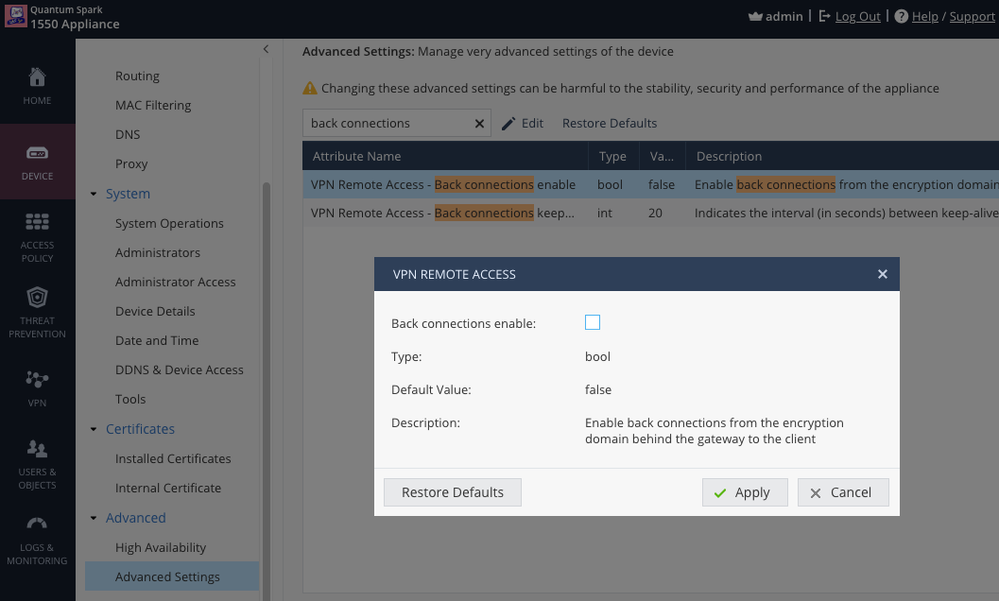
You need to additionally enable Back Connections in Advanced Settings:
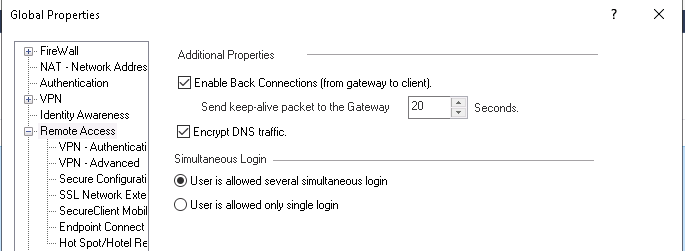
For a centrally managed SMB appliance (or for non-SMB appliances), this is the correct setting in Global Properties to allow connections initiated from the LAN to Remote Access VPN clients:
You can pit Office Mode IP for a specific user, and then yes, you can do what you need
OK i put in office mode, i edited file ipassignement.conf and when i connect i receive correct ip address. Do i need to make something other because still not working.
Sorry for newbie question i'm following the user manual.
You need to additionally enable Back Connections in Advanced Settings:
Hi, first thank for your answer.
Yes i had already create outgoing roule, i attach screenshot. I tried also with Any instead of Lan Networks.
However i don't rebooted checkpoint after put new ipaggnignement,conf
All work fine user always receive the same ip.
Maybe something wrong on file ?
I had put
##############################################################################################
### Gateway Type IP Address User Name ###
### ============= ===== ======================================== =======================###
##############################################################################################
*, 172.16.10.5, tamponi
Thank's i tred to activate but nothing.
1) Office per mode use ok
2) Outgoing roule plicy to allow lan to vpn remote access.
3) Enabled back conneccion
i try to enable anti-spoofing on vpn remote access but nothing.
Can you share the policy rule you've created?
Ok.
In the policy, instead of using the Remote Access object, try to use the Office Mode IP/Network.
OK i solved the issue. My configuration work like screenshot.
I don't know why i can't ping my remote notebook also if windows firewall it's down but for example i can access the shared folder.
The real missing puzzle for me it's what you suggest me and i report like solutions, the allow back connection.
The Remote Access object could not be mapping the network correctly, but I'm glad you've worked it out.
Can we move this to Quantum Spark ?
Why?
If this were posted somewhere else, that's probably where I'd move it.
However, this deals with both topics, so I'm inclined to leave it where it is. 🙂
For a centrally managed SMB appliance (or for non-SMB appliances), this is the correct setting in Global Properties to allow connections initiated from the LAN to Remote Access VPN clients:
Leaderboard
Epsum factorial non deposit quid pro quo hic escorol.
| User | Count |
|---|---|
| 3 | |
| 1 | |
| 1 | |
| 1 |
Fri 29 May 2026 @ 09:00 AM (EDT)
Caracas: Executive Breakfast: Innovación en Ciberseguridad – IA y Threat IntelligenceTue 02 Jun 2026 @ 10:00 AM (AEST)
The Cloud Architect Series: Check Point WAF. The next generation of AI-Powered Protection - APACTue 02 Jun 2026 @ 06:00 PM (IDT)
Under the Hood | Check Point SASE: Identity Integration & Access Policy Design Best PracticesTue 02 Jun 2026 @ 10:00 AM (AEST)
The Cloud Architect Series: Check Point WAF. The next generation of AI-Powered Protection - APACTue 02 Jun 2026 @ 06:00 PM (IDT)
Under the Hood | Check Point SASE: Identity Integration & Access Policy Design Best PracticesThu 04 Jun 2026 @ 02:00 PM (CEST)
Deep Dive Webinar: New CloudGuard GWLB Deployment Without NAT Gateways - EuropeThu 04 Jun 2026 @ 07:00 PM (IDT)
Deep Dive Webinar: New CloudGuard GWLB Deployment Without NAT Gateways - AmericaFri 12 Jun 2026 @ 10:00 AM (CEST)
CheckMates Live Netherlands - Sessie 47: Continuous Threat Exposure ManagementFri 29 May 2026 @ 09:00 AM (EDT)
Caracas: Executive Breakfast: Innovación en Ciberseguridad – IA y Threat IntelligenceAbout CheckMates
Learn Check Point
Advanced Learning
YOU DESERVE THE BEST SECURITY