- Products
- Learn
- Local User Groups
- Partners
- More
MVP 2026: Submissions
Are Now Open!
What's New in R82.10?
10 December @ 5pm CET / 11am ET
Announcing Quantum R82.10!
Learn MoreOverlap in Security Validation
Help us to understand your needs better
CheckMates Go:
Maestro Madness
Hello everyone.
I have been struggling with an issue for some while. now the time is getting close to me needing an actual solution
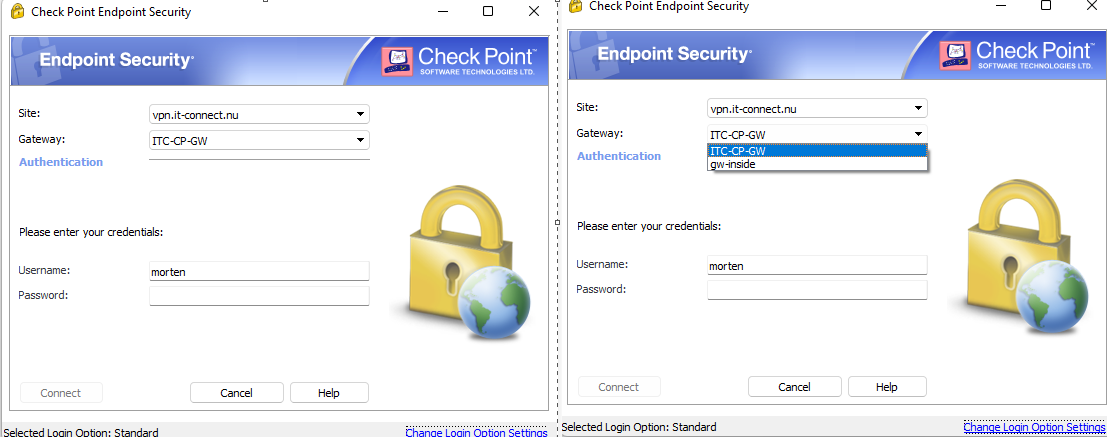
WHen i open the remote access software, i can connect to my "site"that i have added..Photo attached..
it has a site selection in case i wish to connect to another vpn site.
BUT.
the issue comes, if i enable remote access on a 2nd gateway managed in my smartconsole. then a dropdown menu will be added that also prompts me to select gateway.. why is that? and how do i disable that?
i do not wish to have to select gateway.. i was to be select the site that i need and not focus on also selecting a gateway..
this WILL cause confusion and problems down the road once i enable this for my customers.
I have been trying to google the issue and search in user center, but it doesnt seem like i can find any explanation on this
I have also looked in the remote access guide to no avail.
ps. The gateway has different public adresses. different encryption domain... its used by 2 different customers

This is expected, any gateways managed by the same manager and part of the RA community will be presented when creating a site to any gateway in the RA community. To keep the drop down from showing for any additional gateways you can follow sk78180.
i seems it "happens" because they share the same VPN domain=the same remote subnet? is that correct?
i am using different subnets... so shouldnt that be a different case then??
the "new" gateway that i am enabling remote access on is a VSX.. so i have no ssh/gaia ui option 😞
No, any gateways that are managed by the same manager and in the RA community will be presented when creating a site to any of the gateways, this is by design and expected, a site is also a gateway, not all gateways are sites. Follow sk78180 and you will not get the drop down for any additional gateways. Do note any changes to the .ttm file requires the site to be deleted and recreated for those changes to take affect.
Thank you.
I will follow it.
But how do i workaround the fact that there is no SSH option on the VSX Gateway? (its added in firewall) but apparantly a VSX gateway is virtual and doesnt have SSH options
You ssh to the VSX gateway then go into the VS environment, vsenv X
See VSX R81.10 Administration Guide p.90:
Connect to the command line on the VSX Gateway (each VSX Cluster Member).
Log in to Gaia Clish.
Enable ("per-vs") or disable ("default") the feature:
Note - You can run this command in the context of any Virtual Device.
set dns mode {per-vs | default}
Did you mean page90?
I see something else there.
https://dl3.checkpoint.com/paid/1e/1e1528553da29e40b19b7ad0555c8dac/CP_R81.10_Quantum_ScalablePlatfo...
Leaderboard
Epsum factorial non deposit quid pro quo hic escorol.
| User | Count |
|---|---|
| 4 | |
| 3 | |
| 2 | |
| 1 | |
| 1 | |
| 1 | |
| 1 | |
| 1 |
Fri 12 Dec 2025 @ 10:00 AM (CET)
Check Mates Live Netherlands: #41 AI & Multi Context ProtocolTue 16 Dec 2025 @ 05:00 PM (CET)
Under the Hood: CloudGuard Network Security for Oracle Cloud - Config and Autoscaling!Fri 12 Dec 2025 @ 10:00 AM (CET)
Check Mates Live Netherlands: #41 AI & Multi Context ProtocolTue 16 Dec 2025 @ 05:00 PM (CET)
Under the Hood: CloudGuard Network Security for Oracle Cloud - Config and Autoscaling!About CheckMates
Learn Check Point
Advanced Learning
YOU DESERVE THE BEST SECURITY