- Products
- Learn
- Local User Groups
- Partners
- More
MVP 2026: Submissions
Are Now Open!
What's New in R82.10?
Watch NowOverlap in Security Validation
Help us to understand your needs better
CheckMates Go:
Maestro Madness
I've looked everywhere and it doesn't appear that anyone has posted this previously so I thought I'd post a short guide on this.
To change the client certificate password of your Checkpoint Mobile Access VPN certificate, you can follow the below steps.
1. Open your Check Point Mobile Client and browse to your certificate if it isn't already populated in the field.
2. Click on the "Certificate" Icon highlighted in the below screenshot
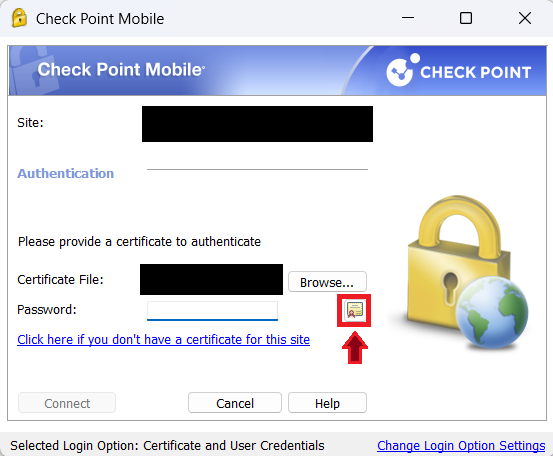
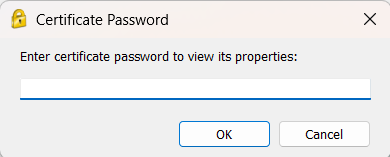
3. Enter the current certificate password into the presented prompt as shown below
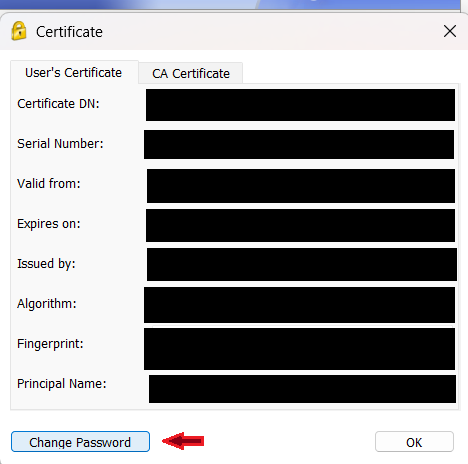
4. On the window that appears, click the "Change Password" button as shown below
5. On the "Change Certificate Password" window that appears, enter the old and new passwords as prompted and press "OK". If you've done this correctly, you will be shown the "Certificate password replaced successfully" window as below
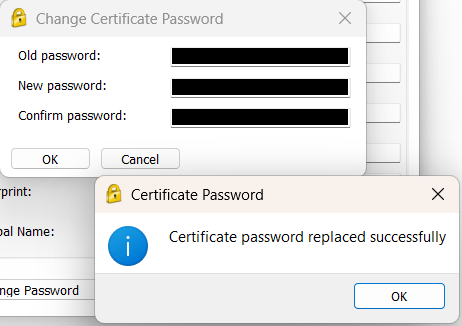
6. You can now press "OK" to close all the windows and connect with your new password.
Easy and quick to do!
This does rely on the user proactively changing the password and doesn't force any complex rules, but it's one step in the right direction.
If anyone knows how to to configure a minimum time period to force password change, or to enforce complexity requirements, I would love to know, so please reply to this post.
Thank you for reading!

Why would you need to do that in the first place?
Thanks for reading Val,
I understand without the actual certificate file, knowing the password is useless.
I also understand that if someone had made a copy of the certificate file and stolen it, changing the password on the original certificate will not change the password on the stolen certificate.
However, as you know, most companies have password policies which require you to change your password on a frequent basis.
Not being able to change it breaks those policies.
Even if you don't agree with some of the policies, if they've been set, you must find a way to follow them sadly.
If this helps one unlucky engineer, then it's a post worth posting I think 😀
Super valid point, thanks for sharing!
Andy
Sure ! But to require you to change your password on a frequent basis does not make anything safer, quite the contrary, as people then use simpler passwords. Many companies have dropped this requirement out of good reasons...
I've had to do this a few times myself for various reasons.
Thanks for sharing!
Here's a question for you, if I may.
Is there a way to lock the certificate if say 5 failed attempts were made on the password?
Otherwise a brute force attack can be made on the certificate to get it's password?
No, and I'm not sure how a password-protected file of any kind would implement such "brute force protection" against any tool that might be able to read it.
Leaderboard
Epsum factorial non deposit quid pro quo hic escorol.
| User | Count |
|---|---|
| 4 | |
| 3 | |
| 2 | |
| 2 | |
| 1 | |
| 1 | |
| 1 | |
| 1 | |
| 1 | |
| 1 |
Tue 16 Dec 2025 @ 05:00 PM (CET)
Under the Hood: CloudGuard Network Security for Oracle Cloud - Config and Autoscaling!Thu 18 Dec 2025 @ 10:00 AM (CET)
Cloud Architect Series - Building a Hybrid Mesh Security Strategy across cloudsTue 16 Dec 2025 @ 05:00 PM (CET)
Under the Hood: CloudGuard Network Security for Oracle Cloud - Config and Autoscaling!Thu 18 Dec 2025 @ 10:00 AM (CET)
Cloud Architect Series - Building a Hybrid Mesh Security Strategy across cloudsAbout CheckMates
Learn Check Point
Advanced Learning
YOU DESERVE THE BEST SECURITY