- Products
- Learn
- Local User Groups
- Partners
- More
MVP 2026: Submissions
Are Now Open!
What's New in R82.10?
Watch NowOverlap in Security Validation
Help us to understand your needs better
CheckMates Go:
Maestro Madness
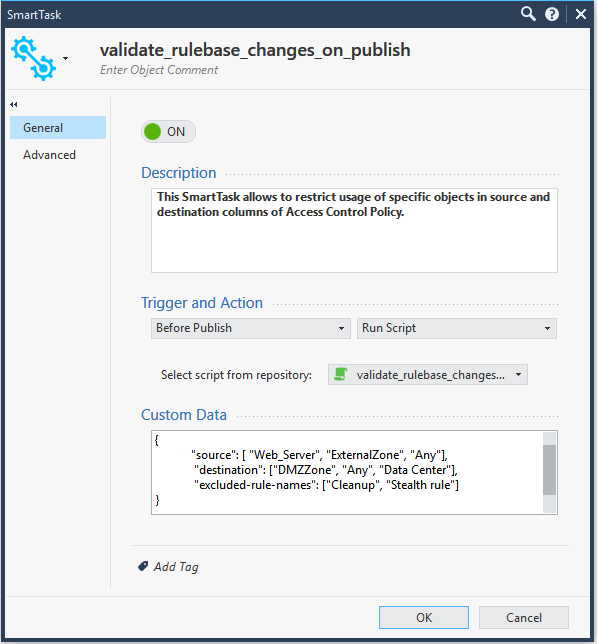
This SmartTask allows to block usage of specific objects in source and destination fields of Access Control Policy. it intercepts the session on publish attempt ("Pre Publish" trigger) and runs a script that looks for objects defined in Custom Data field of SmartTask (see below).
It can be very useful if you want to avoid rules with "Any" in source and/or destination (in this case you'll need to exclude Stealth and Cleanup rules) and restricting access to/from sensitive resources.
Hello @Dima_M,
thank you a lot for your example. It is really nice. I would like to ask you for some advice regarding my use case. Let's say that we have some highly sensitive rules. Nobody should be able to add rule above them to break their drop meaning. I was thinking tu use smart task and before publish trigger for checking of this concept.
Concept of checking of modified/deleted/added objects in rule base is really nice.
{
}
We would totally be able to check if rules were edited. But during the testing I tried to move "permit any" rule above those "highly sensitive rules". I was checking parameters of publish event, and when I changed rule order and published information, the only info in JSONs was about session itself, no info about rule number change. So I have no evidence about changing of order of rules while publishing new rule base and running some smart task on it. Is this information somewhere hidden? How can I get to this information during "before publish" event?
Thank you a lot for your reply.
{
}
Hi Martin @martin
Thanks for bring this up, looks like show-changes output displays only partial info when rules are swapped. We'll investigate it further on and update.
Tried to import this script and the maximum filesize that the GUI can import is 8Kb. The filesize for this is 13Kb. Why is there a limit?
How did you tried to import the smart tasks? it should be done using API, there is no way of importing smart task using GUI.
I imported it with API and it worked with no problem:
mgmt_cli import-smart-task file-path /home/admin/validate_rulebase_changes_on_publish.txt -r true
see API documentation here: https://sc1.checkpoint.com/documents/latest/APIs/#cli/import-smart-task~v1.6%20
That would be the issue. Thanks. I eventually want to try an do this from SmartCloud.
You can still access the API with SmartCloud.
This worked for on a standalone setup. But it did not worked on multi domain. How can I upload the script into smart task with multi domain.
Hi,
Does this analyze every policy or only policies that have been changed?
Regards,
Simon
Leaderboard
Epsum factorial non deposit quid pro quo hic escorol.
| User | Count |
|---|---|
| 19 | |
| 16 | |
| 7 | |
| 5 | |
| 5 | |
| 5 | |
| 4 | |
| 4 | |
| 4 | |
| 4 |
Tue 16 Dec 2025 @ 05:00 PM (CET)
Under the Hood: CloudGuard Network Security for Oracle Cloud - Config and Autoscaling!Thu 18 Dec 2025 @ 10:00 AM (CET)
Cloud Architect Series - Building a Hybrid Mesh Security Strategy across cloudsTue 16 Dec 2025 @ 05:00 PM (CET)
Under the Hood: CloudGuard Network Security for Oracle Cloud - Config and Autoscaling!Thu 18 Dec 2025 @ 10:00 AM (CET)
Cloud Architect Series - Building a Hybrid Mesh Security Strategy across cloudsAbout CheckMates
Learn Check Point
Advanced Learning
YOU DESERVE THE BEST SECURITY