- Products
- Learn
- Local User Groups
- Partners
- More
MVP 2026: Submissions
Are Now Open!
What's New in R82.10?
Watch NowOverlap in Security Validation
Help us to understand your needs better
CheckMates Go:
Maestro Madness
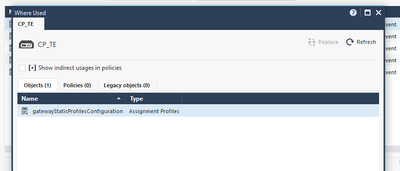
I cannot delete gateway object. Because it is used on the Objects (gatewayStaticprofilesConfiguration ->Assignment Profiles).
I don't know how to delete that object.
Hi Nickel,
Having exactly the same issue - have you managed to solve this?
Thanks
that isn't complicated mate
you need to find relationships and dependencies then you'll be able to remove it
look at the hings SmartConsole giving you. It is pretty logical to some extent.
I'll be honest, I have not used Profiles, so I can't speak with any first hand experience here but I think this has to do with SmartProvisioning being used to configure the Gateway.
Take a look at this link: https://sc1.checkpoint.com/documents/R77/CP_R77_SmartProvisioning_WebAdmin/16735.htm
Click the Menu button in SmartConsole and select SmartProvisioning. I would look around in there and see if the GW you are trying to remove has a profile attached to it. Since this functionality isn't incorporated into SmartConsole yet, it may not be obvious that something in it needs cleaning up. But my guess is what you are looking for is in there somewhere!
Good luck!
Hi,
I had a similar one. Ended in opening TAC. They then did some psql magic or so and made the object then removable.
Something like that but deleting it: https://community.checkpoint.com/t5/General-Management-Topics/psql-client-cpm-postgres-fromversion-t... - BUT - DO NOT DO THIS ON YOUR OWN, as @Tomer_Sole mentioned there.. 🙂
Cheers
Daniel
As mentioned above it is due to a policy that still references the old gateway. When I ran into this issue, removing a IaaS Gateway, I eventually found a rule that still was being installed on the old Gateway within Mobile Access. The Mobile Access blade threw an error while I was trying to remove all blades when I first received the (gatewayStaticprofilesConfiguration ->Assignment Profiles) error.
This occurs because under Threat Prevention there is a default Global Exception that ties these shared policies to all rules.
Global Exceptions
Delete first gateway's Policy. Manage policies and layers-> Policies
Publish.
Then Delete the gateway.
Its not always black and white picture, as they say. Sometimes that does not work, there may be need to do some stuff in guidbedit as well.
Andy
Leaderboard
Epsum factorial non deposit quid pro quo hic escorol.
| User | Count |
|---|---|
| 17 | |
| 15 | |
| 7 | |
| 5 | |
| 5 | |
| 5 | |
| 4 | |
| 4 | |
| 4 | |
| 4 |
Tue 16 Dec 2025 @ 05:00 PM (CET)
Under the Hood: CloudGuard Network Security for Oracle Cloud - Config and Autoscaling!Thu 18 Dec 2025 @ 10:00 AM (CET)
Cloud Architect Series - Building a Hybrid Mesh Security Strategy across cloudsTue 16 Dec 2025 @ 05:00 PM (CET)
Under the Hood: CloudGuard Network Security for Oracle Cloud - Config and Autoscaling!Thu 18 Dec 2025 @ 10:00 AM (CET)
Cloud Architect Series - Building a Hybrid Mesh Security Strategy across cloudsAbout CheckMates
Learn Check Point
Advanced Learning
YOU DESERVE THE BEST SECURITY