- Products
- Learn
- Local User Groups
- Partners
- More
MVP 2026: Submissions
Are Now Open!
What's New in R82.10?
10 December @ 5pm CET / 11am ET
Announcing Quantum R82.10!
Learn MoreOverlap in Security Validation
Help us to understand your needs better
CheckMates Go:
Maestro Madness
Hi,
So one of the banks gives access to only internal services from checkpoint and restricts internet surfing on some LANs.Previously they had a mail server that was in their local LAN and recently they migrated to google workspace. They bought the whole package where they will be using all the services that are given by google like gmail,google sheet etc. They want the LAN users to access only google workspace and restrict other traffic. I created quite alot of fqdn objects on the management server(R80.10) and installed the policy.
It was working for a few minutes and as soon as the ip address to say google.com changes, the users cant access google workspace anymore. Its a ON and OFF thing. Not sure what the issue is, did everything as per the SK for FQDN. restarted the wsdns service aswell. The ip addresses of google seems to be changing and when it does ,google workspace is inaccessible aswell.
The only thing i didnt do is cpstop and cpstart/reboot the appliance.
The management server and the gateway cluster is running on R80.10.
Does anyone know what the issue is?
regards,
Nima

R80.10 is End of Support and you should upgrade to a supported release (R81.20 being the most recent and recommended).
Allowing access to Google Workspace reliably should be done using App Control and with HTTPS Inspection.
But is there a solution to the FQDN and the ever changing IP addresses for a single FQDNin R80.10?
As per the document it says it supports from r80.10.Customer has a internal DNS server. Is there anything that i have to do between the gateway and the DNS server?
As indicated current versions may deal with this requirement better or a change in approach may be necessary.
See also: sk133313 / sk181215
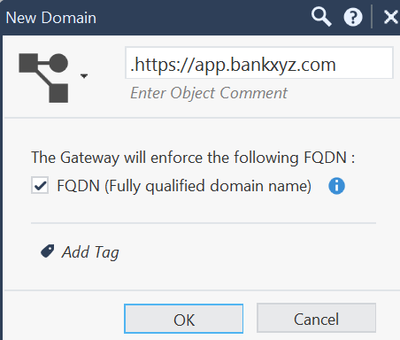
The best solution I can suggest to what you indicated is using domain objects. Say, for argument's sake, the exact domain is https://app.bankxyz.com, you can use below. What guys said is absolutely true, R80.10 is totally unsupported, BUT, to be blunt about it, if your customer cannot use app control or https inspection, even if they upgrade to R81.20, wont make the sligtest difference. Not to say they should not upgrade, R81.20 is super solid, but for now, I would stick with domain objects.
Andy
You can use non-FQDN objects as noted...if you know the exact FQDNs you will need to allow access to.
That is not practical to maintain and can be handled with an App Control signature.
For that to work right without HTTPS Inspection, you need to upgrade to a supported release that includes support for SNI: https://support.checkpoint.com/results/sk/sk163594
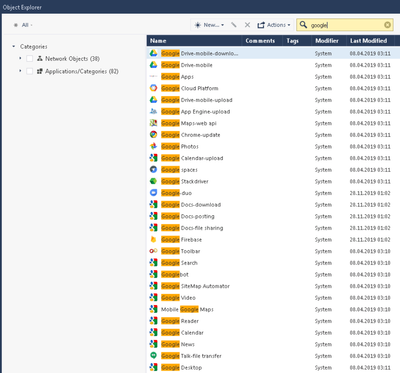
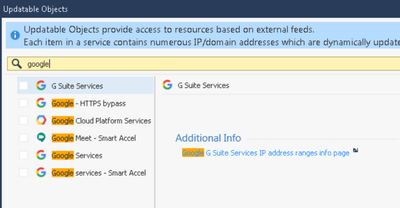
@Nima_Chogyal blocking access to those type of cloud application with FQDN is not practical. That will be a never ending story hunting new IPs as a result of the fast changing of these IPs. Like @PhoneBoy wrote, use app control or myabe updatable objects to create your rules. All of the applications of googles workspace are available via app control and you can create rules based on them. We are using this to allow only some of the apps not all. This is working fine in our environment with enabled HTTPS inspection or SNI support and R81.20.
Here are a sample of googles applications and updatable objects available via SmartConsole to use in the rule base:
The customer has fortigate on their network and it works with fqdn for fortigate gateways without a hitch.
So with https inspection enabled do i need to install the certificates on each of the machine for it to work or can i just put it in detect mode?
Again there are enhancements in newer versions than you are running, so you're very likely comparing apple & oranges here.
Example:
sk161612: Domain Object Enhancement - DNS Passive Learning
HTTPS Inspection requires deploying CA certificates to clients.
This is only "necessary" as you are choosing to remain on R80.10 instead of upgrading to a supported release that has additional functionality that can be leveraged to meet this requirement instead of HTTPS Inspection.
Or, at the very least, you can get support if it's not working as expected.
Leaderboard
Epsum factorial non deposit quid pro quo hic escorol.
| User | Count |
|---|---|
| 22 | |
| 15 | |
| 7 | |
| 6 | |
| 5 | |
| 5 | |
| 4 | |
| 4 | |
| 4 | |
| 4 |
Fri 12 Dec 2025 @ 10:00 AM (CET)
Check Mates Live Netherlands: #41 AI & Multi Context ProtocolFri 12 Dec 2025 @ 10:00 AM (CET)
Check Mates Live Netherlands: #41 AI & Multi Context ProtocolTue 16 Dec 2025 @ 05:00 PM (CET)
Under the Hood: CloudGuard Network Security for Oracle Cloud - Config and Autoscaling!About CheckMates
Learn Check Point
Advanced Learning
YOU DESERVE THE BEST SECURITY