- Products
- Learn
- Local User Groups
- Partners
- More

MVP 2026: Submissions
Are Now Open!
What's New in R82.10?
10 December @ 5pm CET / 11am ET
Announcing Quantum R82.10!
Learn MoreOverlap in Security Validation
Help us to understand your needs better
CheckMates Go:
Maestro Madness
Hi All,
We have Checkpoint 6000-L with r81.10, and we used to view the Threat Prevention and Cyber Attack View Gateway. However, for the last two weeks, it has not been showing any data. I think the issue starts after we upgrade the JHF and the current JHF is 109.
What could be causing this, and what would be the solution?
FYI screenshot is attached.
Thanks
Hi @Ihenock1011 ,
Please answer the following to help identify the issue further:
a. Does it show data for other views?
b. Do you have a dedicated server for SmartEvent or is it integrated with management server?
c. How much storage space available on your SmartEvent server in the /var/log partition?
d. Do you have matching logs for the same filters in the same timeframe?
If this happened directly after upgrade/update I would recommend to see if install Database on SmartEvent server changes anything.
a.Does it show data for other views?
Previously I didn't check all views doesn't show any data.
b. Do you have a dedicated server for SmartEvent or is it integrated with management server?
Yes, I have a dedicated virtual SmartEvent Server
c. How much storage space available on your SmartEvent server in the /var/log partition?
almost full 99% is used
d. Do you have matching logs for the same filters in the same timeframe?
before the upgrade it shows me the logs
When dealing with upgrade you need to take to attention the following:
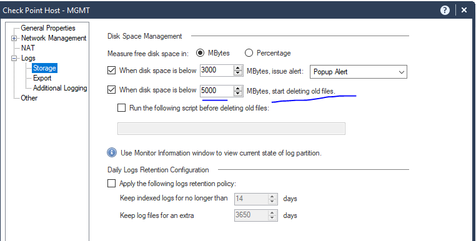
1) The upgrade package is uploaded to the same partition as the logs. If an env is already close to the limit and you import a package that uses few GBs of storage it might delete more logs than you think. It looks like your partition is full and it's possible that it causes constant emergency cleanup. Take a look at the cleanup thresholds and see if the server matches them. Check $FWDIR/log/ and see that you have log files and which one is the oldest.
Also check $RTDIR/log_indexes/ - un-indexed days won't appear in view and reports.
If this is the case then you can delete some old upgrade packages or JHFs, add more storage to your SmartEvent server and update your log retention policy.
2) Install DB on SmartEvent server. I like to say that Install DB is the equivalent of policy installation for management servers. After upgrades (and adding new GWs to env) log servers and SmartEvent servers needs Install DB.
I would definitely follow what @Amir_Senn gave you. I took his advice few times for random mgmt issues, he is excellent when it comes to management/smart event stuff.
Best,
Andy
How about smartlogstop;smartlogstart? And if not then look for any errors in $RTDIR/log/
Dear All Thanks for the help I opened a TAC Case and the Engineer resolves the case and here is his findings.
The Issue is resolved now.
Great job! Just curious, what was the process to increase heap size? Was there an sk followed?
Best,
Andy
Leaderboard
Epsum factorial non deposit quid pro quo hic escorol.
| User | Count |
|---|---|
| 22 | |
| 14 | |
| 12 | |
| 7 | |
| 6 | |
| 5 | |
| 4 | |
| 4 | |
| 4 | |
| 4 |
Fri 12 Dec 2025 @ 10:00 AM (CET)
Check Mates Live Netherlands: #41 AI & Multi Context ProtocolTue 16 Dec 2025 @ 05:00 PM (CET)
Under the Hood: CloudGuard Network Security for Oracle Cloud - Config and Autoscaling!Fri 12 Dec 2025 @ 10:00 AM (CET)
Check Mates Live Netherlands: #41 AI & Multi Context ProtocolTue 16 Dec 2025 @ 05:00 PM (CET)
Under the Hood: CloudGuard Network Security for Oracle Cloud - Config and Autoscaling!Thu 18 Dec 2025 @ 10:00 AM (CET)
Cloud Architect Series - Building a Hybrid Mesh Security Strategy across cloudsAbout CheckMates
Learn Check Point
Advanced Learning
YOU DESERVE THE BEST SECURITY