- Products
- Learn
- Local User Groups
- Partners
- More
MVP 2026: Submissions
Are Now Open!
What's New in R82.10?
10 December @ 5pm CET / 11am ET
Announcing Quantum R82.10!
Learn MoreOverlap in Security Validation
Help us to understand your needs better
CheckMates Go:
Maestro Madness
Hi Checkmates,
When I check the disk situation I saw log directory was full so that I removed old logs from $FWDIR/log/ directory. disk situation is okay now. When I controlled /var/log/opt directory, I saw 854G space allocated. Is that normal? If not, what should I do?
[Expert@hostname:0]# pwd
/var/log/opt
[Expert@hostname:0]# ls
CPSmartLog-R77 CPSmartLog-R80 CPrt-R77 CPrt-R80 CPshrd-R77 CPshrd-R80 CPsuite-R77 CPsuite-R80
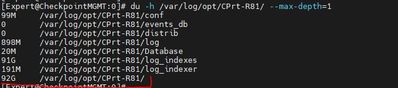
[Expert@hostname:0]# du -h --max-depth=1
233M ./CPshrd-R77
173G ./CPsuite-R80
158M ./CPshrd-R80
143G ./CPrt-R77
391G ./CPsuite-R77
60G ./CPrt-R80
88G ./CPSmartLog-R77
200M ./CPSmartLog-R80
854G .
[Expert@hostname:0]#
This is a known issue: If the SMS is upgraded In-Place, log files from old $FWDIR/log are copied to the new $FWDIR/log (e.g. /var/opt/CPsuite-R80.30/log). But to have a fallback for times the update fails, old logs are not deleted from e.g. /var/opt/CPsuite-R77.30/log.
You can easily confirm in WinSCP that the old log directories only contain old log files also available in the new log folder and remove these. Also see here how to do that: sk114114: Diskspacemanagement tools do not delete logs from previous Security Management versions
Yes.
Assuming you're now in R80.x & no longer need the old R77.x SML or SME log/events DBs, then yea.
follow sk157713:
To resolve the problem, delete the R77.x SmartLog/SmartEvent databases. To do so:
On SmartLog, run:
[Expert@Hostname]# rm -rf /var/log/opt/CPSmartLog-R7*/data/
On SmartEvent, run:
[Expert@Hostname]# rm -rf /var/log/opt/CPrt-R7*/events_db/
for FYI, Also remember your log storage threshold for deletion of current version is probably 5GB or less or whatever you've configured in the Mgmt/LS/SME server's object > Logs Storage > Delete when X...

This is a known issue: If the SMS is upgraded In-Place, log files from old $FWDIR/log are copied to the new $FWDIR/log (e.g. /var/opt/CPsuite-R80.30/log). But to have a fallback for times the update fails, old logs are not deleted from e.g. /var/opt/CPsuite-R77.30/log.
You can easily confirm in WinSCP that the old log directories only contain old log files also available in the new log folder and remove these. Also see here how to do that: sk114114: Diskspacemanagement tools do not delete logs from previous Security Management versions
Why is this posted in SMB Appliances and SMP ?
Yes.
Assuming you're now in R80.x & no longer need the old R77.x SML or SME log/events DBs, then yea.
follow sk157713:
To resolve the problem, delete the R77.x SmartLog/SmartEvent databases. To do so:
On SmartLog, run:
[Expert@Hostname]# rm -rf /var/log/opt/CPSmartLog-R7*/data/
On SmartEvent, run:
[Expert@Hostname]# rm -rf /var/log/opt/CPrt-R7*/events_db/
for FYI, Also remember your log storage threshold for deletion of current version is probably 5GB or less or whatever you've configured in the Mgmt/LS/SME server's object > Logs Storage > Delete when X...
Hello Dror,
i'm on R81.10 since 4months.
it is safe to remove this whole folder?
thank you
Leaderboard
Epsum factorial non deposit quid pro quo hic escorol.
| User | Count |
|---|---|
| 22 | |
| 15 | |
| 7 | |
| 6 | |
| 5 | |
| 5 | |
| 4 | |
| 4 | |
| 4 | |
| 4 |
Fri 12 Dec 2025 @ 10:00 AM (CET)
Check Mates Live Netherlands: #41 AI & Multi Context ProtocolTue 16 Dec 2025 @ 05:00 PM (CET)
Under the Hood: CloudGuard Network Security for Oracle Cloud - Config and Autoscaling!Fri 12 Dec 2025 @ 10:00 AM (CET)
Check Mates Live Netherlands: #41 AI & Multi Context ProtocolTue 16 Dec 2025 @ 05:00 PM (CET)
Under the Hood: CloudGuard Network Security for Oracle Cloud - Config and Autoscaling!Thu 18 Dec 2025 @ 10:00 AM (CET)
Cloud Architect Series - Building a Hybrid Mesh Security Strategy across cloudsAbout CheckMates
Learn Check Point
Advanced Learning
YOU DESERVE THE BEST SECURITY