- Products
- Learn
- Local User Groups
- Partners
- More

AI Security Masters E7:
How CPR Broke ChatGPT's Isolation and What It Means for You
Call For Papers
Your Expertise. Our Stage
Good, Better, Best:
Prioritizing Defenses Against Credential Abuse
Ink Dragon: A Major Nation-State Campaign
Watch HereCheckMates Go:
CheckMates Fest
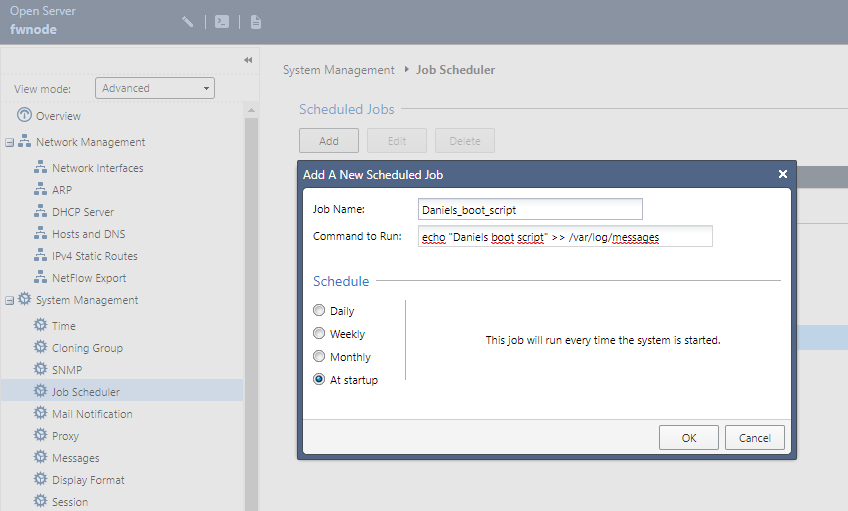
The -Best- method to have GAiA running a script at system boot in my mind is using it's built-in functionality for this:

Hi Daniel,
you can use the following script:
/etc/rc.local
This script will be executed *after* all the other init scripts. You can put your own initialization stuff in here if you don't want to do the full Sys V style init stuff.
Or use a "/etc/rc3.d" start script:
/etc/rc3.d/Sxx_myscript
xx is the position of the start script.
Regards
Excellent! Thank you!
On Gaia would add an entry to /etc/rc.local. One example use case is from Keld Norman: iPhone Real-time Push notification on SmartEvent.
On Gaia embedded check out sk11818: How to make kernel parameters survive reboot on SMB appliances.
I am using /etc/rc.local to issue "ethtool -r eth1-01" because in some special cases FIBER ports didnt came up after reboot (or set off/on). Maybe issue on the switch, maybe SFP, dont know, but this is workaround working in case of unexpected reboot happened.
Or maybe using @reboot in crontab ? Will it work to execute some script after reboot ? Someone tried ? What in case system was halted ? just thinking loud...
The -Best- method to have GAiA running a script at system boot in my mind is using it's built-in functionality for this:

While I don't think we're deprecating rc.local anytime soon, this is definitely the more supported approach.
I didn't realize "At Startup" was an option in GAiA's scheduler. In my opinion that's even better than modifying rc.local just in case that gets deprecated at some point. Thanks!
It's also more likely to get backed up through the standard backup methods ![]()
Hello
I need a to run a script at Startup from the checkpoint.
My script has more than one line. What is the best way for this?
Copy the script to the Checkpoint and run whit the Job Scheduler? Where is the location for the script.
Or can I input the fully script in the "Command to Run" field?
Matthias
Create your script on the appliance somewhere (e.g. /home/admin/MyScript.sh) and specify the full path to it in the job scheduler.
Leaderboard
Epsum factorial non deposit quid pro quo hic escorol.
| User | Count |
|---|---|
| 76 | |
| 33 | |
| 15 | |
| 14 | |
| 14 | |
| 12 | |
| 11 | |
| 10 | |
| 9 | |
| 8 |
Tue 21 Apr 2026 @ 05:00 PM (IDT)
AI Security Masters E7: How CPR Broke ChatGPT's Isolation and What It Means for YouTue 28 Apr 2026 @ 06:00 PM (IDT)
Under the Hood: Securing your GenAI-enabled Web Applications with Check Point WAFThu 30 Apr 2026 @ 03:00 PM (PDT)
Hillsboro, OR: Securing The AI Transformation and Exposure ManagementTue 21 Apr 2026 @ 05:00 PM (IDT)
AI Security Masters E7: How CPR Broke ChatGPT's Isolation and What It Means for YouTue 28 Apr 2026 @ 06:00 PM (IDT)
Under the Hood: Securing your GenAI-enabled Web Applications with Check Point WAFTue 12 May 2026 @ 10:00 AM (CEST)
The Cloud Architects Series: Check Point Cloud Firewall delivered as a serviceThu 30 Apr 2026 @ 03:00 PM (PDT)
Hillsboro, OR: Securing The AI Transformation and Exposure ManagementAbout CheckMates
Learn Check Point
Advanced Learning
YOU DESERVE THE BEST SECURITY