- Products
- Learn
- Local User Groups
- Partners
- More

MVP 2026: Submissions
Are Now Open!
What's New in R82.10?
Watch NowOverlap in Security Validation
Help us to understand your needs better
CheckMates Go:
Maestro Madness
Hi all,
I've created a IPS profile according to our needs and almost everything is working well, except of one thing:
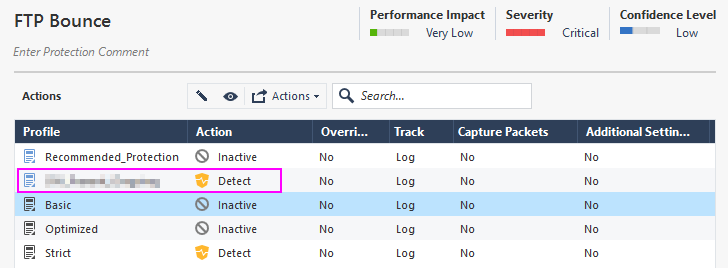
In my IPS profile I've set the IPS protection FTP Bounce to Action: Detect
This works fine and a lot of logging information is generated. Most of the detected attacks are generated by a single external IP which is is unknown to us and fills up our logs.
Therefore I've created an exception for this single IP where I want to have "prevent" as an action for this protection.
I've tried several ways to create the exception (Protected scope vs Src/Dst) but for this IP the FTP Bounce protection stays in detect mode and the same logs as shown above are generated.
Do I miss something in general? Are there some priority levels which keeps the FTP Bounce Protection to be in Prevent mode for this single IP?
Our firewall cluster is on V80.20 while our Mgmt Server is on V80.30
Kind regards
Oliver
This is why in R80.30:
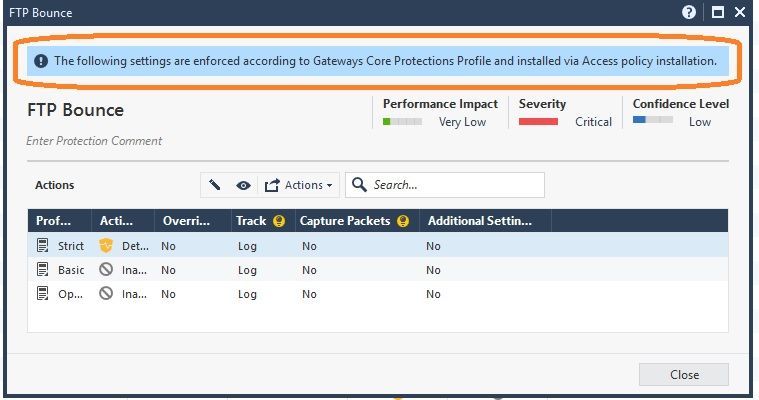
The FTP Bounce protection became a "Core" Protection in R80.30 and no longer part of the IPS blade (even though the log card says it is) so your Threat Prevention exception will have no effect, since FTP Bounce is part of the Access Control Policy. Strangely this signature says it is a Core Protection in R80.30 but it doesn't have the "shield w/ firewall" icon like a typical Core Protection (example: FTP Commands). This is really strange and I don't know what to make of it, but is probably due to the very old age of this protection (2002) dating back into the SmartDefense days which were not a fun time.
Because it is a Core Protection in R80.30 the only exceptions that can be added will completely inactivate the protection, you are not allowed to set Prevent (or Detect) in an exception like you can with an IPS ThreatCloud Protection. So as mentioned earlier your only play here is to set Inactive; this is due to the "no-mans land" that Core Protections sit in between Inspection Settings and IPS ThreatCloud Protections as described in my IPS Immersion class.
You can see a prior issue like this here: https://community.checkpoint.com/t5/IPS-Anti-Virus-Anti-Bot-Anti/FTP-Bounce-prevent-instead-of-inact...
I do not have any idea why your exception is not working, but honestly, any IPS protection set to Detect will cost resources without adding any security ! I would suggest to switch it to prevent after the IPS deployment testing phase is over.
Many thx for the notice on the resources of the gateway, but unfortunately I cannot set the protection to prevent as this would cause some ftp connections from our customers to be dropped.
Kind regards
Oliver
So why not switch it off completely ? Remember, this is an EServ 2.97 vulnerability from 2002 !
Probabely this will be the final solution, but still doesn't explain why the exception is not working.
This is why in R80.30:
The FTP Bounce protection became a "Core" Protection in R80.30 and no longer part of the IPS blade (even though the log card says it is) so your Threat Prevention exception will have no effect, since FTP Bounce is part of the Access Control Policy. Strangely this signature says it is a Core Protection in R80.30 but it doesn't have the "shield w/ firewall" icon like a typical Core Protection (example: FTP Commands). This is really strange and I don't know what to make of it, but is probably due to the very old age of this protection (2002) dating back into the SmartDefense days which were not a fun time.
Because it is a Core Protection in R80.30 the only exceptions that can be added will completely inactivate the protection, you are not allowed to set Prevent (or Detect) in an exception like you can with an IPS ThreatCloud Protection. So as mentioned earlier your only play here is to set Inactive; this is due to the "no-mans land" that Core Protections sit in between Inspection Settings and IPS ThreatCloud Protections as described in my IPS Immersion class.
You can see a prior issue like this here: https://community.checkpoint.com/t5/IPS-Anti-Virus-Anti-Bot-Anti/FTP-Bounce-prevent-instead-of-inact...
Hello Timothy,
many thx for clarification. IPS have been easier in V77.30 without the split in the different "classes".
Kind regards
Oliver
Thanks for this, I would have never noticed that banner at the top about it being a core protection.
Tue 16 Dec 2025 @ 05:00 PM (CET)
Under the Hood: CloudGuard Network Security for Oracle Cloud - Config and Autoscaling!Thu 18 Dec 2025 @ 10:00 AM (CET)
Cloud Architect Series - Building a Hybrid Mesh Security Strategy across cloudsTue 16 Dec 2025 @ 05:00 PM (CET)
Under the Hood: CloudGuard Network Security for Oracle Cloud - Config and Autoscaling!Thu 18 Dec 2025 @ 10:00 AM (CET)
Cloud Architect Series - Building a Hybrid Mesh Security Strategy across cloudsAbout CheckMates
Learn Check Point
Advanced Learning
YOU DESERVE THE BEST SECURITY