- Products
- Learn
- Local User Groups
- Partners
- More
What's New in R82.10?
10 December @ 5pm CET / 11am ET
Improve Your Security Posture with
Threat Prevention and Policy Insights
Overlap in Security Validation
Help us to understand your needs better
CheckMates Go:
Maestro Madness
Greetings.
Feeling very frustrated trying to get an evaluation copy up and working on my PC. Please forgive my ignorance, but I feel like I am going in circles and wasting quite a bit of time.
1) I have created a user account and requested an evaluation license. I received the email with attached license file.
2) I downloaded the R80.10 gaia, and have installed it in a VMWARE Workstation Pro 15 instance.
3) The open server is running. I can log into it with a web browser.
4) Installed and ran smartconsole. It sees the local checkpoint machine.
5) Ran SmartUpdate and imported licenses from file (sent via email)
6) If I log into the machine, all of the blades are greyed out, and the license status page shows the 'activate now' button greyed.
7) I cannot find any place to put my user center registration information in.
What am I missing? Attaching screen shots:
Thank you. I am going there now. I assume the walkthrough shows me where to download the standalone r80.30 image?
Thanks
Jamie
It looks like you have installed management only Gaia machine. If you have installed standalone, then make sure you apply policy on it.
What is your frustration about? So far, nothing that would indicate an issue.
Hi - thanks for the reply.
This is the name of the ISO I installed: Check_Point_R80.10_T479_Gaia.iso
When I log into the machine directly, all of the blades on the right hand side are greyed out.
Jamie
Assuming you installed this as a "standalone" install (would be selected during the first time wizard).
In Smartconsole, open the object for your server (Checkpoint8010, in your screenshot 6), select the blades you want to use on the initial properties page. And probably configure and install policies for each blade that requires one. (network security policy is a requirement for just about anything else to work).
And then install policy.
Enabling and disabling blades is generally done by selecting them on the Check Point object's properties page, configuring them, and then pushing the updates to them via installing policy, or install database (on management servers).
Thank you. That helps.
I am trying to follow the 'beginners' lab that Val Loukine recommended earlier. I reached a small snag...
I am running on VMware Workstation 15.
I originally had 80.10 installed, but Val recommended I use 80.30. I downloaded two different images, Check_Point_R80.30_T200_Security_Gateway.iso and Check_Point_R80.30_T200_Security_Management.iso. The download page seemed to indicate that Check_Point_R80.30_T200_Security_Gateway.iso was also the 'standalone' image, for installing BOTH the GW and SMS.
Because of system resource limitations on my PC, I decided to install a standalone VM instead of two seperate GW and SMS VMs. I booted and installed from the Check_Point_R80.30_T200_Security_Gateway.iso and found that the gateway product was selected and greyed, and Management product was checkable. I checked management as well, so both GW and Management products are supposedly installed in a 'standalone' setup.
Upon connecting to the Gaia web GUI, it would appear that I am connecting to the GW. How do I connect to the SMS? How to I verify the SMS components were installed during the GW installation?
Also, if I add an additional network interface to the VM and reboot, does the interface show up in the GW?
Trying to get more ram to install so I can just install them as seperate VMs per the beginners lab.......
Thanks
Jamie
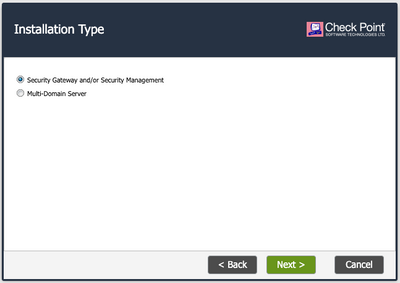
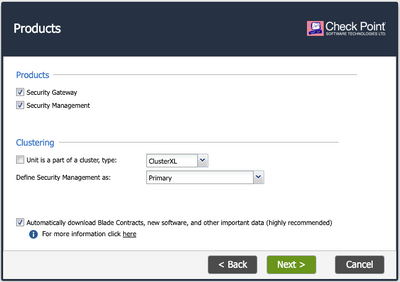
It sounds like you did not choose Security Management AND Security Gateway during the First-Time Wizard run in the web browser after the initial install.
Ensure it is picked in both screens:
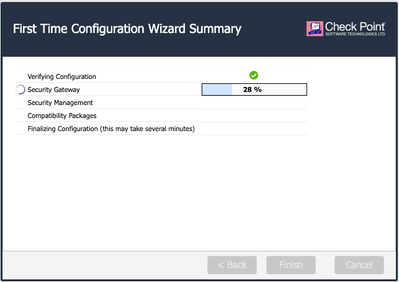
and further it shows in the Summary screen:
You should also be prompted to reboot afterwords.
Using Check_Point_R80.30_T200_Security_Gateway.iso, there is no way to uncheck the gateway option, it is greyed out, and will always install the GW (Mgmt only requires the other iso).
To connect to the SMS, use smartconsole, it is version dependent, you will need the R80.30.
GAIA portal is the same, management, gateway, MDM, standalone, etc.
Leaderboard
Epsum factorial non deposit quid pro quo hic escorol.
| User | Count |
|---|---|
| 23 | |
| 17 | |
| 7 | |
| 5 | |
| 4 | |
| 3 | |
| 2 | |
| 2 | |
| 2 | |
| 2 |
Wed 03 Dec 2025 @ 10:00 AM (COT)
Última Sesión del Año – CheckMates LATAM: ERM & TEM con ExpertosThu 04 Dec 2025 @ 12:30 PM (SGT)
End-of-Year Event: Securing AI Transformation in a Hyperconnected World - APACThu 04 Dec 2025 @ 03:00 PM (CET)
End-of-Year Event: Securing AI Transformation in a Hyperconnected World - EMEAThu 04 Dec 2025 @ 02:00 PM (EST)
End-of-Year Event: Securing AI Transformation in a Hyperconnected World - AmericasWed 03 Dec 2025 @ 10:00 AM (COT)
Última Sesión del Año – CheckMates LATAM: ERM & TEM con ExpertosThu 04 Dec 2025 @ 12:30 PM (SGT)
End-of-Year Event: Securing AI Transformation in a Hyperconnected World - APACThu 04 Dec 2025 @ 03:00 PM (CET)
End-of-Year Event: Securing AI Transformation in a Hyperconnected World - EMEAThu 04 Dec 2025 @ 02:00 PM (EST)
End-of-Year Event: Securing AI Transformation in a Hyperconnected World - AmericasAbout CheckMates
Learn Check Point
Advanced Learning
YOU DESERVE THE BEST SECURITY