- Products
- Learn
- Local User Groups
- Partners
- More
MVP 2026: Submissions
Are Now Open!
What's New in R82.10?
Watch NowOverlap in Security Validation
Help us to understand your needs better
CheckMates Go:
Maestro Madness
Hello Mates,
I am configuring VPN IPSEC between Juniper SRX and Checkpoint R80.10 like this topology. The tunnel already is UP.
TUNNEL is UP.
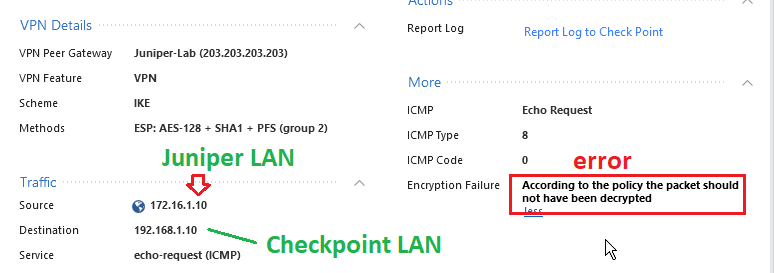
But when I ping from Juniper-LAN to Checkpoint-LAN. Not success! I saw log in checkpoint,it says that "According to the policy the packet should not be decrypted"
I search on some forums, they said that is because of overlapping subnets of two site (Juniper and Checkpoint). But in my topology, it is definitely not overlapping anything.
Could someone please help me know why?
Thank you.
sk167655 ?
Hello bro,
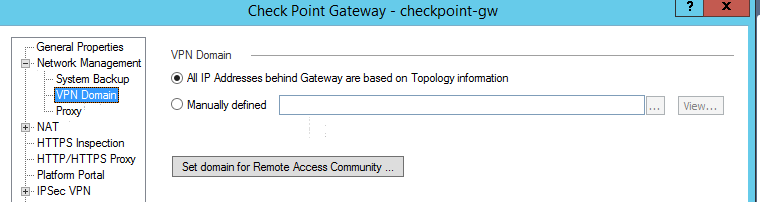
Here I'm not using NAT in my topology (is this OK?), Here is my VPN Domain
Can you show Tunnels on Community and double-click it to see if VPN is up both ways? And show the policy the error refers to ?
Here is an excerpt from a VPN Interoperability handout I provide when teaching the CCTA class that explains this somewhat confusing error message, based on your log entry it looks like either your firewall's VPN domain or the peer object's VPN domain are not defined correctly and completely:
Packet was Decrypted, but Policy Says Packet Should not have been
decrypted – An encrypted packet was received by your firewall that was
decrypted successfully but one of the following has occurred:
• The source IP address on the decrypted packet does not correspond to
the known VPN domain of the VPN peer, or the destination IP address
does not fall within your own firewall's defined VPN domain. This is
most commonly caused by inappropriate NAT rules being applied to VPN
traffic on the VPN peer side; selecting Disable NAT in VPN Community
on the VPN peer’s settings will usually solve this problem.
• There is an overlap between the VPN domain of your firewall and the
VPN domain definition of the peer firewall; you or your peer may have
defined an overly-generous conflicting network such as 10.0.0.0/8 or
192.168.0.0/16 in your VPN domain and/or antispoofing setup. The
command vpn overlap_encdom communities –s run on the Security
Gateway will display any VPN Domain overlap conditions. Consider using
a Group w/ Exclusion object (where the peer’s VPN domain is excluded)
as your firewall’s VPN domain to get around this issue.
Hello Mr. Timothy_Hall,
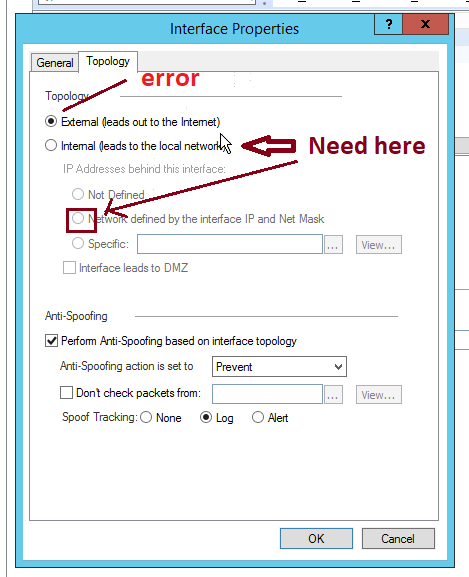
After I run command vpn overlap_encdom communities –s , it show no overlap domain. Then I re-configure VPN from the begin on Checkpoint side, and then found that I forgot to adjust "Topology section" of LAN-Juniper-subnet in "Interoperable Device" like below: from "external" to "internal". Then error was resolved. Thanks for support.
Thanks for support!
Ok, great...so really nothing terribly wrong you did, thats small mistake anyone can make.
@Timothy_Hall brought up a good suggestion. Try command vpn overlap_encdom and see if you get any results. That would tell you 100% for sure if it overlaps or not.
Leaderboard
Epsum factorial non deposit quid pro quo hic escorol.
| User | Count |
|---|---|
| 11 | |
| 9 | |
| 9 | |
| 8 | |
| 6 | |
| 3 | |
| 2 | |
| 2 | |
| 2 | |
| 1 |
Tue 16 Dec 2025 @ 05:00 PM (CET)
Under the Hood: CloudGuard Network Security for Oracle Cloud - Config and Autoscaling!Thu 18 Dec 2025 @ 10:00 AM (CET)
Cloud Architect Series - Building a Hybrid Mesh Security Strategy across cloudsTue 16 Dec 2025 @ 05:00 PM (CET)
Under the Hood: CloudGuard Network Security for Oracle Cloud - Config and Autoscaling!Thu 18 Dec 2025 @ 10:00 AM (CET)
Cloud Architect Series - Building a Hybrid Mesh Security Strategy across cloudsAbout CheckMates
Learn Check Point
Advanced Learning
YOU DESERVE THE BEST SECURITY