- Products
- Learn
- Local User Groups
- Partners
- More

MVP 2026: Submissions
Are Now Open!
What's New in R82.10?
Watch NowOverlap in Security Validation
Help us to understand your needs better
CheckMates Go:
Maestro Madness
Hi,all
Can any of the engineers help solve this problem?Thank you very much!
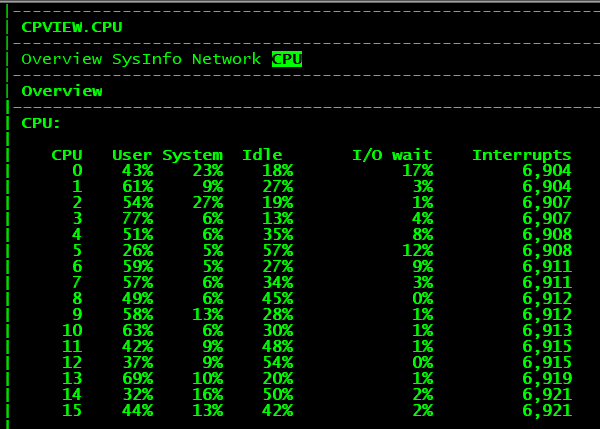
Looking at the cpview screenshot this must be R77.20 or lower?
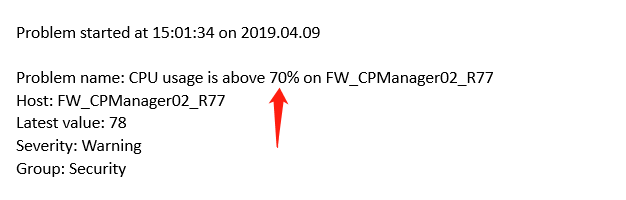
The text next to that screenshot seems to come from a monitoring system, the first thing you need to do is set threshold there to 90% instead of 70%.
That your Gateway runs above 70% load on CPu's is nothing special, what you should look at is why this started, did you recently:
Does the monitoring system have graphs to show the load over time? If so can you see how the load increased, was it a quick jump at the moment that the line upgrade was done or was it a steady growth?
First advice: Upgrade the setup to R80.20 as soon as you can (if the hardware supports it).
If not possible at least go to R77.30 as this will give you a lot better options to tune the performance.
Even though these linked documents are about R80 a lot of these things can still be used on R77.30 as well.
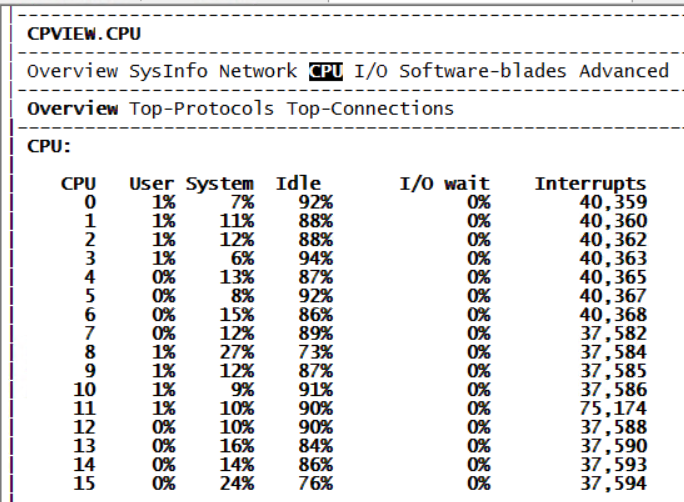
That is weird as this is what I see in R77.30 cpview:
This is the version of cpview I have on a R77.30 system with jumbo take 345. I also checked on a gateway without any jumbo and this only does not show the I/O in the menu, but further looks the same as the above. Yours really looks like a R77.20 cpview.
The main difference in what I see on your screenshot and mine is in the I/O wait column.
You should look at the interfaces, if you see any errors there as well. In the Network page go to Interfaces and then Traffic, now scroll down (down arrow) until you see the error page.
Hey Maarten
The reason you got confused is that CPView have more menus on GW
But what Wang showed us is screen from CPView on MGMT which have fewer menus
You're both running R77.30, but Wang is running a clean or older jumbo of R77.30 since it's missing the I/O menu (which was added for both GW and MGMT)
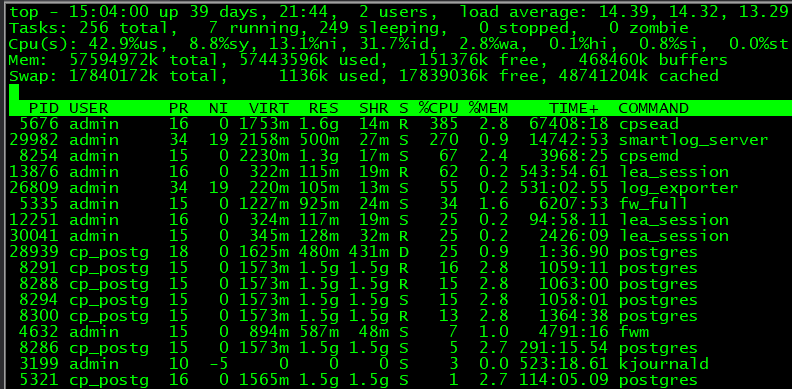
All the processes that are busy on your SMS have to do with correlating and indexing logs. What is your indexed log rate? What are the hardware/memory specs of your SMS?
Run these commands and post the results (not all of them may work on R77.30):
cpstat mg -f log_server
cpstat ls -f logging
$RTDIR/scripts/doctor-log.sh -f
If those don't work on your version, see this: sk88681: How to calculate/count the total amount of FireWall Logs per second that arrive to Security...
Based on the presence of multiple lea_session daemons it would appear the logs are also being exported to some third party product as well. Depending on your logging rate, you may need to separate the log indexing/correlation/exporting from your SMS to a separate SmartEvent box.
Leaderboard
Epsum factorial non deposit quid pro quo hic escorol.
| User | Count |
|---|---|
| 18 | |
| 10 | |
| 9 | |
| 9 | |
| 4 | |
| 4 | |
| 3 | |
| 2 | |
| 2 | |
| 2 |
Fri 12 Dec 2025 @ 10:00 AM (CET)
Check Mates Live Netherlands: #41 AI & Multi Context ProtocolTue 16 Dec 2025 @ 05:00 PM (CET)
Under the Hood: CloudGuard Network Security for Oracle Cloud - Config and Autoscaling!Fri 12 Dec 2025 @ 10:00 AM (CET)
Check Mates Live Netherlands: #41 AI & Multi Context ProtocolTue 16 Dec 2025 @ 05:00 PM (CET)
Under the Hood: CloudGuard Network Security for Oracle Cloud - Config and Autoscaling!About CheckMates
Learn Check Point
Advanced Learning
YOU DESERVE THE BEST SECURITY