- Products
- Learn
- Local User Groups
- Partners
- More

MVP 2026: Submissions
Are Now Open!
What's New in R82.10?
10 December @ 5pm CET / 11am ET
Announcing Quantum R82.10!
Learn MoreOverlap in Security Validation
Help us to understand your needs better
CheckMates Go:
Maestro Madness
Often in smaller setups where a central authentication server is not used, organizations may wish to use "Check Point Passwords" to authenticate users (also called Internal Password or FireWall-1 Password).
These passwords are limited to 8 characters or less prior to R81.
This is by design as it's best practice to use a centrally managed authentication source (like RADIUS/TACACS+ or even AD) and "Internal Password" is more meant for demos/testing.
However, some organizations do not want to maintain a central authentication server.
However, there is a little known feature that you can use to support longer, stronger passwords without resorting to a centrally managed authentication server.
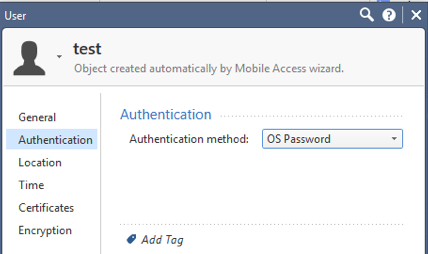
That is to define users using "OS Password" authentication.
What that tells the gateway is to authenticate to the underlying OS (in this case Gaia), which supports longer, stronger passwords.
See screenshot below:

Obviously, you don't want to give typical users access to the WebUI of Gaia to review or change the configuration.
This is where Gaia's robust Role-Based Access comes in.
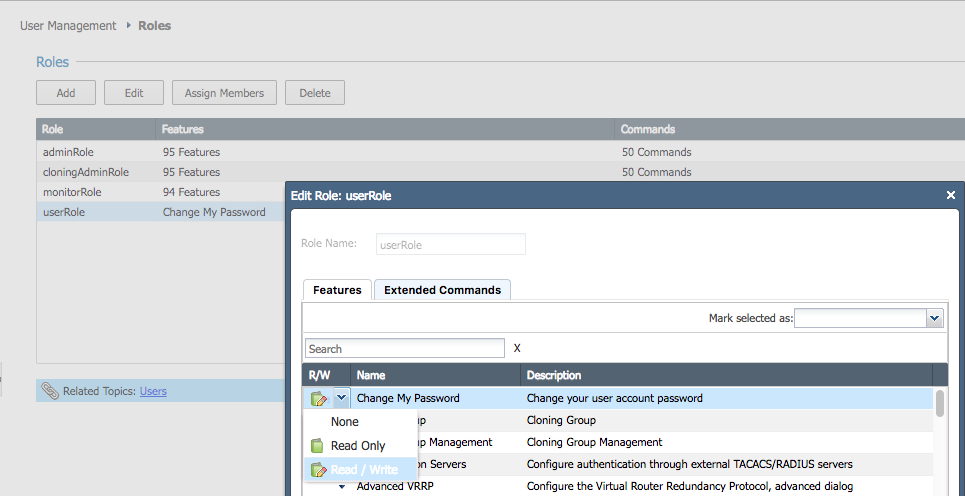
You should create a role that only allows them to do one thing: change their user account password.
Which is actually an enhancement compared to Check Point Passwords ![]()
Assign that new role to users as you create them.
Screenshot of what the role looks like in the Gaia WebUI below:

The main caveat to this approach is each (physical) gateway will need to have the user defined in Gaia.
This means in a cluster, both members will need to have the user defined (unless you're using Cloning Groups).
This also means, if you have multiple gateways/clusters, end users will need to change their passwords on each gateway/cluster.
NOTE: I've only done perfunctory testing of this, and it may have some other caveats that I haven't outlined here.
I recommend thoroughly testing this before you deploy in production.
Feedback is welcome.
Edit: Added note about R81 supporting longer passwords (and removed the fact R80.40 may have supported this).
Great tip Dameon!
Regards.
That’s a good improvement.
if you also rely on cloning groups you may have users synced between cluster members which helps to maintain them.
Very true, thus the comment I made above about Cluster Sync.
I guess I meant cloning groups...will fix ![]()
Any suggestion / recommendation on how to achieve 2FA, we have Vasco Token. Challenge/goal that the 1st factor should give Remote Users the option to change 1st password by themselves. Thank you again
Regards,
Dale
Looks like R80.40 (possibly with JHF) supports longer than 8 character "Internal Password" passwords.
Updated the original post to reflect this.
Hi,
Can you please advise which R80.40 HF supports longer than 8 character "Internal Password"? I've made a recent R80.40 deployment and that limitation is still present. Same for the R80.40 demo version.
Thanks
Turns out I was incorrect above.
The limitation is actually lifted in R81: https://supportcenter.checkpoint.com/supportcenter/portal?eventSubmit_doGoviewsolutiondetails=&solut...
Will edit my post above.
Leaderboard
Epsum factorial non deposit quid pro quo hic escorol.
| User | Count |
|---|---|
| 16 | |
| 13 | |
| 8 | |
| 7 | |
| 6 | |
| 4 | |
| 4 | |
| 3 | |
| 3 | |
| 2 |
Fri 12 Dec 2025 @ 10:00 AM (CET)
Check Mates Live Netherlands: #41 AI & Multi Context ProtocolTue 16 Dec 2025 @ 05:00 PM (CET)
Under the Hood: CloudGuard Network Security for Oracle Cloud - Config and Autoscaling!Fri 12 Dec 2025 @ 10:00 AM (CET)
Check Mates Live Netherlands: #41 AI & Multi Context ProtocolTue 16 Dec 2025 @ 05:00 PM (CET)
Under the Hood: CloudGuard Network Security for Oracle Cloud - Config and Autoscaling!About CheckMates
Learn Check Point
Advanced Learning
YOU DESERVE THE BEST SECURITY