- Products
- Learn
- Local User Groups
- Partners
- More

MVP 2026: Submissions
Are Now Open!
What's New in R82.10?
10 December @ 5pm CET / 11am ET
Announcing Quantum R82.10!
Learn MoreOverlap in Security Validation
Help us to understand your needs better
CheckMates Go:
Maestro Madness
HI Stefano,
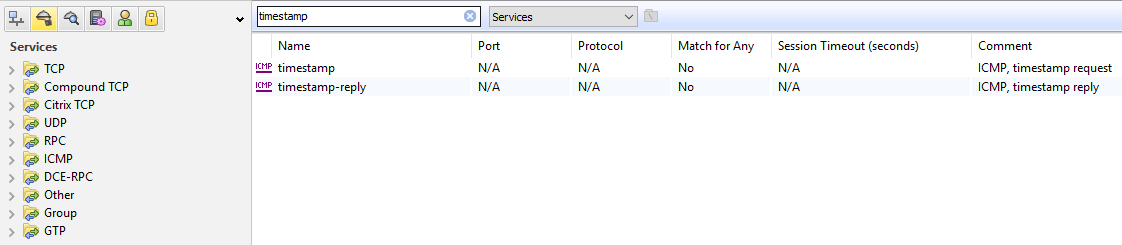
you can find all timestamp services via the integrated search function of your SmartDashboard:

You've probably allowed icmp pings by permitting the entire icmp protocol suite, including timestamps:

Just replace icmp-proto with echo-request like this:

I wonder why your internal audit didn't note that R75.40 is a version that went out of support in April 2016. You should consider upgrading to a more recent release, such as R77.30 or higher.
HI Stefano,
you can find all timestamp services via the integrated search function of your SmartDashboard:

You've probably allowed icmp pings by permitting the entire icmp protocol suite, including timestamps:

Just replace icmp-proto with echo-request like this:

I wonder why your internal audit didn't note that R75.40 is a version that went out of support in April 2016. You should consider upgrading to a more recent release, such as R77.30 or higher.
Hi Danny, thanks for the greetings.
Thanks a lot Danny, I'll try this solution.
Let me say that the most up-to-date clusters are R75.40 but there is a R65 HFA 70 cluster in production too.. ![]()
Thanks again.
Stefano.
Hi Stefano,
I do a lot of security audits at our company. I think the timstamp problem is the smallest.
The following vulnerabilities should occur with R65HFA 70 and possibly R75.40:
- SHA1 vulnerabilities
- RC4 vulnerabilities
- poodle vulnerabilitys
and and and
I agree with Danny here. I should urgently upgrade the systems to R77.30 or higher.
Regards
Heiko
Hi. Any idea how to disable the same but on MDS smart center or log server, for local vulnerability scanner, where there is no firewall in between?
Edit: Have also some Eventia Reporter servers with same "issue", for which I can not even open smart console directly.
That requires disabling them at the OS level.
For TCP timestamps: sysctl -w net.ipv4.tcp_timestamps=0
For ICMP, I'm not sure it's relevant or not and would recommend engaging TAC: https://help.checkpoint.com
Leaderboard
Epsum factorial non deposit quid pro quo hic escorol.
| User | Count |
|---|---|
| 16 | |
| 13 | |
| 8 | |
| 7 | |
| 6 | |
| 4 | |
| 3 | |
| 3 | |
| 2 | |
| 2 |
Fri 12 Dec 2025 @ 10:00 AM (CET)
Check Mates Live Netherlands: #41 AI & Multi Context ProtocolTue 16 Dec 2025 @ 05:00 PM (CET)
Under the Hood: CloudGuard Network Security for Oracle Cloud - Config and Autoscaling!Fri 12 Dec 2025 @ 10:00 AM (CET)
Check Mates Live Netherlands: #41 AI & Multi Context ProtocolTue 16 Dec 2025 @ 05:00 PM (CET)
Under the Hood: CloudGuard Network Security for Oracle Cloud - Config and Autoscaling!About CheckMates
Learn Check Point
Advanced Learning
YOU DESERVE THE BEST SECURITY