- Products
- Learn
- Local User Groups
- Partners
- More

What’s New in Identity and Trust?
11 November @ 5pm CET / 11am EST
AI Security Masters
Security in the Pace of AI:
From Threat to Force Multiplier
CPX is Back!
Join us in Las Vegas, Vienna, and/or Bangkok!
What’s New in Agentic Network Orchestration
CheckMates Go:
Fun Ding
Hello, team.
Currently my client's network is under attack.
We have an On-Premise AntiSpam, which is simply not working well, and the client is receiving "infinity" of malicious SPAM mails.
As a contingency measure, we have already "detected" the countries of origin from where the attacks are coming from.
Is it advisable to work with Checkpoint's "Geo Policy" feature?
Or is it more advisable to "enable" the AntiSPAM blade and decide to work with Checkpoint as AntiSPAM, at least temporarily.
The CP AntiSPAM blade, how recommendable is it? Does this blade generate hardware resources consumption for you?
Greetings.
Use Updatable Objects of the relevant Geographies in your Access Policy if that's the approach you want to take (versus legacy Geo Policy).
Should you enable Anti Spam, you may need to enable MTA mode on the gateway unless your SMTP server doesn't require TLS.
Given the SK recommends using different gateways for Threat Prevention and Anti-Spam when using MTA, it's safe to say this will have a performance impact.
Buddy, block those countries IMMEDIATELY using updatable objects. Just create a rule and add those countries as source, dst as any and action block, any service.
Andy
I applied it.
Now I am in the phase of monitoring, if indeed, it starts to block it. 😄
The Geo Policy, is another option I could work with, right?
I guess it is the "criteria" of each administrator to know which one to use for these scenarios.
Cheers. 🙂
Hey bro, as @PhoneBoy said, use updatable objects, as per CP documentation, it should be used for any version above R80.20
Cheers,
Andy
Use Updatable Objects of the relevant Geographies in your Access Policy if that's the approach you want to take (versus legacy Geo Policy).
Should you enable Anti Spam, you may need to enable MTA mode on the gateway unless your SMTP server doesn't require TLS.
Given the SK recommends using different gateways for Threat Prevention and Anti-Spam when using MTA, it's safe to say this will have a performance impact.
What I understand from the comment, is that, to use the Checkpoint AntiSPAM blade, it is recommended to use it in a Firewall that is only dedicated to "work" as if it were an On-Premise AntiSPAM, right?
For the reasons that you have already exposed previously.
Greetings.
That's the way I read that SK.
That sounds logical.
Andy
@Matlu you can use the AntiSpam blade with only IP reputation feature enabled, this blocks all known malicious IP addresses sending mails. This is like using known Blacklists to block known bad SMTP servers. No TLS decryption needed for this and this has only minimal performance impacts. You can use all other features of AntiSpam blade without significant performance impact. Only if you use ThreatPrevention and the MTA this will have an performance impact but it depends on your mail traffic.
Hello,
Thank you for your reply.
A curiosity for ignorance, the MTA is some "option" that must be enabled, as the "AntiSPAM" blade is enabled?
I'm looking for it in my console, and I can't find it.
I think that applying your recommendation, for now is the most viable, always avoiding that the performance of the boxes may be affected.
Regards.
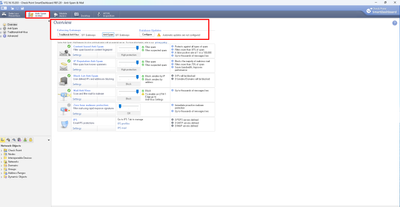
No, there is no need to enable MTA, except you want to decrypt SMTP TLS or using ThreatExtraction/Emulation. AntiSpam is configured via old SmartDashboard see Using Anti-Spam and Mail „Configuring an IP Reputation Policy“
|
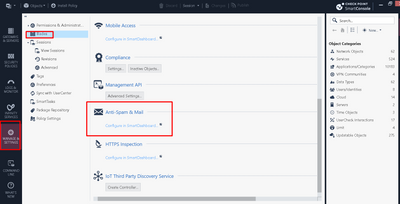
In SmartConsole, select Manage & Settings > Blades > Anti-Spam & Mail > and click Configure in SmartDashboard. SmartDashboard opens and shows the Anti-Spam & Mail tab. |
Leaderboard
Epsum factorial non deposit quid pro quo hic escorol.
| User | Count |
|---|---|
| 10 | |
| 10 | |
| 9 | |
| 8 | |
| 8 | |
| 5 | |
| 4 | |
| 4 | |
| 3 | |
| 3 |
Tue 10 Nov 2026 @ 06:00 PM (IST)
Under the Hood: Introducing Check Point Cloud Firewall as a ServiceTue 10 Nov 2026 @ 08:00 PM (IST)
Check Point Mobile Security | Extending Zero Trust with NetskopeThu 12 Nov 2026 @ 11:00 AM (EST)
Tips and Tricks 2026 #15: Check Point MDR and Incident ResponseTue 10 Nov 2026 @ 06:00 PM (IST)
Under the Hood: Introducing Check Point Cloud Firewall as a ServiceTue 10 Nov 2026 @ 08:00 PM (IST)
Check Point Mobile Security | Extending Zero Trust with NetskopeThu 12 Nov 2026 @ 11:00 AM (EST)
Tips and Tricks 2026 #15: Check Point MDR and Incident ResponseTue 17 Nov 2026 @ 08:30 AM (EST)
Bogota Breakfast & Hack: IA bajo control y ataques en vivo con Workspace SecurityAbout CheckMates
Learn Check Point
Advanced Learning
WE SECURE YOUR AI TRANSFORMATION