- Products
- Learn
- Local User Groups
- Partners
- More

MVP 2026: Submissions
Are Now Open!
What's New in R82.10?
10 December @ 5pm CET / 11am ET
Announcing Quantum R82.10!
Learn MoreOverlap in Security Validation
Help us to understand your needs better
CheckMates Go:
Maestro Madness
Dear Mates
I have been searching around, and so far I was not able to find an answer to the issue that I am facing.
I have currently migrated our VPN solution to Check Point RA VPN, but I am having an issue when it comes to create rules for remote access users. Each group has permissions to access different machines remotely, so I have requested the creation of specific LDAP groups to be used for remote access.
Unfornatunately, when a use an LDAP group in the Source field of the policy, users are not being able to authenticate. The authentication only works when I select the option "All Account Unit´s Users".
Any idea on how this issue could be overcomed? or a workaround perhaps?
Thanks in advance
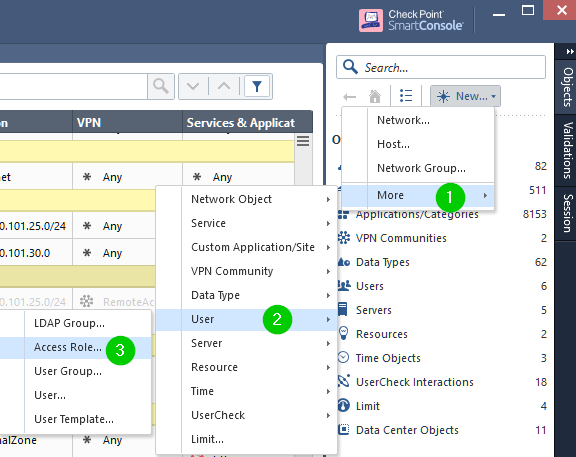
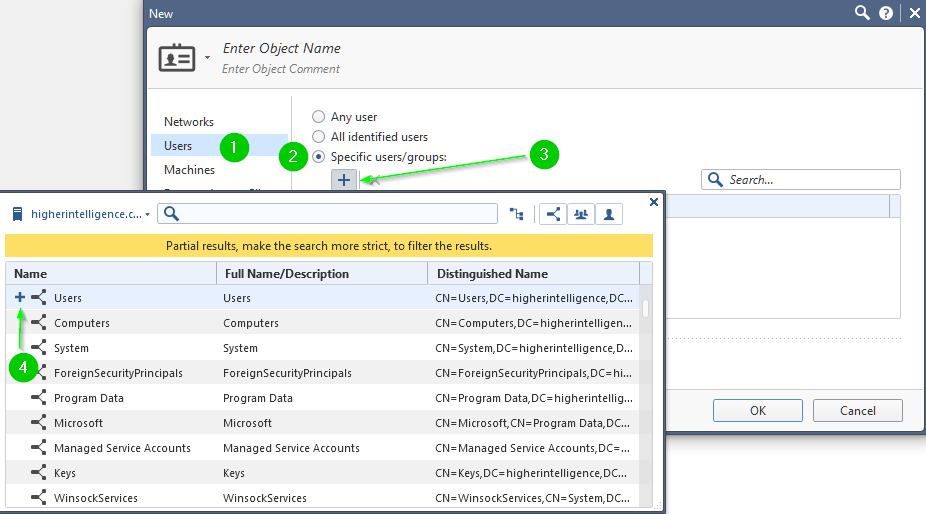
Try using Access Roles instead of LDAP group and select the desired AD group under "Users" section of the role:


Hi Vladimir,
When I try that I get the following error during policy verification:
"
Firewall and Address Translation Policy Verification:
Verifier warnings: Rule 32: Only User Groups are allowed as Source in VPN and Client Authentication Rules
"
Note: I am still using R77.30.
Thanks
Since you are still using R77.30, which you should have mentioned in your first post, you need to remove the RemoteAccess VPN group from the VPN column.
HI Danny
Thanks for your contribution, and sorry about not mentioning that I am using R77.30 later.
I would like to know why you suggested ti remove the RemoteAccess VPN group from the VPN Column since I want the users to connect using the Remote Access Community.
Thanks once again
Have a look into sk64400: Policy Verification Error: "Only User Groups are allowed as Source in VPN and Client Authen...
Hi there!
I have the same issue.
I´ve added a access role with a AD user in a firewall rule with "any traffic" in "VPN", but I can´t connect using "Endpoint Security".
In Smartlog I receive the message from blade Mobile Access, "User does not belong to the Remote Access Community,"
System version R77.30
Endpoint Security E80.80.
Valdimir, Is this example for R80.30 ? I am on R80.10 and do not see the "+" option, only the manual input
Thanks,
Andy
Leaderboard
Epsum factorial non deposit quid pro quo hic escorol.
| User | Count |
|---|---|
| 20 | |
| 20 | |
| 8 | |
| 7 | |
| 7 | |
| 4 | |
| 4 | |
| 3 | |
| 2 | |
| 2 |
Fri 12 Dec 2025 @ 10:00 AM (CET)
Check Mates Live Netherlands: #41 AI & Multi Context ProtocolTue 16 Dec 2025 @ 05:00 PM (CET)
Under the Hood: CloudGuard Network Security for Oracle Cloud - Config and Autoscaling!Fri 12 Dec 2025 @ 10:00 AM (CET)
Check Mates Live Netherlands: #41 AI & Multi Context ProtocolTue 16 Dec 2025 @ 05:00 PM (CET)
Under the Hood: CloudGuard Network Security for Oracle Cloud - Config and Autoscaling!Thu 18 Dec 2025 @ 10:00 AM (CET)
Cloud Architect Series - Building a Hybrid Mesh Security Strategy across cloudsAbout CheckMates
Learn Check Point
Advanced Learning
YOU DESERVE THE BEST SECURITY