- Products
- Learn
- Local User Groups
- Partners
- More

What's New in R82.10?
Register HereWhen the Agents Attack
A Live Look at Agentic Exposure Validation
AI Security Masters E8:
Claude Mythos: New Era in Cyber Security
CheckMates Go:
CheckMates Fest
Hello Experts.
I am trying to perform inbound HTTPS inspection; I do not have any private key password assigned to the certificate (wildcard certificate). While trying to import the internal server certificate for the inbound rules, I cannot import the certificate without providing the password.
Is there a way to skip/bypass the private key password section? It shows an error when I try to skip the password section.
*Note: When I provide the export password of the certificate in the private key password section, it accepts and imports the certificate.
Thanks in advance!!
Regards,
Digo.
Hello @Digo11 ,
Not sure if you were kidding when you asked for "a way to skip/bypass the private key " 🙂.
From CKP HTTPS Inspection documentation, we have the below paragraph explaining what is need:
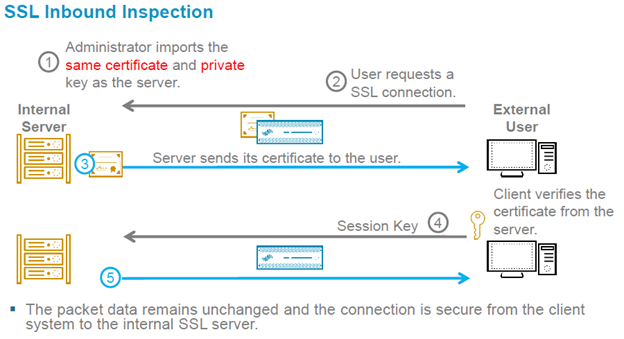
| When a client from outside the organization initiates an HTTPS connection to an internal server, the Security Gateway intercepts the traffic. The Security Gateway inspects the inbound traffic and creates a new HTTPS connection from the gateway to the internal server. To allow HTTPS Inspection, the Security Gateway must use the original server certificate and private key. The Security Gateway uses this certificate and the private key for SSL connections to the internal servers. |
Inbound HTTPS ConnectionsInbound connections are HTTPS connections that arrive from an external client and connect to a server in the DMZ or the internal network. Inbound connection flow
|
Now on your problem, you can't, because when we do INBOUND HTTP Inspection , meaning we decrypt traffic that comes from outside to our DMZ servers, the CKP HAS TO Present itself as the "original server", therefore, in order to do that, the server SSL certificate and the private key, needs to be installed to he can substitute itself into the communication.
As example:
Hopefully is clearer for you now.
Ty,
Hello @Digo11 ,
Not sure if you were kidding when you asked for "a way to skip/bypass the private key " 🙂.
From CKP HTTPS Inspection documentation, we have the below paragraph explaining what is need:
| When a client from outside the organization initiates an HTTPS connection to an internal server, the Security Gateway intercepts the traffic. The Security Gateway inspects the inbound traffic and creates a new HTTPS connection from the gateway to the internal server. To allow HTTPS Inspection, the Security Gateway must use the original server certificate and private key. The Security Gateway uses this certificate and the private key for SSL connections to the internal servers. |
Inbound HTTPS ConnectionsInbound connections are HTTPS connections that arrive from an external client and connect to a server in the DMZ or the internal network. Inbound connection flow
|
Now on your problem, you can't, because when we do INBOUND HTTP Inspection , meaning we decrypt traffic that comes from outside to our DMZ servers, the CKP HAS TO Present itself as the "original server", therefore, in order to do that, the server SSL certificate and the private key, needs to be installed to he can substitute itself into the communication.
As example:
Hopefully is clearer for you now.
Ty,
Hi Sorin_Gogean,
Good day!!
Thanks a lot for explaining the connection flow. Somehow, I was able to import the certificate by entering the "export" password that I had created at the time of exporting the certificate. I had to convert the certificate to .P12 format as it was originally in .PEM format.
I used the certificate for inbound inspection and the traffic is getting inspected as seen in the logs. I will check further and post here if assistance is required.
Thanks!!
Good job! 👍
Glad it helped @Digo11 😊
What @Sorin_Gogean gave pretty much explains it all. Sadly, there is NO way to skip private key portion, thats the whole point actually of this process, otherwise, it would not be secure.
Leaderboard
Epsum factorial non deposit quid pro quo hic escorol.
| User | Count |
|---|---|
| 12 | |
| 9 | |
| 8 | |
| 6 | |
| 6 | |
| 5 | |
| 5 | |
| 4 | |
| 3 | |
| 3 |
Tue 23 Jun 2026 @ 05:00 PM (CEST)
Under the Hood: Check Point Cloud Firewall | Securing all of your clouds: Art of the possibleThu 25 Jun 2026 @ 10:00 AM (PDT)
AI Security Masters E10: READY OR NOT: Securing the AI Enterprise 2/5 - AI Red TeamingThu 02 Jul 2026 @ 06:00 PM (CST)
Revolucionando la Seguridad con IA Generativa: Prevención Inteligente en Tiempo RealTue 23 Jun 2026 @ 05:00 PM (CEST)
Under the Hood: Check Point Cloud Firewall | Securing all of your clouds: Art of the possibleThu 25 Jun 2026 @ 10:00 AM (PDT)
AI Security Masters E10: READY OR NOT: Securing the AI Enterprise 2/5 - AI Red TeamingTue 14 Jul 2026 @ 10:00 AM (PDT)
AI Security Masters E11: READY OR NOT: Securing the AI Enterprise 3/5 - AI Workforce SecurityThu 02 Jul 2026 @ 06:00 PM (CST)
Revolucionando la Seguridad con IA Generativa: Prevención Inteligente en Tiempo RealAbout CheckMates
Learn Check Point
Advanced Learning
YOU DESERVE THE BEST SECURITY