- Products
- Learn
- Local User Groups
- Partners
- More

MVP 2026: Submissions
Are Now Open!
What's New in R82.10?
10 December @ 5pm CET / 11am ET
Announcing Quantum R82.10!
Learn MoreOverlap in Security Validation
Help us to understand your needs better
CheckMates Go:
Maestro Madness
I am trying to get my head around IPS Policy.
Firewall I am managing was setup by another guy who is no longer in the company
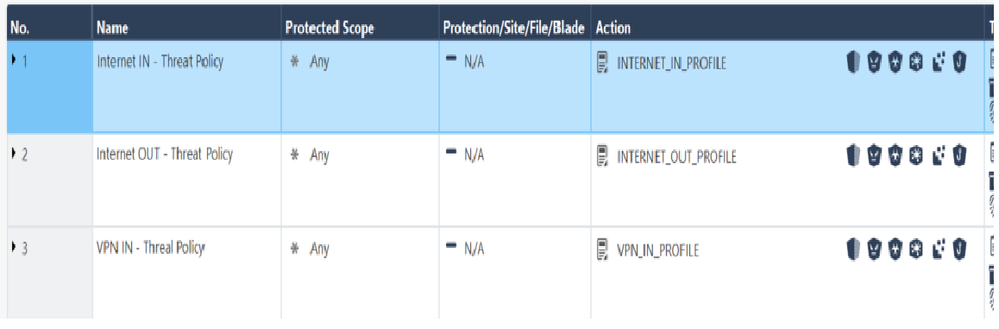
There are three rules in my existing Custom policy INTERNET_IN_PROFILE , INTERNET_OUT_PROFILE, VPN_IN_PROFILE ( image attached)
There is no protected scope applied with any of these rules but interestingly when I check the logs the first rule (Internet IN - Threat Policy) only prevents/detects IPS in the incoming traffic i.e inbound traffic mainly towards my application.
The second rule only prevents/detects IPS outbound traffic i.e traffic usually generated from my internal network.
There is no scope defined so bit confused about how this is working.
Right click on the dark blue bar and add the missing column like source. Then you will understand the policy
I dont believe top to bottom approach even matters here, like it would in normal policy rules. Btw, yes, you are correct, inactive means it will NOT inspect/apply to source/dst.
Andy
Right click on the dark blue bar and add the missing column like source. Then you will understand the policy
Thank You Lesley and sorry for being a noob on this one.
One more thing how does this rule work ? Match from top to bottom or will the E-1.1 , E1.2 will get bypassed from the Threat Prevention profile and rest of them will get inspected ? Does the Inactive in the Action section refers to not inspect the matching source and destination ?
I dont believe top to bottom approach even matters here, like it would in normal policy rules. Btw, yes, you are correct, inactive means it will NOT inspect/apply to source/dst.
Andy
Rules E-1.1 and E-1.2 are exceptions that can change the final decision (Inactive, Prevent, Detect) of what to do only if rule 1 is matched. If rule 1 is not matched, E-1.1 and E-1.2 are skipped. Overall in the Threat Prevention layers just the first matching rule is taken, unless there is more than one Threat Prevention policy layer (not common), in which case the first matching rule is selected in all TP layers, and the most stringent action wins unless there is an exception which changes it.
What the guys told me below applies here. Only advise I can give is consider to remove the exceptions because they seem to whitelist a lot. 1.2 is whitelist for traffic TOWARDS internet. So if a hosts connects to a C&C server on internet it will be skipped due the exception and not inspected by for example anti-bot blade.
Hello @Lesley there is an Edge firewall as well and before the packet goes out to the internet it has to be traverse the Edge firewall. We do not want to be using Threat Prevention with same signatures and everything in 2 places and on top of that both of them are Checkpoint
@Timothy_Hall one more thing do we expect to see any logs from those exception ?
Definitely you should get them. I know few customers who use them and we always see the logs. By default, when you create them, logging is enabled.
Andy
Leaderboard
Epsum factorial non deposit quid pro quo hic escorol.
| User | Count |
|---|---|
| 16 | |
| 13 | |
| 8 | |
| 7 | |
| 6 | |
| 4 | |
| 4 | |
| 3 | |
| 3 | |
| 2 |
Fri 12 Dec 2025 @ 10:00 AM (CET)
Check Mates Live Netherlands: #41 AI & Multi Context ProtocolTue 16 Dec 2025 @ 05:00 PM (CET)
Under the Hood: CloudGuard Network Security for Oracle Cloud - Config and Autoscaling!Fri 12 Dec 2025 @ 10:00 AM (CET)
Check Mates Live Netherlands: #41 AI & Multi Context ProtocolTue 16 Dec 2025 @ 05:00 PM (CET)
Under the Hood: CloudGuard Network Security for Oracle Cloud - Config and Autoscaling!About CheckMates
Learn Check Point
Advanced Learning
YOU DESERVE THE BEST SECURITY