- Products
- Learn
- Local User Groups
- Partners
- More

MVP 2026: Submissions
Are Now Open!
What's New in R82.10?
10 December @ 5pm CET / 11am ET
Announcing Quantum R82.10!
Learn MoreOverlap in Security Validation
Help us to understand your needs better
CheckMates Go:
Maestro Madness
[Expert@CTSG3Firewall]# tcpdump -nni any host 172.20.106.234
tcpdump: WARNING: any: That device doesn't support promiscuous mode
(Promiscuous mode not supported on the "any" device)
tcpdump: verbose output suppressed, use -v or -vv for full protocol decode
listening on any, link-type LINUX_SLL (Linux cooked), capture size 262144 bytes
19:17:40.710318 IP 10.25.153.3.49522 > 172.20.106.234.443: Flags [S], seq 2707150385, win 8192, options [mss 1460,nop,wscale 8,nop,nop,sackOK], length 0
19:17:43.716807 IP 10.25.153.3.49522 > 172.20.106.234.443: Flags [S], seq 2707150385, win 8192, options [mss 1460,nop,wscale 8,nop,nop,sackOK], length 0
19:17:49.722827 IP 10.25.153.3.49522 > 172.20.106.234.443: Flags [S], seq 2707150385, win 8192, options [mss 1460,nop,nop,sackOK], length 0
19:18:00.721660 IP 10.25.153.3.49523 > 172.20.106.234.443: Flags [S], seq 2812651852, win 8192, options [mss 1460,nop,wscale 8,nop,nop,sackOK], length 0
19:18:03.731702 IP 10.25.153.3.49523 > 172.20.106.234.443: Flags [S], seq 2812651852, win 8192, options [mss 1460,nop,wscale 8,nop,nop,sackOK], length 0
19:18:09.737746 IP 10.25.153.3.49523 > 172.20.106.234.443: Flags
Not receiving return traffic ,while bypass firewall able connect VPN client ,through firewall can not see return traffic ..
using firewall model Checkpoint 750 small Business.
Any one can guide on further troubleshooting ideas....
Please be more specific:
What kind of VPN? IPSec or SSL?
VPN from where to where?
When you are bypassing firewall, are you unloading the policy or are physically bypassing it?
If second, what IP is assigned to the client and by which device?
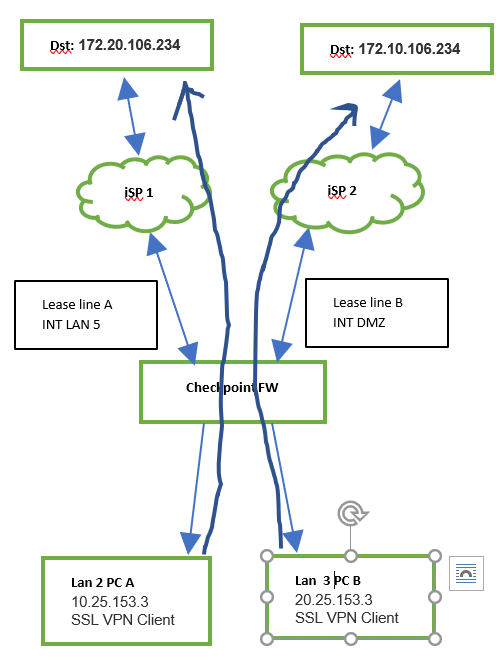
Describe the topology of your setup.
HI Vladimir ,
please find the topology..

The Arrows segregating both network (2 different networks) .There is no internet connection,2 separate lease lines With Different brand FW VPN client able to connect , same implementation done with Checkpoint firewall instead of WAN int in fig 1 ,using LAN 5 as show in fig 5.
All required rules allowed(selected strict option) ,able to ping until ISP interfaces ,icmp not allowed dst ip ,while try to establish VPN connection can see out going traffic for ex: PC A to dst ip 172.20.106.234 as per logs which in shared to before .
same issue for both networks
Not able to find where the incoming traffic dropping ...SSL VPN client not connecting its showing not responded .
Firewall is Checkpoint 750 small business firewall ,R77.20.
kindly share if got any idea ....
"Strict" policy explicitly prohibits all internal networks from talking to each other, so we'll have to dig a bit to figure out what is going on.
the IP you are showing is the RFC1918 address, so you are not going over connections to ISPs, but private lines that should be connected to other internal interfaces.
To verify, please include screenshots of:
Your routing settings:

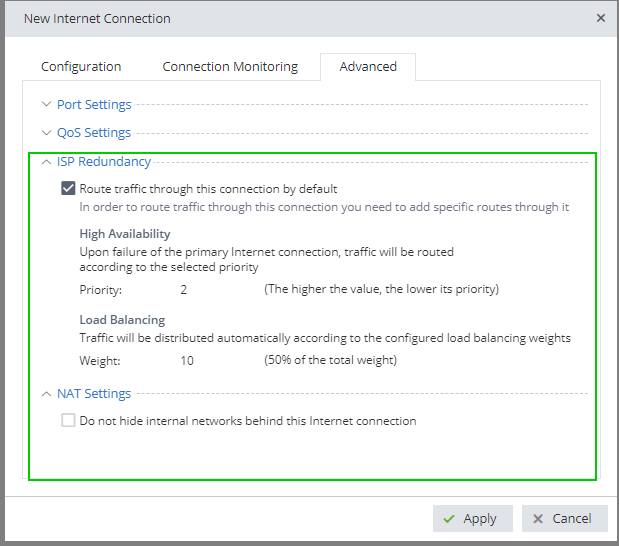
Your configuration for ISP redundancy and NAT for the gateway, i.e.:

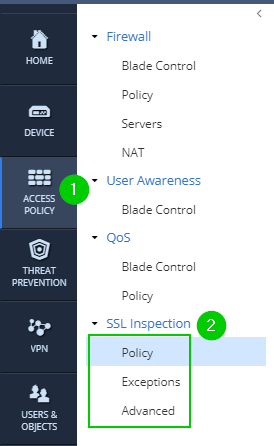
SSL Inspection Policy and Inspections:

And Firewall NAT policy settings (same screenshot as depicted here) and NAT Rules (3):

If the settings in the above section (2) are set to "On", turn it off, apply settings and try again.
Change Access Control Policy from "Strict" to "Standard" and attempt to establish SSL VPN.
For troubleshooting, use "fw monitor" command (please lookup sk describing its usage). The iIoO depicting traversal of the firewall's interfaces.
[Expert@drawbridge]# fw monitor -e "src=172.20.106.234 or dst=72.30.35.10 ,accept;"
fw: getting filter (from command line)
fw: compiling
monitorfilter:
Compiled OK.
fw: loading
fw: monitoring (control-C to stop)
[vs_0][fw_0] LAN1:i[60]: 192.168.7.148 -> 72.30.35.10 (ICMP) len=60 id=13357
ICMP: type=8 code=0 echo request id=1 seq=3195
[vs_0][fw_0] LAN1:I[60]: 192.168.7.148 -> 72.30.35.10 (ICMP) len=60 id=13357
ICMP: type=8 code=0 echo request id=1 seq=3195
[vs_0][fw_0] WAN:o[60]: 192.168.7.148 -> 72.30.35.10 (ICMP) len=60 id=13357
ICMP: type=8 code=0 echo request id=1 seq=3195
[vs_0][fw_0] WAN:O[60]: aaa.aaa.aaa.aaa -> 72.30.35.10 (ICMP) len=60 id=13357
ICMP: type=8 code=0 echo request id=12540 seq=3195
[vs_0][fw_0] LAN1:i[60]: 192.168.7.148 -> 72.30.35.10 (ICMP) len=60 id=13358
ICMP: type=8 code=0 echo request id=1 seq=3196
[vs_0][fw_0] LAN1:I[60]: 192.168.7.148 -> 72.30.35.10 (ICMP) len=60 id=13358
ICMP: type=8 code=0 echo request id=1 seq=3196
[vs_0][fw_0] WAN:o[60]: 192.168.7.148 -> 72.30.35.10 (ICMP) len=60 id=13358
ICMP: type=8 code=0 echo request id=1 seq=3196
[vs_0][fw_0] WAN:O[60]: aaa.aaa.aaa.aaa -> 72.30.35.10 (ICMP) len=60 id=13358
ICMP: type=8 code=0 echo request id=12540 seq=3196
[vs_0][fw_0] LAN1:i[60]: 192.168.7.148 -> 72.30.35.10 (ICMP) len=60 id=13359
ICMP: type=8 code=0 echo request id=1 seq=3197
[vs_0][fw_0] LAN1:I[60]: 192.168.7.148 -> 72.30.35.10 (ICMP) len=60 id=13359
ICMP: type=8 code=0 echo request id=1 seq=3197
[vs_0][fw_0] WAN:o[60]: 192.168.7.148 -> 72.30.35.10 (ICMP) len=60 id=13359
ICMP: type=8 code=0 echo request id=1 seq=3197
[vs_0][fw_0] WAN:O[60]: aaa.aaa.aaa.aaa -> 72.30.35.10 (ICMP) len=60 id=13359
ICMP: type=8 code=0 echo request id=12540 seq=3197
[vs_0][fw_0] LAN1:i[60]: 192.168.7.148 -> 72.30.35.10 (ICMP) len=60 id=13360
ICMP: type=8 code=0 echo request id=1 seq=3198
[vs_0][fw_0] LAN1:I[60]: 192.168.7.148 -> 72.30.35.10 (ICMP) len=60 id=13360
ICMP: type=8 code=0 echo request id=1 seq=3198
[vs_0][fw_0] WAN:o[60]: 192.168.7.148 -> 72.30.35.10 (ICMP) len=60 id=13360
ICMP: type=8 code=0 echo request id=1 seq=3198
[vs_0][fw_0] WAN:O[60]: aaa.aaa.aaa.aaa -> 72.30.35.10 (ICMP) len=60 id=13360
ICMP: type=8 code=0 echo request id=12540 seq=3198
If changing the policy from "Strict" to "Standard" worked, look closer at the rules you've created while using "Strict" policy.

Thanks for your valuable replies ..
Does this rely to r80.10? Might be a bug
https://community.checkpoint.com/thread/7267-tcpdump-r8010
Thanks
Kim
I do not think 750 appliance are capable of running R80.10.
My money is on simple configuration error.
Nah, those 700 SMB GW’a are running on Gaia embedded R77.20.x and not (yet) on R80.
I just saw you were using tcpdump with parametre -Penni and it also generated an error. This Tim Hall found as a bug. I dont know if this could be the issue.
I would have removed the parametre to first see if traffic flows as expected.
I think Vladimir Yakovlev got a point about a misconfiguration.
Thanks
Kim
Hi All , Thanks for giving valuable info ,Special thanks to Vladimir ..
The issue got resolved its because of anti spoofing dropping.And modified routing and policy configuration .Now it working with Strict mode.In Cli globally disable the anti spoofing.
Leaderboard
Epsum factorial non deposit quid pro quo hic escorol.
| User | Count |
|---|---|
| 16 | |
| 12 | |
| 8 | |
| 7 | |
| 6 | |
| 4 | |
| 3 | |
| 3 | |
| 2 | |
| 2 |
Fri 12 Dec 2025 @ 10:00 AM (CET)
Check Mates Live Netherlands: #41 AI & Multi Context ProtocolTue 16 Dec 2025 @ 05:00 PM (CET)
Under the Hood: CloudGuard Network Security for Oracle Cloud - Config and Autoscaling!Fri 12 Dec 2025 @ 10:00 AM (CET)
Check Mates Live Netherlands: #41 AI & Multi Context ProtocolTue 16 Dec 2025 @ 05:00 PM (CET)
Under the Hood: CloudGuard Network Security for Oracle Cloud - Config and Autoscaling!Thu 18 Dec 2025 @ 10:00 AM (CET)
Cloud Architect Series - Building a Hybrid Mesh Security Strategy across cloudsAbout CheckMates
Learn Check Point
Advanced Learning
YOU DESERVE THE BEST SECURITY