- Products
- Learn
- Local User Groups
- Partners
- More

MVP 2026: Submissions
Are Now Open!
What's New in R82.10?
10 December @ 5pm CET / 11am ET
Announcing Quantum R82.10!
Learn MoreOverlap in Security Validation
Help us to understand your needs better
CheckMates Go:
Maestro Madness
hello Guys! i´m having some issues troubleshooting a Site to Site VPN Traffic,
i have a Virtual system to all my Site to Site VPN on a cluster with r80.40 OS, both cluster gateways are 23500 series,
i need to check some specific incoming and outgoing traffic that pass trough a client´s Site to Site VPN,
The problem:
i can see traffic with the graphic interface named logs and monitor but only http and https traffic,
i´m doing a ping from the source (172.27.0.34) to destination (10.8.0.6) and i don´t see it, on logs and monitor
also the ping request don´t have any response ( timeout for this request)
the firewall have two virtual interfaces ( wrp256 to inside traffic and wrp257 to outside traffic) , i´m trying to use tcpdump on that interfaces and don´t show nothing ,
what i´m typing: (tcpdump -i wrp256 | grep 172.27.0.34) and (tcpdump -i wrp257 | grep 10.8.0.6)
i´m also trying to use:
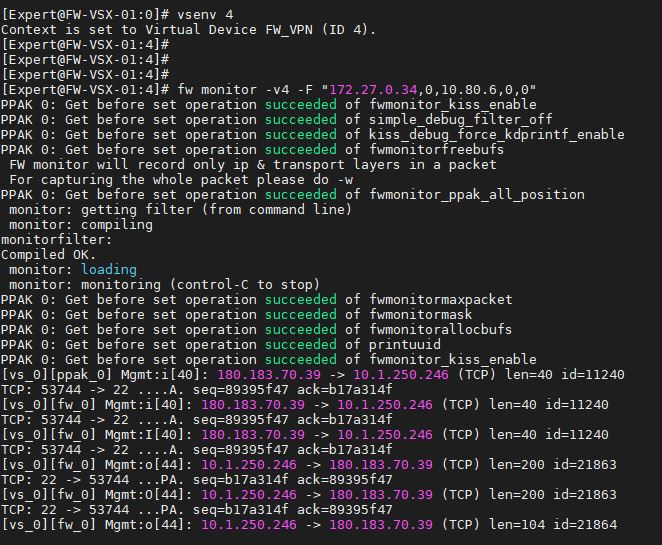
fw monitor -v4 -F "172.27.0.34,0,10.80.6,0,0" and doesn´t work either (the command only shows my ssh connection to the active vsx gateway of the cluster = 10.1.250.246 is the active cluster gateway and 180.183.70.39 is my pc)
i think i´m doing something wrong when i´m typing the commands can you help me guys?
Hello @Albottini
You can try
fw monitor -v < VSID > -e < expression >
And
tcpdump -i wrp256 on one session
and
tcpdump -i wrp257 on another.
BR,
Kostas
"10.80.6" does not look like a valid IP to me. Should it be "10.8.0.6" instead?
Oliver is correct @KostasGR, you must specify a valid IP address in a fw monitor -F filter and cannot leave the last octet off hoping to match the first three octets, nor can you use CIDR notation (/24) nor any kind of wildcard like * or ?. Also keep in mind that ICMP traffic is never accelerated by SecureXL and will always go F2F.
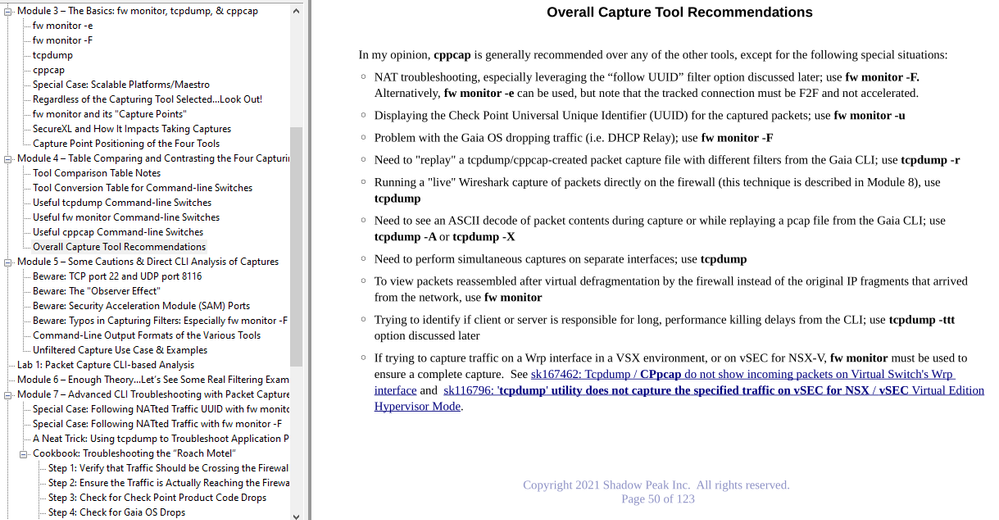
However as noted in my Max Capture video series (the relevant page is below), tcpdump/cppcap won't usually give you a complete capture (or perhaps not even show any packets at all) when used on a Wrp interface due to a SecureXL feature called "warp jump". The recommendation for successfully capturing traffic on a Wrp interface according to the various SKs is to use "fw monitor", but those SKs do not specify whether to use the -e option (which captures inside F2F/INSPECT) or -F (which captures packets in sim/SecureXL).
I would think that fw monitor -F would show the packets you need on a Wrp interface if given a proper filtering syntax, but there is the possibility you'll need to to disable SecureXL completely (or exclude the desired traffic from SecureXL acceleration via steps in sk104468) and use fw monitor -e instead.
hello it was a typing error the ip is 10.8.0.6
where can i find a cppcap user guide ?
The main documentation is the SK for cppcap:
sk141412: Running tcpdump causes high CPU usage - Introducing cppcap
Beyond that the most extensive documentation would be my "Max Capture: Know your packets" self-guided video series which has lots of use cases, examples, and a compare/contrast with the other three capturing tools (tcpdump, fw monitor -e, and fw monitor -F).
the ip is 10.8.0.6 it was a typing error
Leaderboard
Epsum factorial non deposit quid pro quo hic escorol.
| User | Count |
|---|---|
| 20 | |
| 20 | |
| 8 | |
| 7 | |
| 7 | |
| 4 | |
| 4 | |
| 3 | |
| 2 | |
| 2 |
Fri 12 Dec 2025 @ 10:00 AM (CET)
Check Mates Live Netherlands: #41 AI & Multi Context ProtocolTue 16 Dec 2025 @ 05:00 PM (CET)
Under the Hood: CloudGuard Network Security for Oracle Cloud - Config and Autoscaling!Fri 12 Dec 2025 @ 10:00 AM (CET)
Check Mates Live Netherlands: #41 AI & Multi Context ProtocolTue 16 Dec 2025 @ 05:00 PM (CET)
Under the Hood: CloudGuard Network Security for Oracle Cloud - Config and Autoscaling!Thu 18 Dec 2025 @ 10:00 AM (CET)
Cloud Architect Series - Building a Hybrid Mesh Security Strategy across cloudsAbout CheckMates
Learn Check Point
Advanced Learning
YOU DESERVE THE BEST SECURITY