- Products
- Learn
- Local User Groups
- Partners
- More

MVP 2026: Submissions
Are Now Open!
What's New in R82.10?
Watch NowOverlap in Security Validation
Help us to understand your needs better
CheckMates Go:
Maestro Madness
I'm setting up some virtual machines in VirtualBox attempting to complete@Magnus-Holmberg's CCSA lab series (which is brilliant might I add, thank you Magnus) in preparation for my CCSA, however, I'm having some trouble accessing SmartConsole.
I have a Windows10 machine running on an internal network (192.168.1.0/24) with address 192.168.1.5 (also has a NAT connection on 10.0.3.15) and my Check Point Gaia Management server ('cpmgmt', distributed setup on R80.40) running on 192.168.1.200. I can easily log in to the WebUI and access the management server and can successfully ping each machine from the other, however, the issue arises when I attempt to access cpmgmt via SmartConsole via which the only message I receive is "Unable to connect to server". I've turned off all of Windows Firewalls and have some idea that IPV4 Static Routes could be my issue, but no luck thus far.
Any ideas?
Ah problem solved!
I did a bit more troubleshooting online and in expert mode ran the shell /etc/fw/scripts/cpm_status.sh and found that the management server was not only not running, but barely initialising. After boosting it's RAM to 8GB (I know I should've had it at that from the start but my poor 16GB computer is struggling with feelings of inadequacy and can hardly keep up). Nonetheless, the script ran when I upped the RAM and told me that my server was successfully initialising until it was running. And now my management server is running!
Thanks for your help Magnus, looking forward to finishing that course now.
first of all thank you 🙂
It sounds like it may have been missed with the allowed GUI clients.
https://sc1.checkpoint.com/documents/R81/WebAdminGuides/EN/CP_R81_Gaia_AdminGuide/Topics-GAG/GUI-Cli...
regards,
Magnus
Hi Magnus,
Thanks for the response. Unfortunately, that didn't work... it's strange, I managed to log in via SmartConsole yesterday with no problems but also no explanation or reason as to why it hadn't worked the day prior. Then, this morning, when I went to try again, it had "Unable to connect to server" once again for me.
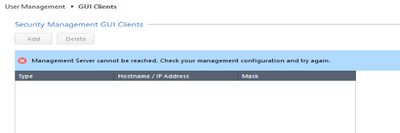
I had a look at the documentation you shared and tried via that avenue as well, using both WebUI and clish, neither of which gave me any success, as per images given below. Any idea as to why this might be?
Thanks again for the assistance!
Ah problem solved!
I did a bit more troubleshooting online and in expert mode ran the shell /etc/fw/scripts/cpm_status.sh and found that the management server was not only not running, but barely initialising. After boosting it's RAM to 8GB (I know I should've had it at that from the start but my poor 16GB computer is struggling with feelings of inadequacy and can hardly keep up). Nonetheless, the script ran when I upped the RAM and told me that my server was successfully initialising until it was running. And now my management server is running!
Thanks for your help Magnus, looking forward to finishing that course now.
Troubleshooting during training / lab is the best way to learn in real 🙂 good finding!
ye with 16gb it will be difficult, I don’t remember how much I needed to use in total during the CCSA part. If possible I would try to add some more ram in the computer. 🙂
I usually allocate 16GB to my management VM for optimal performance.
8GB is sufficient if you're not doing too much in SmartEvent.
I believe you can get away with as little as 6GB, but I imagine it won't be too performant.
I'm setting up some virtual machines in VirtualBox attempting to complete @Magnus-Holmberg's CCSA lab series (which is brilliant might I add, thank you Magnus) in preparation for my CCSA, however, I'm having some trouble accessing SmartConsole.
I have a Windows10 machine running on an internal network (192.168.1.0/24) with address 192.168.1.5 (also has a NAT connection on 10.0.3.15) and my Check Point Gaia Management server ('cpmgmt', distributed setup on R80.40) running on 192.168.1.200. I can easily log in to the WebUI and access the management server and can successfully ping each machine from the other, however, the issue arises when I attempt to access cpmgmt via SmartConsole via which the only message I receive is "Unable to connect to server". I've turned off all of Windows Firewalls and have some idea that IPV4 Static Routes could be my issue, but no luck thus far.
Any ideas?
Leaderboard
Epsum factorial non deposit quid pro quo hic escorol.
| User | Count |
|---|---|
| 12 | |
| 10 | |
| 9 | |
| 8 | |
| 6 | |
| 3 | |
| 2 | |
| 2 | |
| 2 | |
| 1 |
Tue 16 Dec 2025 @ 05:00 PM (CET)
Under the Hood: CloudGuard Network Security for Oracle Cloud - Config and Autoscaling!Thu 18 Dec 2025 @ 10:00 AM (CET)
Cloud Architect Series - Building a Hybrid Mesh Security Strategy across cloudsTue 16 Dec 2025 @ 05:00 PM (CET)
Under the Hood: CloudGuard Network Security for Oracle Cloud - Config and Autoscaling!Thu 18 Dec 2025 @ 10:00 AM (CET)
Cloud Architect Series - Building a Hybrid Mesh Security Strategy across cloudsAbout CheckMates
Learn Check Point
Advanced Learning
YOU DESERVE THE BEST SECURITY