- Products
- Learn
- Local User Groups
- Partners
- More
On-Premise SD-WAN Management
Register HereWhat's New in R82.10?
Watch Here AI Security Masters E8:
Claude Mythos: New Era in Cyber Security
CheckMates Go:
The Moment Before
Hi Team,
My scenario is as follows and the issue I faced is when the bgp routes are checked on firewall one of the path show as Inactive. I tired debugging with trace options but I unable to crack through. Am I missing something? may be another pair of eyes can help me here?
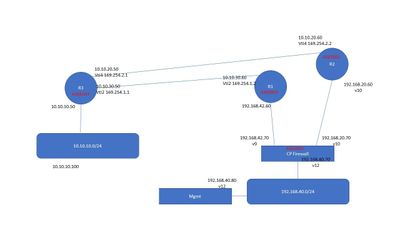
Here are the route and BGP status on firewall
MUM-FW01> show bgp peers
Flags: R - Peer restarted, W - Waiting for End-Of-RIB from Peer
PeerID AS Routes ActRts State InUpds OutUpds Uptime
192.168.42.60 65001 2 0 Established 2 1 00:18:15
192.168.20.60 65002 2 1 Established 2 1 00:17:43And here are the route received which shows routes received from 192.168.42.60 as inactive
MUM-FW01> show route all
Codes: C - Connected, S - Static, R - RIP, B - BGP (D - Default),
O - OSPF IntraArea (IA - InterArea, E - External, N - NSSA),
A - Aggregate, K - Kernel Remnant, H - Hidden, P - Suppressed,
NP - NAT Pool, U - Unreachable, i - Inactive
B 10.10.10.0/24 via 192.168.20.60, eth2, cost None, age 1310
To R2
B i 10.10.10.0/24 via 192.168.42.60, eth1, cost None, age 1341
To R1
C 127.0.0.0/8 is directly connected, lo
C 192.168.20.0/24 is directly connected, eth2
C 192.168.40.0/24 is directly connected, eth0
B H i 192.168.40.0/24 is an unusable route
To R2
B H i 192.168.40.0/24 is an unusable route
To R1
C 192.168.42.0/24 is directly connected, eth1
MUM-FW01>
In fact my entire path is through one link but unable to achieve the redundancy through another link.
That's surprising!! I mean does checkpoint shows one route as inactive? I mean show down one link and other route started showing as Active and installed. I mean scenario started working fine but was troubleshooting on inactive route.
MUM-FW01> show route all
Codes: C - Connected, S - Static, R - RIP, B - BGP (D - Default),
O - OSPF IntraArea (IA - InterArea, E - External, N - NSSA),
A - Aggregate, K - Kernel Remnant, H - Hidden, P - Suppressed,
NP - NAT Pool, U - Unreachable, i - Inactive
B 10.10.10.0/24 via 192.168.42.60, eth1, cost None, age 1591
To R1
C 127.0.0.0/8 is directly connected, lo
C 192.168.20.0/24 is directly connected, eth2
C 192.168.40.0/24 is directly connected, eth0
B H i 192.168.40.0/24 is an unusable route
To R2
B H i 192.168.40.0/24 is an unusable route
To R1
C 192.168.42.0/24 is directly connected, eth1
That's surprising!! I mean does checkpoint shows one route as inactive? I mean show down one link and other route started showing as Active and installed. I mean scenario started working fine but was troubleshooting on inactive route.
MUM-FW01> show route all
Codes: C - Connected, S - Static, R - RIP, B - BGP (D - Default),
O - OSPF IntraArea (IA - InterArea, E - External, N - NSSA),
A - Aggregate, K - Kernel Remnant, H - Hidden, P - Suppressed,
NP - NAT Pool, U - Unreachable, i - Inactive
B 10.10.10.0/24 via 192.168.42.60, eth1, cost None, age 1591
To R1
C 127.0.0.0/8 is directly connected, lo
C 192.168.20.0/24 is directly connected, eth2
C 192.168.40.0/24 is directly connected, eth0
B H i 192.168.40.0/24 is an unusable route
To R2
B H i 192.168.40.0/24 is an unusable route
To R1
C 192.168.42.0/24 is directly connected, eth1
You would only see two active routes if they are "equal" with ecmp enabled.
BGP path commands should show more/both iirc.
Correct - That's a new thing for me. Thanks though and there was not issue at all though
What was the solution? I am working through the same issue right now.
1. Do you have the following configured?
HostName> set bgp ecmp on
HostName> save config
2. Do you have route filters or route maps matching the routes to be imported from each peer?
3. Are the routes equal i.e. do their as-path lengths etc match?
The issue in the OP's screenshot is that routes are fine, it's the additional less-good routes that will be inactive. This is doing to be due to the BGP path-selection algorithm. In this case, it looks like all attributes were equal, so it came all the way down to the end: the RID (router-id). BGP chooses the lowest RID when determining which path to install into the FIB.
In this case, 192.168.20.60 was the lowest RID (assuming the peer is using its advertised IP as the RID and it wasn't manually selected differently).
https://study-ccnp.com/bgp-path-selection-algorithm-explained/
Leaderboard
Epsum factorial non deposit quid pro quo hic escorol.
| User | Count |
|---|---|
| 12 | |
| 5 | |
| 4 | |
| 3 | |
| 3 | |
| 2 | |
| 2 | |
| 1 | |
| 1 | |
| 1 |
Tue 14 Jul 2026 @ 10:00 AM (PDT)
AI Security Masters E11: READY OR NOT: Securing the AI Enterprise 3/5 - AI Workforce SecurityThu 30 Jul 2026 @ 10:00 AM (PDT)
AI Security Masters E12: READY OR NOT: Securing the AI Enterprise 4/5 - AI GatewayThu 20 Aug 2026 @ 10:00 AM (PDT)
AI Security Masters E13: READY OR NOT: Securing the AI Ent 5/5 - AI Research & Threat LandscapeTue 14 Jul 2026 @ 10:00 AM (PDT)
AI Security Masters E11: READY OR NOT: Securing the AI Enterprise 3/5 - AI Workforce SecurityThu 30 Jul 2026 @ 10:00 AM (PDT)
AI Security Masters E12: READY OR NOT: Securing the AI Enterprise 4/5 - AI GatewayThu 20 Aug 2026 @ 10:00 AM (PDT)
AI Security Masters E13: READY OR NOT: Securing the AI Ent 5/5 - AI Research & Threat LandscapeAbout CheckMates
Learn Check Point
Advanced Learning
YOU DESERVE THE BEST SECURITY
