Create a Post
cancel
Showing results for 
Search instead for 
Did you mean: 
Blason_R
MVP Gold
MVP Gold
Jump to solution

BGP Routes are showing as inactive on CheckPoint

Hi Team,

My scenario is as follows and the issue I faced is when the bgp routes are checked on firewall one of the path show as Inactive. I tired debugging with trace options but I unable to crack through. Am I missing something? may be another pair of eyes can help me here?
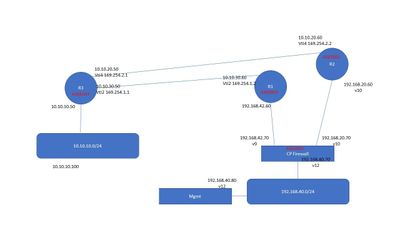
vyos.jpg


Here are the route and BGP status on firewall

MUM-FW01> show bgp peers

Flags: R - Peer restarted, W - Waiting for End-Of-RIB from Peer

PeerID AS Routes ActRts State InUpds OutUpds Uptime
192.168.42.60 65001 2 0 Established 2 1 00:18:15
192.168.20.60 65002 2 1 Established 2 1 00:17:43

And here are the route received which shows routes received from 192.168.42.60 as inactive

MUM-FW01> show route all
Codes: C - Connected, S - Static, R - RIP, B - BGP (D - Default),
       O - OSPF IntraArea (IA - InterArea, E - External, N - NSSA),
       A - Aggregate, K - Kernel Remnant, H - Hidden, P - Suppressed,
       NP - NAT Pool, U - Unreachable, i - Inactive

B               10.10.10.0/24       via 192.168.20.60, eth2, cost None, age 1310
                                        To R2
B            i  10.10.10.0/24       via 192.168.42.60, eth1, cost None, age 1341
                                        To R1
C               127.0.0.0/8         is directly connected, lo
C               192.168.20.0/24     is directly connected, eth2
C               192.168.40.0/24     is directly connected, eth0
B          H i  192.168.40.0/24     is an unusable route
                                        To R2
B          H i  192.168.40.0/24     is an unusable route
                                        To R1
C               192.168.42.0/24     is directly connected, eth1
MUM-FW01>


In fact my entire path is through one link but unable to achieve the redundancy through another link.


Thanks and Regards,
Blason R
CCSA,CCSE,CCCS
0 Kudos
1 Solution

Accepted Solutions
Blason_R
MVP Gold
MVP Gold

That's surprising!! I mean does checkpoint shows one route as inactive? I mean show down one link and other route started showing as Active and installed. I mean scenario started working fine but was troubleshooting on inactive route.

MUM-FW01> show route all
Codes: C - Connected, S - Static, R - RIP, B - BGP (D - Default),
       O - OSPF IntraArea (IA - InterArea, E - External, N - NSSA),
       A - Aggregate, K - Kernel Remnant, H - Hidden, P - Suppressed,
       NP - NAT Pool, U - Unreachable, i - Inactive

B               10.10.10.0/24       via 192.168.42.60, eth1, cost None, age 1591
                                        To R1
C               127.0.0.0/8         is directly connected, lo
C               192.168.20.0/24     is directly connected, eth2
C               192.168.40.0/24     is directly connected, eth0
B          H i  192.168.40.0/24     is an unusable route
                                        To R2
B          H i  192.168.40.0/24     is an unusable route
                                        To R1
C               192.168.42.0/24     is directly connected, eth1
Thanks and Regards,
Blason R
CCSA,CCSE,CCCS

View solution in original post

0 Kudos
6 Replies
Blason_R
MVP Gold
MVP Gold

That's surprising!! I mean does checkpoint shows one route as inactive? I mean show down one link and other route started showing as Active and installed. I mean scenario started working fine but was troubleshooting on inactive route.

MUM-FW01> show route all
Codes: C - Connected, S - Static, R - RIP, B - BGP (D - Default),
       O - OSPF IntraArea (IA - InterArea, E - External, N - NSSA),
       A - Aggregate, K - Kernel Remnant, H - Hidden, P - Suppressed,
       NP - NAT Pool, U - Unreachable, i - Inactive

B               10.10.10.0/24       via 192.168.42.60, eth1, cost None, age 1591
                                        To R1
C               127.0.0.0/8         is directly connected, lo
C               192.168.20.0/24     is directly connected, eth2
C               192.168.40.0/24     is directly connected, eth0
B          H i  192.168.40.0/24     is an unusable route
                                        To R2
B          H i  192.168.40.0/24     is an unusable route
                                        To R1
C               192.168.42.0/24     is directly connected, eth1
Thanks and Regards,
Blason R
CCSA,CCSE,CCCS

0 Kudos
Chris_Atkinson
MVP Platinum CHKP MVP Platinum CHKP
MVP Platinum CHKP

You would only see two active routes if they are "equal" with ecmp enabled.

BGP path commands should show more/both iirc.

CCSM R77/R80/ELITE
0 Kudos
Blason_R
MVP Gold
MVP Gold

Correct - That's a new thing for me. Thanks though and there was not issue at all though

Thanks and Regards,
Blason R
CCSA,CCSE,CCCS
0 Kudos
cmale
Explorer

What was the solution? I am working through the same issue right now.

0 Kudos
Chris_Atkinson
MVP Platinum CHKP MVP Platinum CHKP
MVP Platinum CHKP

1. Do you have the following configured?

HostName> set bgp ecmp on
HostName> save config

2. Do you have route filters or route maps matching the routes to be imported from each peer?

3. Are the routes equal i.e. do their as-path lengths etc match?

CCSM R77/R80/ELITE
0 Kudos
Duane_Toler
MVP Silver
MVP Silver

The issue in the OP's screenshot is that routes are fine, it's the additional less-good routes that will be inactive.  This is doing to be due to the BGP path-selection algorithm.  In this case, it looks like all attributes were equal, so it came all the way down to the end: the RID (router-id).  BGP chooses the lowest RID when determining which path to install into the FIB.

In this case, 192.168.20.60 was the lowest RID (assuming the peer is using its advertised IP as the RID and it wasn't manually selected differently).

https://study-ccnp.com/bgp-path-selection-algorithm-explained/


--
Ansible for Check Point APIs series: https://www.youtube.com/@EdgeCaseScenario and Substack
0 Kudos

Leaderboard

Epsum factorial non deposit quid pro quo hic escorol.

Upcoming Events

    CheckMates Events