- Products
- Learn
- Local User Groups
- Partners
- More

The Great Exposure Reset
24 February 2026 @ 5pm CET / 11am EST
CheckMates Fest 2026
Watch Now!AI Security Masters
Hacking with AI: The Dark Side of Innovation
CheckMates Go:
CheckMates Fest
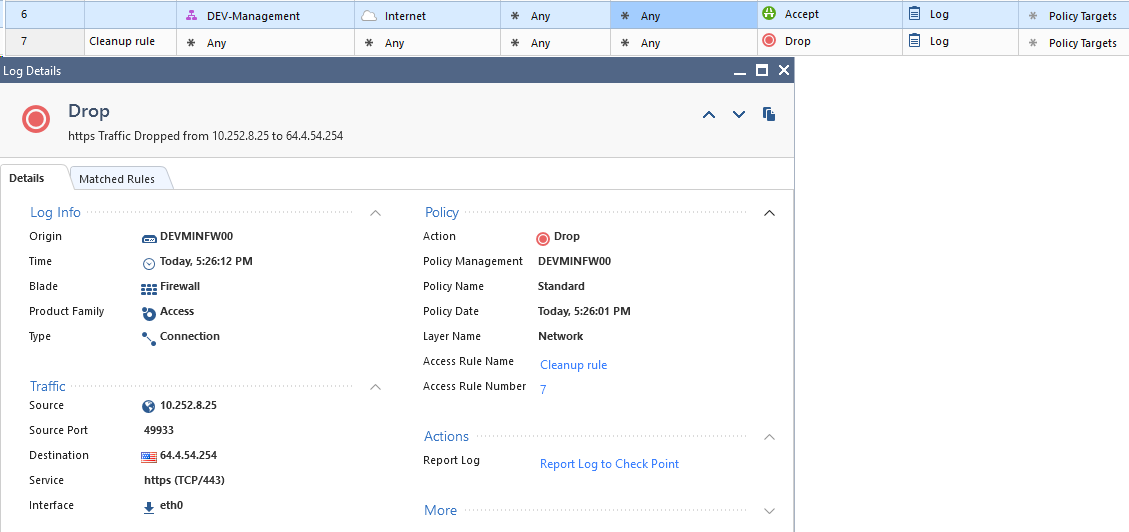
R80.10 - I have a single policy that has the Firewall and App & URL Filtering blades enabled on it. In that policy I have a rule that says Allow for destination Internet. My Internet-bound traffic is blocked by my cleanup rule. What am I missing here?
p.s. I'm not asking how to allow internet access.. I've seen that post and I can make it work with other methods. I'm trying to understand how CP is processing the rules here.

I figured it out -- the App / URL blades were, in fact, not enabled.
So if you don't have them enabled and create a unified policy -- you can install said policy, but the rules will essentially be ignored without any indication that they are being ignored. Surprised, not surprised.
The Internet object in the Application Control & URL Filtering policy actually only applies to traffic that's leaving an interface marked as external.
I would check the topology settings on the Gateway object and make sure your interface-facing interface is marked external.
Traffic going to DMZ networks that have the checkbox "leads to DMZ" checked will also match object "Internet" in a APCL/URLF layer. This was covered extensively in my book, see:
sk108057: What does the box "Interface leads to DMZ" control in interface topology?
--
Second Edition of my "Max Power" Firewall Book
Now Available at http://www.maxpowerfirewalls.com
My internet-facing interface was already marked external. There is no DMZ.
Any other ideas?
- would you mind printing the gateway editor --> network management --> "eth0" interface properties? does its editor mention "leads to internet"?
- if this is an R80.10 gateway, the "more" part in the log card contains the source zone. If the zone is not External, that would be the root cause of the match on the cleanup rule.
hope this helps.
eth0 - "This network" - Management LAN
eth1 - "External" - Public WAN
eth2 - DefinedNetworkGroup - Various Private LANs
eth3 - "This network" - End-user LAN
There is nothing about zone in the log -- just ID, ID Generated By Indexer, First, Sequencenum, Db Tag, Logid, Description.
I figured it out -- the App / URL blades were, in fact, not enabled.
So if you don't have them enabled and create a unified policy -- you can install said policy, but the rules will essentially be ignored without any indication that they are being ignored. Surprised, not surprised.
You're going to get a warning, not an error, during install policy. We have plans to emphasize this in later releases.
I wish I got a warning. All I get it is a green check mark:

Leaderboard
Epsum factorial non deposit quid pro quo hic escorol.
| User | Count |
|---|---|
| 54 | |
| 41 | |
| 15 | |
| 14 | |
| 12 | |
| 11 | |
| 11 | |
| 11 | |
| 10 | |
| 8 |
Thu 19 Feb 2026 @ 03:00 PM (EST)
Americas Deep Dive: Check Point Management API Best PracticesTue 24 Feb 2026 @ 11:00 AM (EST)
Under The Hood: CloudGuard Network Security for Azure Virtual WANThu 19 Feb 2026 @ 03:00 PM (EST)
Americas Deep Dive: Check Point Management API Best PracticesTue 24 Feb 2026 @ 11:00 AM (EST)
Under The Hood: CloudGuard Network Security for Azure Virtual WANAbout CheckMates
Learn Check Point
Advanced Learning
YOU DESERVE THE BEST SECURITY