- Products
- Learn
- Local User Groups
- Partners
- More

What's New in R82.10?
Register HereWhen the Agents Attack
A Live Look at Agentic Exposure Validation
AI Security Masters E8:
Claude Mythos: New Era in Cyber Security
CheckMates Go:
CheckMates Fest
Hello,
I work for a very large enterprise and we are in the process of deploying (2) virtual gateways for a PoC in our environment. Our build team has deployed the OVAs on ESXi using what our CheckPoint SE gave us (ivory_main-631-991001385-GW.ova)
Please keep in mind I am very new to CheckPoint appliances and CheckPoint products. This OVA was deployed and I am able to access the CLI via vSphere web console for both VMs. I was prompted with a simple screen that has a banner displaying;"This system is for authorized use only". I utilized admin / admin and it displays; "Login incorrect", on both VMs.
Am I missing something crucial here? Seems like this should be a very simple step in the deployment.
Were they built through a vCenter or directly on an ESXi host? The OVAs need you to set the password via the initial config on a vCenter, but that doesn't work directly on an ESXi host and you won't be able to log in.
You can always just download the ISO image, upload it to the ESXi host, and use it in a virtual optical drive to install the OS.
Thank you to everyone who replied. Our SE told us that they had initially sent us the incorrect OVA. Correct OVA was ivory_main-631-991001385_unsecured.ova
This had to do with the original OVA requiring a bunch of parameters to be configured when importing the OVA. If those aren't set initially there is no opportunity to set them later. So our internal build team just left all of this blank and that resulted in a VM that couldn't be configured.
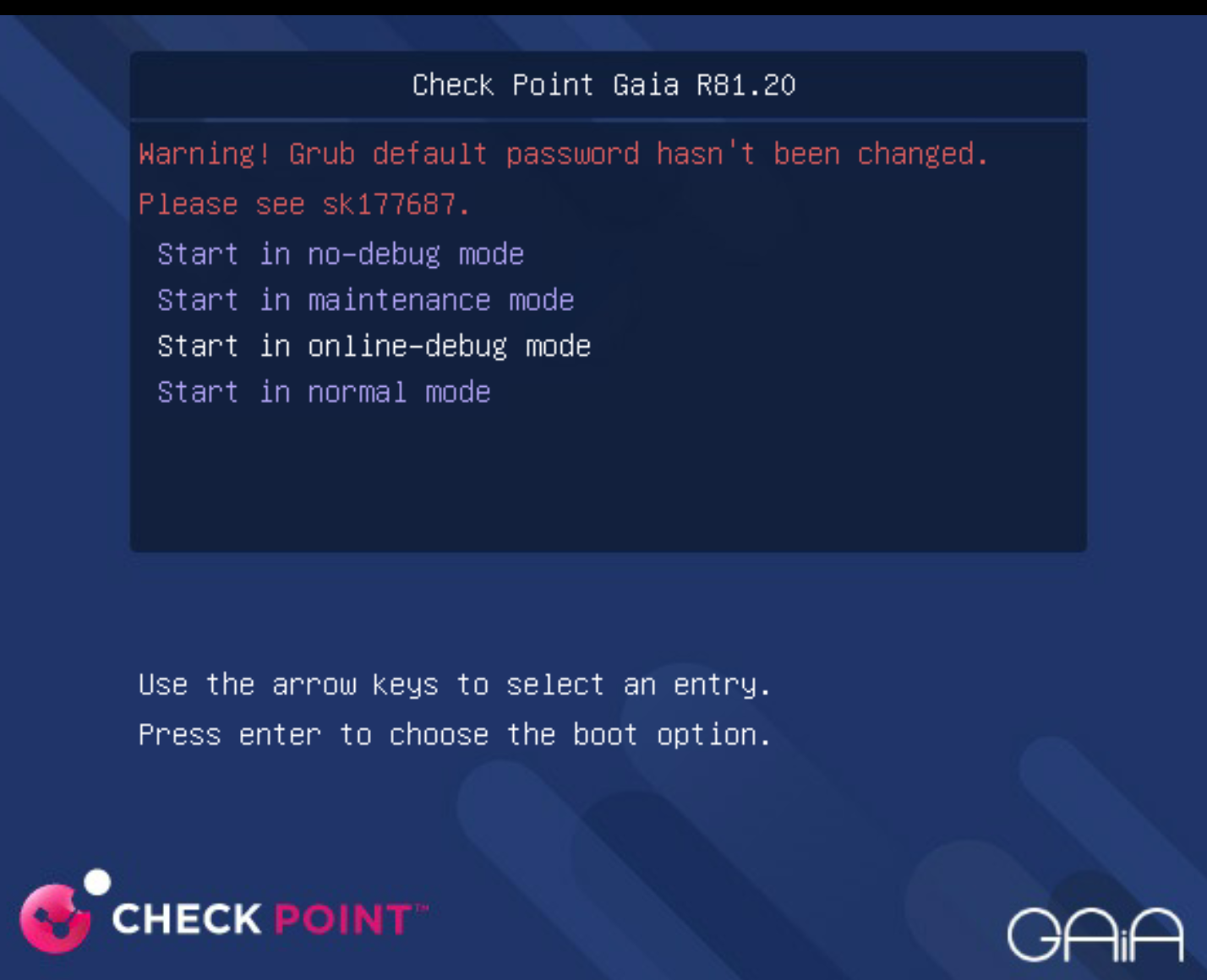
I attached the screenshot of what should have been configured when importing the OVA into ESXi.
Were they built through a vCenter or directly on an ESXi host? The OVAs need you to set the password via the initial config on a vCenter, but that doesn't work directly on an ESXi host and you won't be able to log in.
You can always just download the ISO image, upload it to the ESXi host, and use it in a virtual optical drive to install the OS.
This is exactly what happened. Our SE sent us the correct OVA that I put in one of my replies on this. Unfortunately since we have a separate build team I didn't get to deploy any of this myself or even see these parameters and the build team always leaves everything blank.
Thank you for this reply though! I appreciate all of your help.
So the screenshot you attached shows grub password, which is not even set initially. Is it possible someone may had entered different password when going through initial install?
Best,
Andy
I think you read that backwards. The message is complaining that the GRUB password hasn't been changed. R81.20 makes you set that in config_system or the first-time wizard, so those definitely haven't been completed. I don't recall if deploying the OVA through a vCenter gives you the option to change the GRUB password at the cloud-init level.
I know thats what it said, but that does not appear to be related to the issue they have. I dont ever recall having to set grub password in R81.20, even in new install.
Andy
Did you consider reaching out to the person provided you with the OVA?
Thank you to everyone who replied. Our SE told us that they had initially sent us the incorrect OVA. Correct OVA was ivory_main-631-991001385_unsecured.ova
This had to do with the original OVA requiring a bunch of parameters to be configured when importing the OVA. If those aren't set initially there is no opportunity to set them later. So our internal build team just left all of this blank and that resulted in a VM that couldn't be configured.
I attached the screenshot of what should have been configured when importing the OVA into ESXi.
Leaderboard
Epsum factorial non deposit quid pro quo hic escorol.
| User | Count |
|---|---|
| 24 | |
| 5 | |
| 5 | |
| 5 | |
| 5 | |
| 4 | |
| 4 | |
| 3 | |
| 3 | |
| 3 |
Tue 23 Jun 2026 @ 05:00 PM (CEST)
Under the Hood: Check Point Cloud Firewall | Securing all of your clouds: Art of the possibleThu 25 Jun 2026 @ 10:00 AM (PDT)
AI Security Masters E10: READY OR NOT: Securing the AI Enterprise 2/5 - AI Red TeamingThu 02 Jul 2026 @ 06:00 PM (CST)
Revolucionando la Seguridad con IA Generativa: Prevención Inteligente en Tiempo RealThu 09 Jul 2026 @ 11:00 AM (CEST)
The Cloud Architects Series: Check Point Edge Protection SD-WAN & SASETue 14 Jul 2026 @ 10:00 AM (PDT)
AI Security Masters E11: READY OR NOT: Securing the AI Enterprise 3/5 - AI Workforce SecurityTue 23 Jun 2026 @ 05:00 PM (CEST)
Under the Hood: Check Point Cloud Firewall | Securing all of your clouds: Art of the possibleThu 25 Jun 2026 @ 10:00 AM (PDT)
AI Security Masters E10: READY OR NOT: Securing the AI Enterprise 2/5 - AI Red TeamingTue 14 Jul 2026 @ 10:00 AM (PDT)
AI Security Masters E11: READY OR NOT: Securing the AI Enterprise 3/5 - AI Workforce SecurityThu 30 Jul 2026 @ 10:00 AM (PDT)
AI Security Masters E12: READY OR NOT: Securing the AI Enterprise 4/5 - AI GatewayThu 20 Aug 2026 @ 10:00 AM (PDT)
AI Security Masters E13: READY OR NOT: Securing the AI Ent 5/5 - AI Research & Threat LandscapeThu 02 Jul 2026 @ 06:00 PM (CST)
Revolucionando la Seguridad con IA Generativa: Prevención Inteligente en Tiempo RealAbout CheckMates
Learn Check Point
Advanced Learning
YOU DESERVE THE BEST SECURITY