- Products
- Learn
- Local User Groups
- Partners
- More

On-Premise SD-WAN Management
Register HereWhat's New in R82.10?
Watch Here AI Security Masters E8:
Claude Mythos: New Era in Cyber Security
CheckMates Go:
The Moment Before
Hi Experts,
From the very first beginning Active Directory Query is configured using the Mobile Access Wizard.
Nowadays I’am using the Identity Collector and want to get rid of the Active Directory Query configuration and the LDAP Account unit (checkpoint.lab__AD).
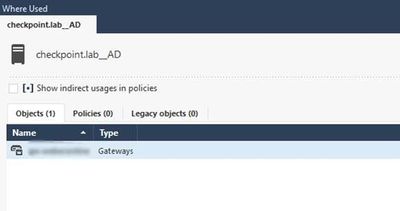
When I open the LDAP account unit and open the open “Where Used” I see it’s only used in the gateway configuration.
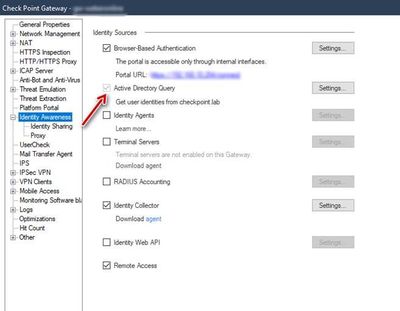
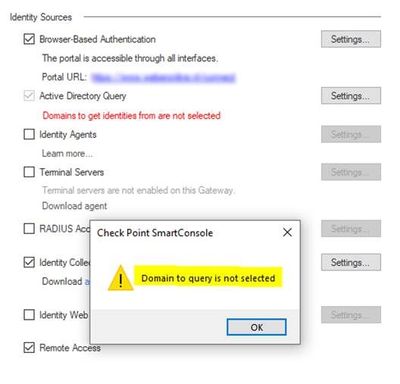
On the gateway object the option “Active Directory Query” is greyed out, so I cannot deactivate this option.
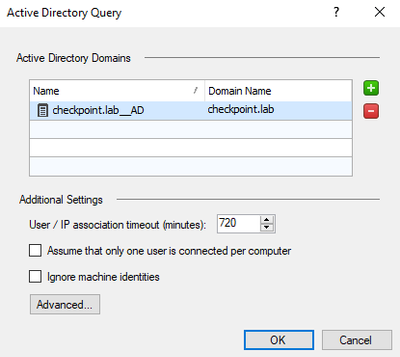
When I open the settings and removing the LDAP Account Unit (checkpoint.lab__AD) and click OK, the following warning is displayed.
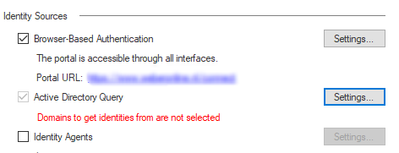
And when clicking OK
Domain to query is not selected will be displayed, so there is no option to deactivate Active Directory Query at this point..
Any suggestions how to deactivate Active Directory Query?????
I have tried several options but without success…..
If you disable the IA blade and then enable it again, the Mobile Access Wizard will let you enable IA without AD Query.
No, it is in the wizard also greyed out
There is probably still a reference to the AU object in the Mobile Access Blade in the SmartDashboard; I don't think Where Used will show references in the legacy SmartDasboard so I suspect that's why it is greyed out everywhere in SmartConsole. Try poking around in the legacy SmartDashboard.
I had that exact issue before and I solved it by removing some IA references in guidbedit for AD Cant recall what, but will update if I find out.
Thanks!!
Hi @MarkWeber ,
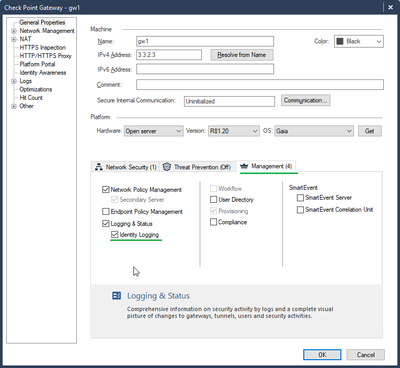
This happens probably since you have Identity Logging enabled on the "Management" Tab.
Identity Logging is basically same as AD Query, but running on the mgmt side to enrich the management logs, without any enforcement abilities.
As for your specific issue, please disable Identity Logging on the mgmt tab first, and afterwards disable AD Query.
A general note for all Identity Awareness customers which are using AD integration such as AD Query and Identity Collector: there is no need to enable Identity Logging in addition to that. One of the Identity Awareness targets is anyhow enrich the management logs, together with enforcing traffic according to identities. It means, in other words, that ADQ / IDC will do logging + enforcement while Identity Logging is doing only logging.
Hi Royi,
You're the EXPERT!!! That was the solution, disabled the Identity Logging feature and now I'am able to disable AD Query.
Thanks a lot.
Leaderboard
Epsum factorial non deposit quid pro quo hic escorol.
| User | Count |
|---|---|
| 70 | |
| 23 | |
| 7 | |
| 5 | |
| 4 | |
| 4 | |
| 4 | |
| 3 | |
| 3 | |
| 3 |
Tue 14 Jul 2026 @ 10:00 AM (PDT)
AI Security Masters E11: READY OR NOT: Securing the AI Enterprise 3/5 - AI Workforce SecurityThu 30 Jul 2026 @ 10:00 AM (PDT)
AI Security Masters E12: READY OR NOT: Securing the AI Enterprise 4/5 - AI GatewayThu 20 Aug 2026 @ 10:00 AM (PDT)
AI Security Masters E13: READY OR NOT: Securing the AI Ent 5/5 - AI Research & Threat LandscapeTue 14 Jul 2026 @ 10:00 AM (PDT)
AI Security Masters E11: READY OR NOT: Securing the AI Enterprise 3/5 - AI Workforce SecurityThu 30 Jul 2026 @ 10:00 AM (PDT)
AI Security Masters E12: READY OR NOT: Securing the AI Enterprise 4/5 - AI GatewayThu 20 Aug 2026 @ 10:00 AM (PDT)
AI Security Masters E13: READY OR NOT: Securing the AI Ent 5/5 - AI Research & Threat LandscapeAbout CheckMates
Learn Check Point
Advanced Learning
YOU DESERVE THE BEST SECURITY