- Products
- Learn
- Local User Groups
- Partners
- More

The Great Exposure Reset
24 February 2026 @ 5pm CET / 11am EST
CheckMates Fest 2026
Watch Now!AI Security Masters
Hacking with AI: The Dark Side of Innovation
CheckMates Go:
CheckMates Fest
Hi,
sk122102 closes with a note of "CheckPoint recommends, for better performance, to disable all ThreatCloud protections on the Core Protections profile, and disable all Core Protections on the ThreatCloud protections profile, which are installed on the same Security Gateway."
I take this to mean we use 2 "standard" Threat Prevention profiles, one for ThreatCloud (aka standard IPS) protections, and one for Core Protections. On the ThreatCloud profile we would set every Core Protection to "Inactive", and on the Core Protections profile we would set all ThreatCloud protections to "Inactive". Please correct me if I am understanding incorrectly.
So I am wondering, can we estimate the performance benefit to using 2 separate profiles like this? I ask because while using 1 profile is simpler for admins, a big enough performance improvement would justify the use 2 separate profiles.
Hmm this sk is really confusing for me. Looking for an answer as well.
And please elaborate on the sk details, it starts by problematize that connections is dropped or accepted unexpectedly and sudenly the sk changes focus and adds a performance aspect to it.
That threw me off at first too but after looking over the SK again, I think the SK is trying to explain that in [ Core Protections > Gateways ] the gateway is, unexpectedly to the admin, assigned a profile that is different than the Threat Prevention profile assigned to the gateway via Threat Prevention rules. I could see that situation happening since "Optimized" is the default Core Protections profile regardless of Threat Prevention rules. I guess that since the SK talks about a situation that arises when using 2 separate profiles, the performance blurb is to give a reason for Core Protections having the ability to use a separate profile.
From R80.10, we've already separated out the Core Protection and ThreatCloud Protection into separate profiles.
I don't think the last paragraph of that SK is relevant anymore and will ask for it to be removed.
Thanks for the insight! If it is still accurate, I am going to just think of them as separate containers within the same Threat Prevention profile, seeing as they both graphically use the same Threat Prevention profile. I'm glad it isn't recommended to use separate profiles for Core Protections and IPS/ThreatCloud protections anymore!!!
That's a good question, I don't see how following that recommendation would improve gateway performance necessarily. Core Protections/Activations and IPS ThreatCloud Protections have separate profiles applied to them. All the profile signatures get mashed up together into the unified policy pattern matching database at compilation.
Perhaps it would speed up policy compilation time on the SMS? I know @Lari_Luoma has answered questions about Core Activations in the past. Failing that there is always an R&D assist via @PhoneBoy
Doesn't help that Core Activations are just...weird. Currently updating my IPS/AV/ABOT Immersion course for R81.20, and realized the other day I still sometimes get confused when dealing with Core Activations...sigh.
Hmmm, In SmartConsole it looks to me like IPS Core Protections and IPS ThreatCloud can use the same profile. You aren't thinking of how Inspection Settings profiles have separate profiles from Threat Prevention, right? I just wanted to double check. It would be very interesting to know that although Core Protections and ThreatCloud protections appear to share the same Threat Prevention profiles, that might not be the case under the hood, and that would also affect the recommendation from the SK significantly. It's neat to know that all the profile signatures get mashed together like that, so we might not expect any gateway performance gains by following the suggestion. I would guess that in most cases, a little extra policy compilation time would outweigh the extra complexity of using 2 separate profiles (especially when not all admins are necessarily experts) should compilation time be affected.
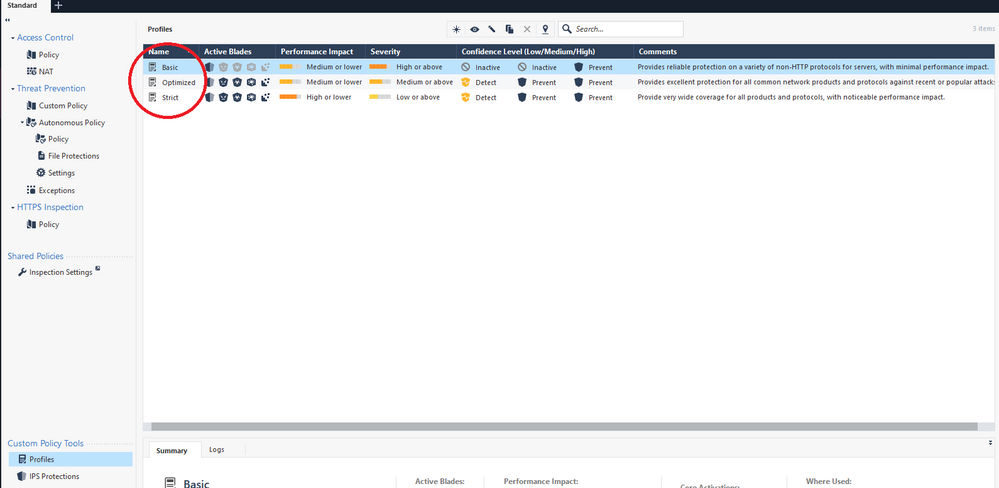
I agree Core protections are in such a "no man's land"... They seem to use a Threat Prevention profile, don't use the Threat Prevention rulebase, they require the IPS blade be enabled on the gateway if you want to assign a Core Protections profile to it, and the Core Protections are installed with the Access Control policy. The last fact agrees that the Core Protections profile is in fact separate from any Threat Prevention profiles, even though they appear to be the same profile.
I agree, this is super confusing. I don't know how you even can enable core protections in IPS profiles or vice versa. AFAIK you cannot...
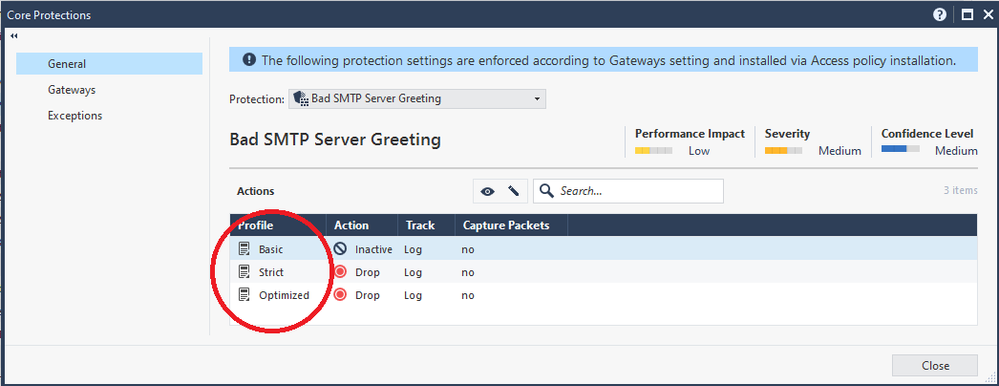
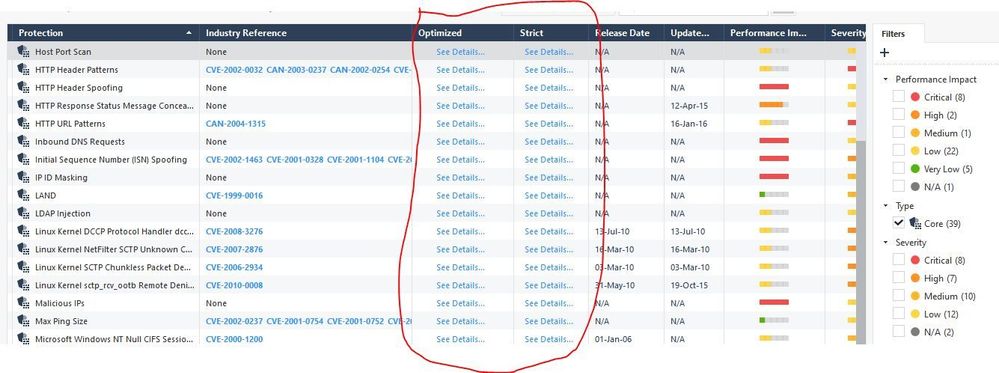
It doesn't make things easier that the core profiles and IPS profiles have the same names. When you click "See Details" it will take you to the core protection profile.
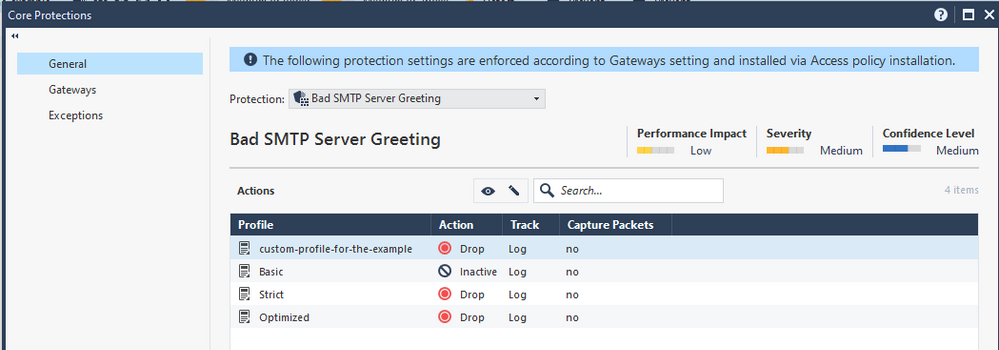
Super confusing! They make it look like they are the same profiles. Here I added a new Threat Prevention profile via [ Threat Prevention Profiles > New ], and it also shows up in the Core Protections section.
I agree with all of you that it is not very clear how core protections are used. We have to remember that there are only 39 core protections vs over 11K Threat Cloud protections. In my opinion core protections are becoming obsolete as they are meant to protect your servers (to fully benefit of them you should define web, mail and DNS server objects in SmartConsole, but haven't seen any customer do that). Some protections can always cause performance issues, but I haven't heard anything that assigning core protections to certain profile would cause issues. If someone else knows better, please advice as I would be happy to understand it. 🙂
For under the hood description take a look at the IPS ATRG.
Here is a summary of different protections:
Core protections
ThreatCloud protections
Very useful insights!!
Leaderboard
Epsum factorial non deposit quid pro quo hic escorol.
| User | Count |
|---|---|
| 57 | |
| 43 | |
| 15 | |
| 14 | |
| 14 | |
| 11 | |
| 11 | |
| 10 | |
| 9 | |
| 8 |
Thu 12 Feb 2026 @ 05:00 PM (CET)
AI Security Masters Session 3: AI-Generated Malware - From Experimentation to Operational RealityFri 13 Feb 2026 @ 10:00 AM (CET)
CheckMates Live Netherlands - Sessie 43: Terugblik op de Check Point Sales Kick Off 2026Thu 19 Feb 2026 @ 03:00 PM (EST)
Americas Deep Dive: Check Point Management API Best PracticesThu 12 Feb 2026 @ 05:00 PM (CET)
AI Security Masters Session 3: AI-Generated Malware - From Experimentation to Operational RealityFri 13 Feb 2026 @ 10:00 AM (CET)
CheckMates Live Netherlands - Sessie 43: Terugblik op de Check Point Sales Kick Off 2026Thu 19 Feb 2026 @ 03:00 PM (EST)
Americas Deep Dive: Check Point Management API Best PracticesAbout CheckMates
Learn Check Point
Advanced Learning
YOU DESERVE THE BEST SECURITY