- Products
- Learn
- Local User Groups
- Partners
- More

What's New in Check Point SASE
Wednesday, 9 September @ 5pm CET / 11am EDT
The State of Ransomware Q2 2026:
This Quarter's Trends, and Their Impact on Your Defenses
AI Security Masters
Implementing the AI Security Trifecta
CheckMates Go:
Half is Not Enough
Hi,
We're running the current SmartConsole 81.10.9600.427 on a Windows Server 2016 Standard and another instance on a Window Server 2022 Standard machine. Both machines are VMs and have 24GB RAM and 8 x 2,4GHz CPUs.
Unfortunately the console in Windows Server 2022 is very slow and freezes often for 10-30 seconds during normal operations.
Example:
When I start the console in Windows Server 2016 it tooks about 5 seconds until the login appears.
When I start the console in Windows Server 2022 it tooks about 20-30 seconds until the login appears.
I choosed this example because it shows that it already happened before any connections to the MGMT servers are made.
CPU and memory are both fine.
I've already installed the console on different machines and faced the same behaviour: 2016 = fast, 2022 = slow.
Does anybody has the same issue or an idea what could causing it?
Thx.
Jas
I've found out that the server was not able to verify the self-signed CA of the management servers certificate. This happened always during the logon process and after I didn't used the console for some minutes.
I've exported the certificate chain with OpenSSL from the management server and imported the self-signed CA into the "Trusted Root Certification" store of Windows. There have been no more hang-ups since then. 👍
I'm wondering why it is not an issue on the Windows 2016 servers. They don't have the self-signed CA in the "Trusted Root Certification" store as well. But they've no hang-ups.
BTW: Is it by default that the management server creates and uses a self-signed CA for the communication? Or should we replace it?
I have 2022 VM with 16 GB of ram and R81.20 console installed on it, no issues at all.
Andy
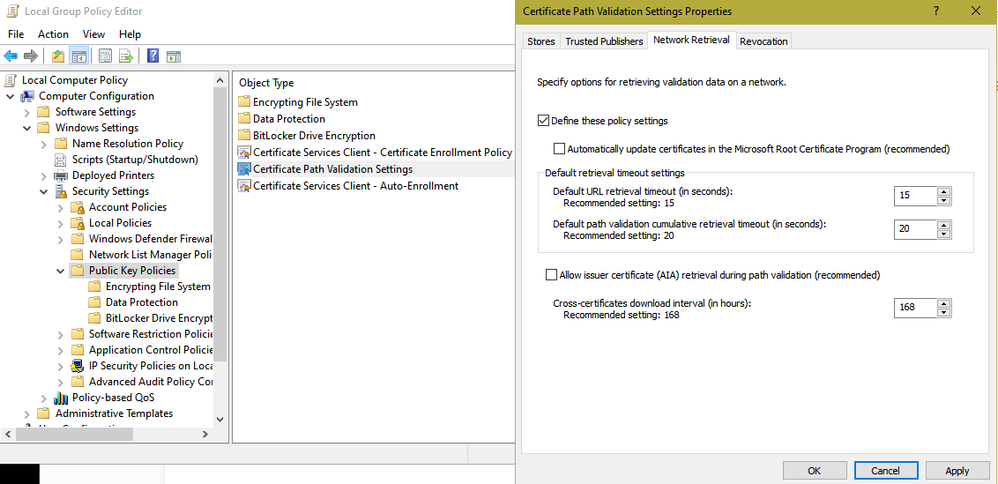
I saw this same thing in my ATC training lab. The SmartConsole software is digitally signed, and the startup delay is caused by Certificate Path Validation timing out because the Internet can't be reached, or the relevant protocol is blocked somewhere.
You can disable this path checking in Group Policy which will massively speed up the SmartConsole startup time, but beware the security implications. To make this change check the box "Define these policy settings" then uncheck everything else:
As far as freezeups in the SmartConsole while is running, usually this is caused my manipulating a gateway/cluster object's configuration or even just viewing it. When you hit OK/Cancel unfortunately these operations are still handled in the legacy single-threaded fwm process and not the newer cpm. So no matter how many cores your SMS has the SmartConsole will seize up while it is blocked waiting for fwm.
Yep, you were right. It was the certificate validation. But the mentioned setting didn't helped. I had to untick "Check for publisher's certificate revocation" in the Internet Settings of Windows.
EDIT: there's no GPO setting to disable the option for all users. You've to modify the registry (https://learn.microsoft.com/en-us/archive/msdn-technet-forums/f245b6ff-bad5-45db-8727-c57afea60054).
Regarding the manipulating a gateway I will check. The systems are hosted and resist in the same subnet. Normally both should use the same path and settings to reach the MGMT server.
Could still be firewall management issue, so not an issue on the Windows server / Smart Console software.
what take are you running on fwmgmt?
Product version Check Point Gaia R81.10
OS build 335
OS kernel version 3.10.0-957.21.3cpx86_64
please output cpinfo -y all output from mgmt system this will tell jumbo take version
Looks like you have no Jumbo fix installed, that is not good. Would recommend to install latest GA take.
See below for all the stuff that has been fixed:
This MGMT server was freshly installed by our service partner a few weeks ago. I think I've to talk to them why they didn't installed the hotfix.
Thank you in advanced. I will report.
You can talk to them and they can install latest (or recommended one), but personally, I would be shocked if that fixed this specific issue.
Andy
I've found out that the server was not able to verify the self-signed CA of the management servers certificate. This happened always during the logon process and after I didn't used the console for some minutes.
I've exported the certificate chain with OpenSSL from the management server and imported the self-signed CA into the "Trusted Root Certification" store of Windows. There have been no more hang-ups since then. 👍
I'm wondering why it is not an issue on the Windows 2016 servers. They don't have the self-signed CA in the "Trusted Root Certification" store as well. But they've no hang-ups.
BTW: Is it by default that the management server creates and uses a self-signed CA for the communication? Or should we replace it?
I think it is by default, but I have a feeling there has to be something way different that process is done when it comes to 2022 server.
Andy
Sounds like something that changed in Windows Server 2022.
Yes, we use a certificate issued from the ICA for connections to SmartConsole.
I don't believe there is an option to change that.
Leaderboard
Epsum factorial non deposit quid pro quo hic escorol.
| User | Count |
|---|---|
| 22 | |
| 6 | |
| 6 | |
| 6 | |
| 5 | |
| 4 | |
| 4 | |
| 3 | |
| 3 | |
| 3 |
Wed 09 Sep 2026 @ 11:00 AM (EDT)
What's New in Check Point SASE: Extending Secure Connectivity to China and BeyondTue 15 Sep 2026 @ 12:00 PM (MDT)
Lone Tree, CO: Workspace Security and Exposure ManagementThu 17 Sep 2026 @ 10:00 AM (CEST)
The Cloud Architects Series: Check Point Cloud Firewall Architectures - AWS, Azure & GCPThu 17 Sep 2026 @ 10:00 AM (CEST)
The Cloud Architects Series: Check Point Cloud Firewall Architectures - AWS, Azure & GCPThu 17 Sep 2026 @ 05:00 PM (CEST)
Under the Hood: Unified Hybrid Mesh Management across AWS Firewalls, SASE and SD-WANThu 17 Sep 2026 @ 03:00 PM (EDT)
Americas Deep Dive: Troubleshooting 101 for Check Point FirewallsTue 15 Sep 2026 @ 12:00 PM (MDT)
Lone Tree, CO: Workspace Security and Exposure ManagementWed 23 Sep 2026 @ 06:00 PM (EDT)
Santo Domingo: Workspace Security and SASE Live: Protección Total del Usuario Email, Endpoint y SASEAbout CheckMates
Learn Check Point
Advanced Learning
YOU DESERVE THE BEST SECURITY