Create a Post
cancel
Showing results for 
Search instead for 
Did you mean: 
david5
Explorer
Jump to solution

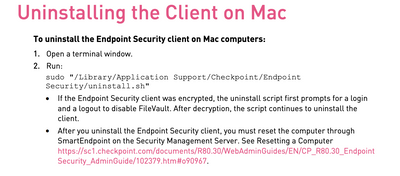
VPN E82.00 Build 986001109 how to uninstall from macos

Hello, I have a MacBook Pro with macOS Mojave. I'd like to remove Endpoint security VPN E82.00 Build 986001109. It always appears on my top bar, no way to uninstall it and no way to stop it. Probably in the past, I've removed the folder inside the application. Up to now, the folder is still there. Can you help me?

0 Kudos
1 Solution

Accepted Solutions
_Val_
Admin
Admin

Please follow the uninstall instructions from the Release Notes for your version: https://downloads.checkpoint.com/fileserver/SOURCE/direct/ID/95264/FILE/CP_E82.00_EndpointSecurityVP...


Screenshot 2023-05-08 at 12.59.34.png

View solution in original post

0 Kudos
2 Replies
_Val_
Admin
Admin

Please follow the uninstall instructions from the Release Notes for your version: https://downloads.checkpoint.com/fileserver/SOURCE/direct/ID/95264/FILE/CP_E82.00_EndpointSecurityVP...


Screenshot 2023-05-08 at 12.59.34.png

0 Kudos
the_rock
MVP Diamond
MVP Diamond

Just to add on top of what Val said...sometimes, even though software is gone, some folders still may linger on for endpoint VPN, so if that happens, I usually download ccleaner for mac (free version) and that lets you get rid of all the remaining folders left.

Cheers,

Andy

Best,
Andy
0 Kudos

Leaderboard

Epsum factorial non deposit quid pro quo hic escorol.

Upcoming Events

    Thu 05 Mar 2026 @ 08:00 AM (EST)

    Americas Deep Dive: HTTPS Inspection

    Thu 05 Mar 2026 @ 03:00 PM (CET)

    2026 Threat Landscape Briefing - EMEA

    Thu 05 Mar 2026 @ 11:00 AM (EST)

    Tips and Tricks 2026 #1: MCP Servers

    Thu 05 Mar 2026 @ 02:00 PM (EST)

    2026 Threat Landscape Briefing -AMER
    CheckMates Events