- Products
- Learn
- Local User Groups
- Partners
- More

AI Security Masters E7:
How CPR Broke ChatGPT's Isolation and What It Means for You
Blueprint Architecture for Securing
The AI Factory & AI Data Center
Call For Papers
Your Expertise. Our Stage
Good, Better, Best:
Prioritizing Defenses Against Credential Abuse
Ink Dragon: A Major Nation-State Campaign
Watch HereCheckMates Go:
CheckMates Fest
Hello tech´s,
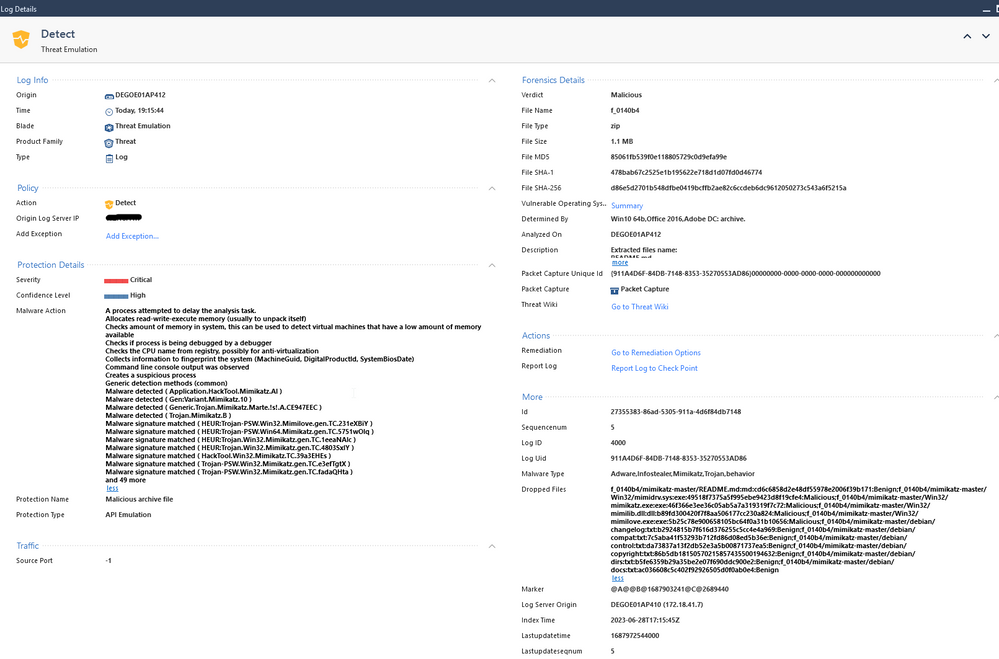
I can regulary see these events:
In the details I see that the Threat Emulation is doing fine and all malicious files have been droppt.
But I am more than interested of knowing where the emulation has been initiated from to inspect this specific device deeper.
I spent already some time in that but cannot find more information on that.
Hope my case is clear.
Cheers,
Oliver
"API Emulation" implies another system / product (e.g. Browser extension) is submitting the files for evaluation so there will likely be details there to review.
But to start I would suggest reviewing the forensic report for more information if you've not already?
In the log window, under Forensic Details refer to the Vulnerable Operating Systems row - click on the Summary link.
If the browser extension is used verify the logging options are set per:
https://support.checkpoint.com/results/sk/sk108695
https://support.checkpoint.com/results/sk/sk171179
*Note: The Log is "Detect" not "Prevent" and the reference to dropped files is not in this context hence further investigation is warranted.
Hello Chris,
thank you for getting in touch on this.
In the log window, under Forensic Details refer to the Vulnerable Operating Systems row - click on the Summary link.
-> I can see what happened on the emulated OS incl. the Emulation Video. but I cannot identify from which client the emulation came from.
If the browser extension is used verify the logging options are set per:
-> I´ve checked the log settings in the registry and all
Did you check the corresponding gateway setting to receive them?
What Endpoint client version is deployed and how is it managed?
Could you provide more informations on your last post?
The Endpoint solution is either cloud managed or On-Prem.
Version wise is the client E86.80 or higher?
The SK article with the logs_enabled parameter also states:
The option needs to be enabled on the Security Gateway as well, logs_api_enabled needs to be set to TRUE under /opt/CPUserCheckPortal/phpincs/conf/TPAPI.ini
For faster resolution perhaps a remote session with TAC would be helpful.
Hi Chris,
our entire environment is On-Prem including TE Appliance.
Version is E86.50. We have a few test clients running on E87.20 as well.
Security Gateway = TE Appliance or is that our Endpoint Management Server?
TE appliance in this instance.
(Though obviously also worthwhile reviewing your Endpoint logs for the same time period aswell)
Ok, I checked the TPAPI.ini and the logs_api_enabled was set to TRUE.
OK Good. Please contact TAC to investigate further.
Very conscious of the time spent here versus actually investigating the endpoint itself.
With respect to that element note we do have an Incident Response service you can engage where needed.
Leaderboard
Epsum factorial non deposit quid pro quo hic escorol.
| User | Count |
|---|---|
| 4 | |
| 2 | |
| 1 | |
| 1 | |
| 1 | |
| 1 | |
| 1 | |
| 1 | |
| 1 | |
| 1 |
Tue 28 Apr 2026 @ 06:00 PM (IDT)
Under the Hood: Securing your GenAI-enabled Web Applications with Check Point WAFThu 30 Apr 2026 @ 03:00 PM (PDT)
Hillsboro, OR: Securing The AI Transformation and Exposure ManagementTue 28 Apr 2026 @ 06:00 PM (IDT)
Under the Hood: Securing your GenAI-enabled Web Applications with Check Point WAFTue 12 May 2026 @ 10:00 AM (CEST)
The Cloud Architects Series: Check Point Cloud Firewall delivered as a serviceThu 30 Apr 2026 @ 03:00 PM (PDT)
Hillsboro, OR: Securing The AI Transformation and Exposure ManagementAbout CheckMates
Learn Check Point
Advanced Learning
YOU DESERVE THE BEST SECURITY