- Products
- Learn
- Local User Groups
- Partners
- More

What’s New in Agentic Network Orchestration
21 October @ 5pm CET / 11am EDT
AI Security Masters
LGTM: Bypassing an LLM Build Gate
When Prompt Injection Fails
Scaling Check Point Automation with Arodonata
CheckMates Go:
Fun Ding
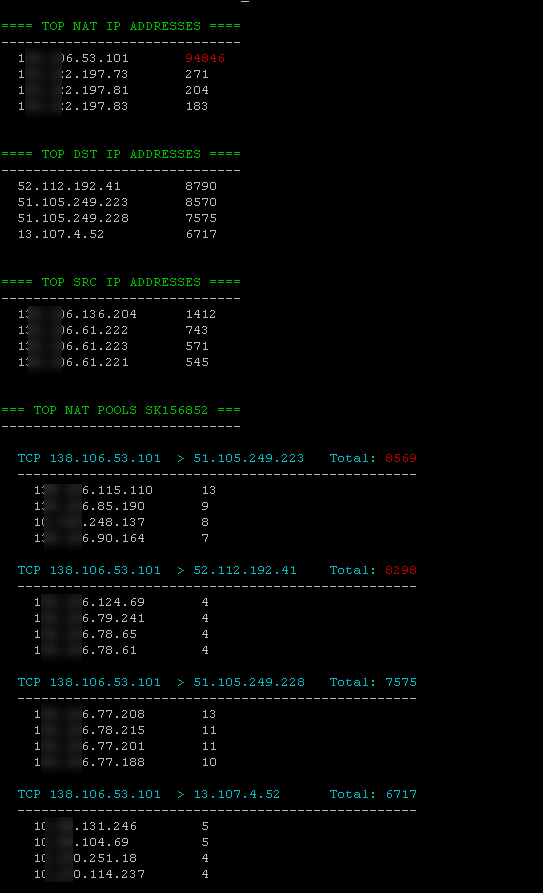
Certainly this has been done before but I somehow didn't find any good reference to get expanded summary of NAT statistics, like top NAT IPs that are being used or top destinations. So whilst troubleshooting my hide NAT failures with O365 I wrote this little bash script to show:
Here's the screenshot, possible issues will be highlighted in red (normally exceeding 40000, but you can change it as you wish)
And the code:
#!/bin/bash

# Script to interpret fwx_alloc table top users
# Only interpreting rows that start with TCP or UDP <00000006 or <00000011
# For VSX set to correct environment manually
# NAT pool does not take into considertaion dst port as per SK156852

topcount=4  # Set how many top users to display
redthreshold=40000  # Highlight to show high usage
RED='\033[0;31m'
GRN='\033[0;32m'
CYN='\033[0;36m'
NC='\033[0m' # No Color

fw tab -t fwx_alloc -u > nat_table.raw

# Get top NAT IPs
echo -e "${GRN}"
echo -e "==== TOP NAT IP ADDRESSES ====${NC}"
echo -e "------------------------------"
cat nat_table.raw | sed 's/[><,;]//g' | egrep "^00000006|^00000011" | awk '{print $2}' | sort | uniq -c | sort -r | head -$topcount | while read line; do

  count=`echo "$line" | awk '{print $1}'`
  if [ $count -gt $redthreshold ]; then count="${RED}${count}${NC}"; fi
  ipaddr=`printf '%d.%d.%d.%d\n' $(echo $line | awk '{print $2}' | sed 's/../0x& /g')`
  while [ ${#ipaddr} -lt 20 ]; do ipaddr="$ipaddr "; done
  echo -e "  $ipaddr $count"
done
echo

# Get top destination IPs
echo -e "${GRN}"
echo -e "==== TOP DST IP ADDRESSES ====${NC}"
echo -e "------------------------------"
cat nat_table.raw | sed 's/[><,;]//g' | egrep "^00000006|^00000011" | awk '{print $4}' | sort | uniq -c | sort -r | head -$topcount | while read line; do

  count=`echo "$line" | awk '{print $1}'`
  ipaddr=`printf '%d.%d.%d.%d\n' $(echo $line | awk '{print $2}' | sed 's/../0x& /g')`
  while [ ${#ipaddr} -lt 20 ]; do ipaddr="$ipaddr "; done
  echo "  $ipaddr $count"
done
echo

# Get top destination IPs
echo -e "${GRN}"
echo -e "==== TOP SRC IP ADDRESSES ====${NC}"
echo -e "------------------------------"
cat nat_table.raw | sed 's/[><,;]//g' | egrep "^00000006|^00000011" | awk '{print $5}' | sort | uniq -c | sort -r | head -$topcount | while read line; do

  count=`echo "$line" | awk '{print $1}'`
  ipaddr=`printf '%d.%d.%d.%d\n' $(echo $line | awk '{print $2}' | sed 's/../0x& /g')`
  while [ ${#ipaddr} -lt 20 ]; do ipaddr="$ipaddr "; done
  echo "  $ipaddr $count"
done
echo


# Get top NAT pools as per sk156852
echo -e "${GRN}"
echo -e "=== TOP NAT POOLS SK156852 ===${NC}"
echo -e "------------------------------"
echo
cat nat_table.raw | sed 's/[><,;]//g' | egrep "^00000006|^00000011" | awk '{print $1" "$2" "$4}' | sort -k1 -k2 -k3 | uniq -c |  sort -r | head -$topcount | while read line; do

  count=`echo "$line" | awk '{print $1}'`
  if [ $count -gt $redthreshold ]; then count="${RED}${count}"; fi

  proto="TCP"
  if [ `echo $line | awk '{print $2}' | grep -c "00000006"` -eq 0 ]; then proto="UDP"; fi


  natIPhex=`echo $line | awk '{print $3}'`
  dstIPhex=`echo $line | awk '{print $4}'`
  natIP=`printf '%d.%d.%d.%d\n' $(echo $line | awk '{print $3}' | sed 's/../0x& /g')`
  dstIP=`printf '%d.%d.%d.%d\n' $(echo $line | awk '{print $4}' | sed 's/../0x& /g')`
  while [ ${#natIP} -lt 15 ]; do natIP="$natIP "; done
  while [ ${#dstIP} -lt 15 ]; do dstIP="$dstIP "; done

  echo -e "${CYN}  $proto $natIP > $dstIP  Total: $count${NC}"
  echo "  --------------------------------------------------"

  cat nat_table.raw | sed 's/[,;<>]//g' | egrep "^00000006|^00000011" | grep "$natIPhex" | grep "$dstIPhex" | awk '{print $5}' | sort | uniq -c | sort -r | head -$topcount | while read line2; do
    count=`echo "$line2" | awk '{print $1}'`
    ipaddr=`printf '%d.%d.%d.%d\n' $(echo $line2 | awk '{print $2}' | sed 's/../0x& /g')`
    while [ ${#ipaddr} -lt 20 ]; do ipaddr="$ipaddr "; done
    echo "    $ipaddr $count"
  done
  echo

done
Great script! This script saves a lot of time. No more manually interpreting and converting the fwx_alloc table 🙂
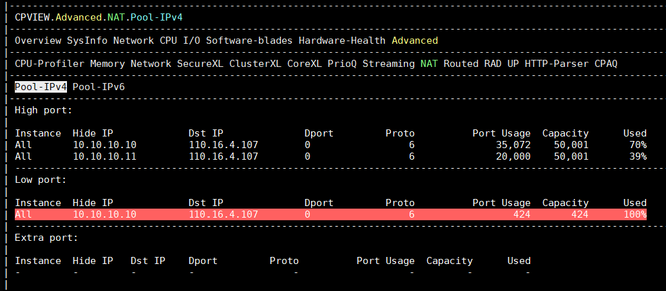
BTW, when looking at SK156852 I noticed that NAT statistics are now added to CPView in R80.40.
This is an excellent script. Is there a version that works for R81.20? I believe fwx_alloc table no longer exists post R80.30.
Hi! The short answer is that NAT stats are available in CPView (see SK156852) and tables changed after R80.40 🙂 so I didn't bother updating script
Where did the fwx_alloc table go in R80.40 and above?
In R80.40 we introduced GNAT, which does not use the fwx_alloc table for allocating ports anymore. Instead, we use a global table (fwx_alloc_global) that is shared between all instances
Yes, I was aware of the tab in CPView. However, it only shows the top 2 NAT pools. We recently started hitting the NAT port exhaustion issue so we wanted a way to proactively monitor atleast the top 4 NAT pools which your script does beautifully.
Here's quick fix for versions R80.40 and higher. I'm afraid I don't have a luxury of large environments to test it properly, but I believe it should work
#!/bin/bash

# Script to interpret fwx_alloc_global (R80.40+) table top users
# Only interpreting rows that start with TCP or UDP <00000006 or <00000011
# For VSX set to correct environment manually
# NAT pool does not take into considertaion dst port as per SK156852

topcount=4  # Set how many top users to display
redthreshold=40000  # Highlight to show high usage
RED='\033[0;31m'
GRN='\033[0;32m'
CYN='\033[0;36m'
NC='\033[0m' # No Color

fw tab -t fwx_alloc_global -u > nat_table.raw

# Get top NAT IPs
echo -e "${GRN}"
echo -e "==== TOP NAT IP ADDRESSES ====${NC}"
echo -e "------------------------------"
cat nat_table.raw | sed 's/[><,;]//g' | egrep "^00000006|^00000011" | awk '{print $2}' | sort | uniq -c | sort -r | head -$topcount | while read line; do

  count=`echo "$line" | awk '{print $1}'`
  if [ $count -gt $redthreshold ]; then count="${RED}${count}${NC}"; fi
  ipaddr=`printf '%d.%d.%d.%d\n' $(echo $line | awk '{print $2}' | sed 's/../0x& /g')`
  while [ ${#ipaddr} -lt 20 ]; do ipaddr="$ipaddr "; done
  echo -e "  $ipaddr $count"
done
echo

# Get top destination IPs
echo -e "${GRN}"
echo -e "==== TOP DST IP ADDRESSES ====${NC}"
echo -e "------------------------------"
cat nat_table.raw | sed 's/[><,;]//g' | egrep "^00000006|^00000011" | awk '{print $4}' | sort | uniq -c | sort -r | head -$topcount | while read line; do

  count=`echo "$line" | awk '{print $1}'`
  ipaddr=`printf '%d.%d.%d.%d\n' $(echo $line | awk '{print $2}' | sed 's/../0x& /g')`
  while [ ${#ipaddr} -lt 20 ]; do ipaddr="$ipaddr "; done
  echo "  $ipaddr $count"
done
echo

# Get top destination IPs
echo -e "${GRN}"
echo -e "==== TOP SRC IP ADDRESSES ====${NC}"
echo -e "------------------------------"
cat nat_table.raw | sed 's/[><,;]//g' | egrep "^00000006|^00000011" | awk '{print $6}' | sort | uniq -c | sort -r | head -$topcount | while read line; do

  count=`echo "$line" | awk '{print $1}'`
  ipaddr=`printf '%d.%d.%d.%d\n' $(echo $line | awk '{print $2}' | sed 's/../0x& /g')`
  while [ ${#ipaddr} -lt 20 ]; do ipaddr="$ipaddr "; done
  echo "  $ipaddr $count"
done
echo


# Get top NAT pools as per sk156852
echo -e "${GRN}"
echo -e "=== TOP NAT POOLS SK156852 ===${NC}"
echo -e "------------------------------"
echo
cat nat_table.raw | sed 's/[><,;]//g' | egrep "^00000006|^00000011" | awk '{print $1" "$2" "$4}' | sort -k1 -k2 -k3 | uniq -c |  sort -r | head -$topcount | while read line; do

  count=`echo "$line" | awk '{print $1}'`
  if [ $count -gt $redthreshold ]; then count="${RED}${count}"; fi

  proto="TCP"
  if [ `echo $line | awk '{print $2}' | grep -c "00000006"` -eq 0 ]; then proto="UDP"; fi


  natIPhex=`echo $line | awk '{print $3}'`
  dstIPhex=`echo $line | awk '{print $4}'`
  natIP=`printf '%d.%d.%d.%d\n' $(echo $line | awk '{print $3}' | sed 's/../0x& /g')`
  dstIP=`printf '%d.%d.%d.%d\n' $(echo $line | awk '{print $4}' | sed 's/../0x& /g')`
  while [ ${#natIP} -lt 15 ]; do natIP="$natIP "; done
  while [ ${#dstIP} -lt 15 ]; do dstIP="$dstIP "; done

  echo -e "${CYN}  $proto $natIP > $dstIP  Total: $count${NC}"
  echo "  --------------------------------------------------"

  cat nat_table.raw | sed 's/[,;<>]//g' | egrep "^00000006|^00000011" | grep "$natIPhex" | grep "$dstIPhex" | awk '{print $6}' | sort | uniq -c | sort -r | head -$topcount | while read line2; do
    count=`echo "$line2" | awk '{print $1}'`
    ipaddr=`printf '%d.%d.%d.%d\n' $(echo $line2 | awk '{print $2}' | sed 's/../0x& /g')`
    while [ ${#ipaddr} -lt 20 ]; do ipaddr="$ipaddr "; done
    echo "    $ipaddr $count"
  done
  echo

done
This is awesome! I can confirm it works. Tested it on R80.40 and R81.20.
It doesn’t seem to work on R82.
I’ll need to analyze what the issue is when I have some time later.
Probably the table layout changed (rows).
There was something I missed in my R82 testing. Since I tested on a 4-core system, GNAT was disabled.
On platforms with 6 cores or more where GNAT is enabled, this issue may not occur.
It also looks like you already verified this in the post below.
Try this one.
I tested it on R82 (no JHFA) and it looks like it's working well.
#!/bin/bash
#
# NAT allocation "top users" for GNAT (R82): fwx_alloc_global
#
# Implements:
#  One-pass AWK aggregation
#  Adds an additional “pool including destination port” view:
#        proto + NAT IP + DST IP + DPORT
#
# Column mapping:
#   NAT IP (translated src) = $2
#   DST IP                 = $4
#   DPORT                  = $5
#   SRC IP (original src)  = $6
#
# If a leading context/VS column exists, indexes shift by +1 automatically.
#

set -euo pipefail

topcount=4
redthreshold=40000
TABLE="fwx_alloc_global"

RED='\033[0;31m'
GRN='\033[0;32m'
CYN='\033[0;36m'
NC='\033[0m'

fw tab -t "$TABLE" -u \
| awk -v top="$topcount" -v thr="$redthreshold" -v RED="$RED" -v GRN="$GRN" -v CYN="$CYN" -v NC="$NC" '
function hex2ip(h,   a,b,c,d) {
  # Convert 8-hex IPv4 to dotted quad; if not 8 hex chars, return as-is
  if (h !~ /^[0-9A-Fa-f]{8}$/) return h
  a = strtonum("0x" substr(h,1,2))
  b = strtonum("0x" substr(h,3,2))
  c = strtonum("0x" substr(h,5,2))
  d = strtonum("0x" substr(h,7,2))
  return a "." b "." c "." d
}
function hex2port(h) {
  if (h !~ /^[0-9A-Fa-f]+$/) return h
  return strtonum("0x" h)
}
function cleanline(s) {
  gsub(/[><,;]/, "", s)
  return s
}
function is_proto(x) { return (x=="00000006" || x=="00000011") }

BEGIN {
  # We will emit “key<TAB>count” lines with tags, then let bash sort/head them.
  # Tags:
  #   NATIP, DSTIP, SRCIP, POOL3 (proto+nat+dst), POOL4 (proto+nat+dst+dport)
}

{
  $0 = cleanline($0)
  if (NF < 6) next

  # Detect where proto sits (field 1 or 2), to handle optional leading context column.
  shift = 0
  proto = $1
  if (!is_proto(proto) && is_proto($2)) { shift = 1; proto = $2 }
  if (!is_proto(proto)) next

  # Proven mapping (with optional shift)
  natHex  = $(2+shift)
  dstHex  = $(4+shift)
  dptHex  = $(5+shift)
  srcHex  = $(6+shift)

  nat[natHex]++
  dst[dstHex]++
  src[srcHex]++

  pool3 = proto " " natHex " " dstHex
  pool4 = proto " " natHex " " dstHex " " dptHex

  pools3[pool3]++
  pools4[pool4]++
}

END {
  # Emit unsorted tallies; bash will sort -nr and head -top.
  for (k in nat)   print "NATIP\t" k "\t" nat[k]
  for (k in dst)   print "DSTIP\t" k "\t" dst[k]
  for (k in src)   print "SRCIP\t" k "\t" src[k]
  for (k in pools3) print "POOL3\t" k "\t" pools3[k]
  for (k in pools4) print "POOL4\t" k "\t" pools4[k]
}
' \
| {
  # Helper: print Top N for a given TAG
  print_top_ip() {
    local tag="$1" header="$2" color="$3"
    echo -e "${color}${header}${NC}"
    echo "------------------------------"
    grep -P "^${tag}\t" \
    | awk -F'\t' '{print $3 "\t" $2}' \
    | sort -nr \
    | head -"$topcount" \
    | while IFS=$'\t' read -r count hex; do
        # hex -> ip (safe: only 8-hex converts)
        ip=$(printf '%d.%d.%d.%d\n' $(echo "$hex" | sed 's/../0x& /g') 2>/dev/null || true)
        if [[ ! "$hex" =~ ^[0-9A-Fa-f]{8}$ ]]; then ip="$hex"; fi
        disp="$count"
        if [ "$count" -gt "$redthreshold" ]; then disp="${RED}${count}${NC}"; fi
        printf "  %-20s %b\n" "$ip" "$disp"
      done
    echo
  }

  print_top_pool3() {
    echo -e "${GRN}=== TOP NAT POOLS (proto + NAT IP + DST IP) ===${NC}"
    echo "----------------------------------------------"
    echo
    grep -P "^POOL3\t" \
    | awk -F'\t' '{print $3 "\t" $2}' \
    | sort -nr \
    | head -"$topcount" \
    | while IFS=$'\t' read -r count key; do
        protoHex=$(echo "$key" | awk '{print $1}')
        natHex=$(echo "$key"  | awk '{print $2}')
        dstHex=$(echo "$key"  | awk '{print $3}')

        p="UDP"; [ "$protoHex" = "00000006" ] && p="TCP"

        natIP=$(printf '%d.%d.%d.%d\n' $(echo "$natHex" | sed 's/../0x& /g') 2>/dev/null || true)
        dstIP=$(printf '%d.%d.%d.%d\n' $(echo "$dstHex" | sed 's/../0x& /g') 2>/dev/null || true)
        [[ ! "$natHex" =~ ^[0-9A-Fa-f]{8}$ ]] && natIP="$natHex"
        [[ ! "$dstHex" =~ ^[0-9A-Fa-f]{8}$ ]] && dstIP="$dstHex"

        disp="$count"
        if [ "$count" -gt "$redthreshold" ]; then disp="${RED}${count}${NC}"; fi
        echo -e "${CYN}  $p $natIP > $dstIP  Total: $disp${NC}"
      done
    echo
  }

  print_top_pool4() {
    echo -e "${GRN}=== TOP NAT POOLS (proto + NAT IP + DST IP + DPORT) ===${NC}"
    echo "-------------------------------------------------------"
    echo
    grep -P "^POOL4\t" \
    | awk -F'\t' '{print $3 "\t" $2}' \
    | sort -nr \
    | head -"$topcount" \
    | while IFS=$'\t' read -r count key; do
        protoHex=$(echo "$key" | awk '{print $1}')
        natHex=$(echo "$key"  | awk '{print $2}')
        dstHex=$(echo "$key"  | awk '{print $3}')
        dptHex=$(echo "$key"  | awk '{print $4}')

        p="UDP"; [ "$protoHex" = "00000006" ] && p="TCP"

        natIP=$(printf '%d.%d.%d.%d\n' $(echo "$natHex" | sed 's/../0x& /g') 2>/dev/null || true)
        dstIP=$(printf '%d.%d.%d.%d\n' $(echo "$dstHex" | sed 's/../0x& /g') 2>/dev/null || true)
        [[ ! "$natHex" =~ ^[0-9A-Fa-f]{8}$ ]] && natIP="$natHex"
        [[ ! "$dstHex" =~ ^[0-9A-Fa-f]{8}$ ]] && dstIP="$dstHex"

        # dport hex -> decimal
        dport=$((16#$dptHex)) 2>/dev/null || dport="$dptHex"

        disp="$count"
        if [ "$count" -gt "$redthreshold" ]; then disp="${RED}${count}${NC}"; fi
        echo -e "${CYN}  $p $natIP > $dstIP:$dport  Total: $disp${NC}"
      done
    echo
  }

  # Read the full tagged tally stream into a temp file once, then reuse it for each section.
  tmpfile="$(mktemp /tmp/nat_alloc.XXXXXX)"
  cat > "$tmpfile"

  print_top_ip "NATIP" "==== TOP NAT IP ADDRESSES ====" "$GRN" < "$tmpfile"
  print_top_ip "DSTIP" "==== TOP DST IP ADDRESSES ====" "$GRN" < "$tmpfile"
  print_top_ip "SRCIP" "==== TOP SRC IP ADDRESSES ====" "$GRN" < "$tmpfile"
  print_top_pool3 < "$tmpfile"
  print_top_pool4 < "$tmpfile"

  rm -f "$tmpfile"
}
EDIT:
Attaching a copy of the script in file format.
This is another one, which has three options.
It reads the interface config and then tries to account for the member and VIP addresses.
Member is the gateway that it is run on.
In the example 203.0.113.1 is the VIP and 203.0.113.2 and .3 are the members (local and remote).
Works well in the lab (R82 ClusterXL - HA)
#!/bin/bash
# gnat-table-analysis.sh
#
# GNAT Outbound NAT Usage – Quick Analysis (R82+)
# Data source: fwx_alloc_global (GNAT allocation table)
#
# Adds "intelligence":
# - Discovers MEMBER IPs (ip addr / fw getifs)
# - Discovers VIPs (clish show cluster members interfaces all)
# - Classifies IPs in output as: MEMBER-IP / VIP / OTHER
#
# Column mapping (proven for this environment, and used as default):
#   NAT IP (translated source) = $2
#   DST IP                     = $4
#   DPORT                       = $5
#   SRC IP (original source)   = $6
#
# Handles optional leading context/VS column automatically (proto in $1 or $2).

set -euo pipefail

TABLE="fwx_alloc_global"
TOPCOUNT="${TOPCOUNT:-4}"
REDTHRESHOLD="${REDTHRESHOLD:-40000}"

GRN=$'\033[0;32m'
CYN=$'\033[0;36m'
NC=$'\033[0m'

# ---- prerequisites ----
command -v fw >/dev/null 2>&1 || { echo "ERROR: 'fw' not found (run on gateway in expert)."; exit 1; }
command -v awk >/dev/null 2>&1 || { echo "ERROR: 'awk' not found."; exit 1; }
command -v sed >/dev/null 2>&1 || { echo "ERROR: 'sed' not found."; exit 1; }
command -v sort >/dev/null 2>&1 || { echo "ERROR: 'sort' not found."; exit 1; }
command -v head >/dev/null 2>&1 || { echo "ERROR: 'head' not found."; exit 1; }

# ---- helpers ----
hex2ip() {
  local h="$1"
  if [[ "$h" =~ ^[0-9A-Fa-f]{8}$ ]]; then
    printf '%d.%d.%d.%d\n' $(echo "$h" | sed 's/../0x& /g')
  else
    echo "$h"
  fi
}
hex2port() {
  local h="$1"
  if [[ "$h" =~ ^[0-9A-Fa-f]+$ ]]; then
    echo $((16#$h)) 2>/dev/null || echo "$h"
  else
    echo "$h"
  fi
}

# ---- intelligence: discover member IPs and VIPs ----
declare -A MEMBER_IPS
declare -A VIP_IPS

discover_member_ips() {
  # ip addr (best general source)
  while read -r ip; do
    [[ -n "$ip" ]] && MEMBER_IPS["$ip"]=1
  done < <(ip -o -4 addr show 2>/dev/null | awk '{print $4}' | cut -d/ -f1 | sort -u || true)

  # fw getifs (extra assurance on Gaia)
  while read -r _ ifname ip mask; do
    [[ -n "$ip" ]] && MEMBER_IPS["$ip"]=1
  done < <(fw getifs 2>/dev/null | awk '{print $1,$2,$3,$4}' || true)
}

discover_vips() {
  # This works on clusters; on non-cluster gateways it may output nothing or error.
  # We parse IPs from the "Virtual cluster interfaces:" section.
  local out
  out="$(clish -c "show cluster members interfaces all" 2>/dev/null || true)"

  # Grab only dotted quads in the output
  while read -r ip; do
    [[ -n "$ip" ]] && VIP_IPS["$ip"]=1
  done < <(echo "$out" | awk '
    match($0, /([0-9]{1,3}\.){3}[0-9]{1,3}/) { print substr($0, RSTART, RLENGTH) }' | sort -u)
}

classify_ip() {
  local ip="$1"
  if [[ -n "${MEMBER_IPS[$ip]:-}" ]]; then
    echo "MEMBER-IP"
  elif [[ -n "${VIP_IPS[$ip]:-}" ]]; then
    echo "VIP"
  else
    echo "OTHER"
  fi
}

refresh_intelligence() {
  MEMBER_IPS=()
  VIP_IPS=()
  discover_member_ips
  discover_vips
}

# ------------------------------------------------------------
# Option 1: Source IPs -> NAT IP counts (classified)
# ------------------------------------------------------------
run_src_to_nat_counts() {
  echo -e "${GRN}=== Source IPs using NAT (summary) ===${NC}"
  echo "(Labels: MEMBER-IP = this gateway member, VIP = cluster virtual IP, OTHER = likely client/host behind gateway)"
  echo

  fw tab -t "$TABLE" -u \
  | sed 's/[><,;]//g' \
  | awk '
    function isproto(x){return (x=="00000006"||x=="00000011")}
    function cleanline(){gsub(/[><,;]/,"")}
    {
      cleanline()
      if(NF<6) next
      shift=0; proto=$1
      if(!isproto(proto) && isproto($2)){shift=1; proto=$2}
      if(!isproto(proto)) next

      src=$(6+shift)
      nat=$(2+shift)
      c[src "\t" nat]++
    }
    END{ for(k in c) print c[k] "\t" k }' \
  | sort -nr \
  | head -200 \
  | while IFS=$'\t' read -r count srcHex natHex; do
      srcIP="$(hex2ip "$srcHex")"
      natIP="$(hex2ip "$natHex")"
      printf "%-6s %-15s (%-8s)  ->  %-15s (%-8s)\n" \
        "$count" "$srcIP" "$(classify_ip "$srcIP")" "$natIP" "$(classify_ip "$natIP")"
    done

  echo
  echo "Tip: Sources labelled VIP/MEMBER-IP are gateway/cluster-side; OTHER are usually client-side."
  echo
}

# ------------------------------------------------------------
# Option 2: Sample decoded rows (first 30, classified)
# ------------------------------------------------------------
rrun_sample_rows() {
  echo -e "${GRN}=== Sample live outbound connections (decoded, first 30) ===${NC}"
  echo

  (
    set +o pipefail
    fw tab -t "$TABLE" -u \
    | sed 's/[><,;]//g' \
    | awk '
      function isproto(x){return (x=="00000006"||x=="00000011")}
      function cleanline(){gsub(/[><,;]/,"")}
      {
        cleanline()
        if(NF<6) next
        shift=0; proto=$1
        if(!isproto(proto) && isproto($2)){shift=1; proto=$2}
        if(!isproto(proto)) next

        nat=$(2+shift); dst=$(4+shift); dpt=$(5+shift); src=$(6+shift)
        print proto "\t" src "\t" nat "\t" dst "\t" dpt
      }' \
    | head -30
  ) | while IFS=$'\t' read -r protoHex srcHex natHex dstHex dptHex; do
      proto="UDP"; [[ "$protoHex" == "00000006" ]] && proto="TCP"
      srcIP="$(hex2ip "$srcHex")"
      natIP="$(hex2ip "$natHex")"
      dstIP="$(hex2ip "$dstHex")"
      dpt="$(hex2port "$dptHex")"
      printf "%-3s src=%-15s(%-8s)  NAT=%-15s(%-8s)  DST=%-15s:%-5s\n" \
        "$proto" "$srcIP" "$(classify_ip "$srcIP")" "$natIP" "$(classify_ip "$natIP")" "$dstIP" "$dpt"
    done
  echo
}

}

# ------------------------------------------------------------
# Option 3: Hotspots (decoded + ranked + classified)
# ------------------------------------------------------------
run_hotspots() {
  echo -e "${GRN}=== NAT capacity hotspots ===${NC}"
  echo

  local tmp
  tmp="$(mktemp /tmp/gnat_hotspots.XXXXXX)"
  trap 'rm -f "$tmp"' RETURN

  # One-pass AWK aggregation
  fw tab -t "$TABLE" -u \
  | awk '
    function isproto(x){return (x=="00000006"||x=="00000011")}
    function cleanline(){gsub(/[><,;]/,"")}
    {
      cleanline()
      if(NF<6) next
      shift=0; proto=$1
      if(!isproto(proto) && isproto($2)){shift=1; proto=$2}
      if(!isproto(proto)) next

      nat=$(2+shift); dst=$(4+shift); dpt=$(5+shift); src=$(6+shift)

      natc[nat]++
      dstc[dst]++
      srcc[src]++
      p3[proto" "nat" "dst]++
      p4[proto" "nat" "dst" "dpt]++
    }
    END{
      for(k in natc) print "NATIP\t"k"\t"natc[k]
      for(k in dstc) print "DSTIP\t"k"\t"dstc[k]
      for(k in srcc) print "SRCIP\t"k"\t"srcc[k]
      for(k in p3)  print "POOL3\t"k"\t"p3[k]
      for(k in p4)  print "POOL4\t"k"\t"p4[k]
    }' > "$tmp"

  echo -e "${GRN}---- Top NAT IPs ----${NC}"
  awk -F'\t' '$1=="NATIP"{print $3"\t"$2}' "$tmp" | sort -nr | head -"$TOPCOUNT" \
  | while IFS=$'\t' read -r c h; do
      ip="$(hex2ip "$h")"
      printf "  %-15s (%-8s)  %s\n" "$ip" "$(classify_ip "$ip")" "$c"
    done
  echo

  echo -e "${GRN}---- Top destinations ----${NC}"
  awk -F'\t' '$1=="DSTIP"{print $3"\t"$2}' "$tmp" | sort -nr | head -"$TOPCOUNT" \
  | while IFS=$'\t' read -r c h; do
      ip="$(hex2ip "$h")"
      printf "  %-15s  %s\n" "$ip" "$c"
    done
  echo

  echo -e "${GRN}---- Top sources ----${NC}"
  awk -F'\t' '$1=="SRCIP"{print $3"\t"$2}' "$tmp" | sort -nr | head -"$TOPCOUNT" \
  | while IFS=$'\t' read -r c h; do
      ip="$(hex2ip "$h")"
      printf "  %-15s (%-8s)  %s\n" "$ip" "$(classify_ip "$ip")" "$c"
    done
  echo

  echo -e "${GRN}---- Top NAT pools (proto + NAT IP + DST IP) ----${NC}"
  awk -F'\t' '$1=="POOL3"{print $3"\t"$2}' "$tmp" | sort -nr | head -"$TOPCOUNT" \
  | while IFS=$'\t' read -r c key; do
      protoHex=$(echo "$key" | awk '{print $1}')
      natHex=$(echo "$key"  | awk '{print $2}')
      dstHex=$(echo "$key"  | awk '{print $3}')
      proto="UDP"; [[ "$protoHex" == "00000006" ]] && proto="TCP"
      natIP="$(hex2ip "$natHex")"
      dstIP="$(hex2ip "$dstHex")"
      echo -e "${CYN}  $proto $natIP($(classify_ip "$natIP")) > $dstIP  Total: $c${NC}"
    done
  echo

  echo -e "${GRN}---- Top NAT pools (proto + NAT IP + DST IP + DPORT) ----${NC}"
  awk -F'\t' '$1=="POOL4"{print $3"\t"$2}' "$tmp" | sort -nr | head -"$TOPCOUNT" \
  | while IFS=$'\t' read -r c key; do
      protoHex=$(echo "$key" | awk '{print $1}')
      natHex=$(echo "$key"  | awk '{print $2}')
      dstHex=$(echo "$key"  | awk '{print $3}')
      dptHex=$(echo "$key"  | awk '{print $4}')
      proto="UDP"; [[ "$protoHex" == "00000006" ]] && proto="TCP"
      natIP="$(hex2ip "$natHex")"
      dstIP="$(hex2ip "$dstHex")"
      dpt="$(hex2port "$dptHex")"
      echo -e "${CYN}  $proto $natIP($(classify_ip "$natIP")) > $dstIP:$dpt  Total: $c${NC}"
    done
  echo
}

# ------------------------------------------------------------
# Menu
# ------------------------------------------------------------
print_menu() {
  cat <<EOF
GNAT Outbound NAT Usage – Quick Analysis

1) Source IPs using NAT (summary)
2) Sample live outbound connections
3) NAT capacity hotspots (IPs, destinations, ports)
0) Exit

Select an option [0–3]:
EOF
}

# initial discovery
refresh_intelligence

while true; do
  print_menu
  read -r choice
  echo
  case "$choice" in
    1) refresh_intelligence; run_src_to_nat_counts ;;
    2) refresh_intelligence; run_sample_rows ;;
    3) refresh_intelligence; run_hotspots ;;
    0) exit 0 ;;
    *) echo "Invalid option. Choose 0–3." ;;
  esac
done
Hi @Kaspars_Zibarts
In a VSX environment, can your script be used?
The script must be “loaded” in the VS0? Or does it have to be loaded independently on each VS?
Thanks for your comments.
Yes, you select required VS (vsenv X) and then run the script 🙂
This is really impressive.
Since yesterday, I’ve been dealing with some strange behavior on the customer’s firewall, and honestly, it took up my entire day.
After looking into it more closely, it seemed like a NAT-related issue, so I started collecting evidence data — but the data just didn’t line up.
We’re running R81.20 in an HA setup.
For Public IP A, when checking cpview → Advanced → NAT, the utilization shows only about 62%.
However, in reality, SmartLog shows a large number of NAT Hide Failure logs.
On the other hand, Public IP B is the one that is actually causing service issues, and internal IT teams are opening tickets because of it — yet it doesn’t even appear in cpview → Advanced → NAT.
Maybe this is because SecureXL is disabled… I’m not sure, but in any case—
When searching FW logs (SmartLog) for NAT Hide Failure related to Public IP B, there are no logs at all.
But when I checked using the bash shell script you shared, the problematic IPs and the symptoms matched perfectly.
Right now, Public IP A and B are using over 70,000 and 120,000 ports respectively, so it’s clear that port exhaustion is the real issue.
Thanks to this, I now have objective evidence data that I can share with the customer.
I really think this kind of useful functionality should be built directly into the Check Point OS.
Thank you for sharing such an excellent tool.
Have a great day.
Regards,

Leaderboard
Epsum factorial non deposit quid pro quo hic escorol.
| User | Count |
|---|---|
| 2 | |
| 1 | |
| 1 | |
| 1 |
Tue 20 Oct 2026 @ 05:00 PM (CEST)
EMEA: Beyond the Basics: Designing Identity Awareness for Large-Scale EnvironmentsTue 20 Oct 2026 @ 03:00 PM (EDT)
AMER: Beyond the Basics: Designing Identity Awareness for Large-Scale EnvironmentsThu 22 Oct 2026 @ 11:00 AM (CEST)
The Cloud Architects Series: Cloud Security as a Service – Combining WAFaaS and CFaaSTue 20 Oct 2026 @ 05:00 PM (CEST)
EMEA: Beyond the Basics: Designing Identity Awareness for Large-Scale EnvironmentsTue 20 Oct 2026 @ 03:00 PM (EDT)
AMER: Beyond the Basics: Designing Identity Awareness for Large-Scale EnvironmentsThu 29 Oct 2026 @ 10:00 AM (CET)
Under the Hood: Check Point Security Management | From Intent to Automation with Agentic AIThu 29 Oct 2026 @ 03:00 PM (EDT)
Americas Deep Live: What's New in Check Point Firewall R82.20Thu 29 Oct 2026 @ 11:00 AM (PDT)
Irvine, CA: Secure the Network, the App, and the Workforce: A Hybrid Mesh & SASE BriefingAbout CheckMates
Learn Check Point
Advanced Learning

YOU DESERVE THE BEST SECURITY