- Products
- Learn
- Local User Groups
- Partners
- More

The State of Ransomware Q1 2026
Key Trends and Their Impact
Good, Better, Best:
Prioritizing Defenses Against Credential Abuse
AI Security Masters E7:
How CPR Broke ChatGPT's Isolation and What It Means for You
Blueprint Architecture for Securing
The AI Factory & AI Data Center
Call For Papers
Your Expertise. Our Stage
CheckMates Go:
CheckMates Fest
In recent years, I have repeatedly noticed confusion regarding the following terms: KSFW, USFW, UPPAK, and KPPAK, which sometimes led to incorrect modules being switched. Therefore, I’ve written a short summary that may help you identify which firewall modules are currently active and how you can switch between them.
SecureXL Performance Pack |
|
|
| UPPAK - User Space Performance Pack |
| SecureXL runs as processes in the user space. This mode increases performance and unlocks more advanced features in SecureXL. This is the default mode on the supported Check Point appliances after you install R81.20 Jumbo Hotfix Accumulator Take 38 or above. |
| KPPAK - Kernel Space Performance Pack |
| SecureXL runs as a kernel module in the kernel space. |
| Viewing the Current SecureXL Mode | # fwaccel stat |
| Changing the Current SecureXL Mode | # cpconfig -> Check Point SecureXL -> Change SecureXL Mode # reboot Important - In cluster, this can cause a failover. |
| More informatios | - R82 Performance Tuning Administration Guide - Configuring SecureXL - R81.20 Performance Tuning Administration Guide - Configuring SecureXL ATRG: SecureXL for R80.20 and higher (sk153832) - SecureXL Mechanism (sk32578) |
CoreXL Firewall instances |
CoreXL is a performance-enhancing technology for Security Gateways on multi-CPU-core processing platforms. CoreXL enhances Security Gateway performance by enabling the processing CPU cores to concurrently perform multiple tasks. CoreXL provides almost linear scalability of performance, according to the number of processing CPU cores on a single machine. The increase in performance is achieved without requiring any changes to management or to network topology. On a Security Gateway with CoreXL enabled, the Firewall instance is replicated multiple times. Each replicated copy, or FW instance, runs on one processing CPU core. These FW instances handle traffic concurrently, and each FW instance is a complete and independent FW inspection. |
| USFW - User Space Firewall |
|
User Space Firewall (USFW) is the infrastructure in which CoreXL Firewall instances run in the user space. This mode is available from R80.30 with Gaia kernel 3.10. |
| KSFW - Kernel Space Firewall |
|
Kernel Space Firewall (KSFW) is the infrastructure in which CoreXLClosed Firewall instances run in the kernel. |
| Viewing the current firewall instance mode |
|
| Changing the current firewall instance mode |
# cpconfig -> Check Point CoreXL -> Change firewall mode or # fwmode -k (for kernel space) # fwmode -u (for user space) # reboot Important - In cluster, this can cause a failover. |
| More informations | - R82 Performance Tuning Administration Guide - CoreXL Firewall Mode - R81.20 Performance Tuning Administration Guide - CoreXL Firewall Mode - User Space Firewall (USFW) support in R80.30 3.10 and higher (sk167052) - ATRG: CoreXL (sk98737) |
|
|
Only the following combinations are supported.
| SecureXL - User Space Mode (UPPAK) |
SecureXL - Kernel Space Mode (KPPAK) |
|
| Firewall User Space Mode (USFW) | Supported | Supported |
| Firewall Kernel Space Mode (KSFW) | Not supported | Supported |
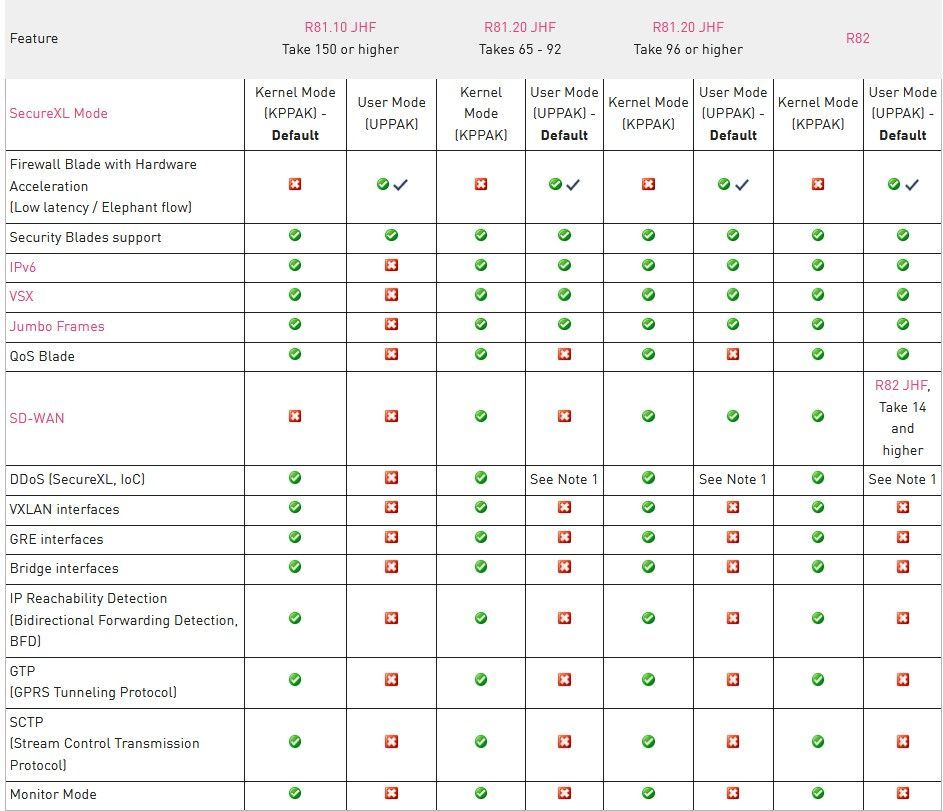
This sk179432 explains that there is a functional difference between UPPAK and KPPAK modes. Therefore, when switching between them, it’s important to carefully review the features currently in use on the firewall to ensure compatibility and avoid any unexpected behavior.
About CheckMates
Learn Check Point
Advanced Learning

YOU DESERVE THE BEST SECURITY