- Products
- Learn
- Local User Groups
- Partners
- More

What’s New in Agentic Network Orchestration
21 October @ 5pm CET / 11am EDT
AI Security Masters
LGTM: Bypassing an LLM Build Gate
When Prompt Injection Fails
Scaling Check Point Automation with Arodonata
CheckMates Go:
Fun Ding
Hello,
I need to make a scheduled remote backup of my branch appliances 680, 730, 1180. all the newest version R77.20.80
I use a ftp server as a target for it, but no success, contrary to UTM 3200.
If I try to ftp directly from a shell, it works. I need not to specify a target path there, asi it uses the home dir of my unix user specified.
On a 3200 one needs to specify the complete path including trailing /
I tried all three options , no path, full path, full path with / in the GUI for 680, 730, 1180 , but no success.
I didn't find any way how to debug it , because cmd line allows usb and tftp backup only and gui the scheduled ftp only, which I consider a strange inconsistence.
I also find neither usb backup as a remote one, nor the running tftp server in the net as a safe thing.
It could lso be the schedule problem, as the config file found from the command line shows in one place the daily schedule and a also the day-of-week. ( I cannot find it at the moment)
Could you advice pls ?
Many thanks
LK
Config used in gui: (not working)
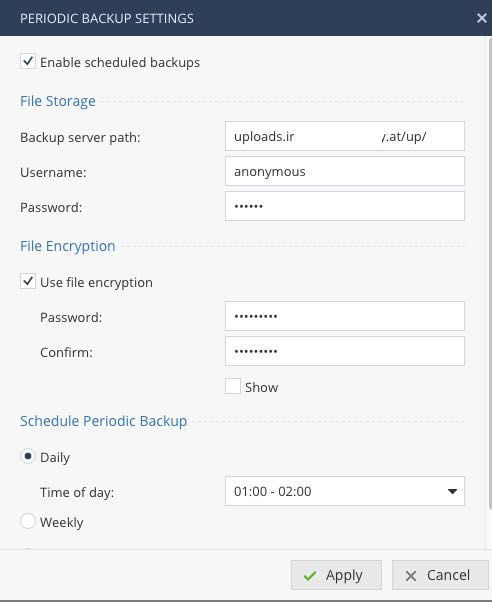
No, sorry - i just painted the middle of the hostname white... Really it is only uploads.irgendeinname.at/up/. If you use 172.16.132.19/home/bkp/ it will not work ?
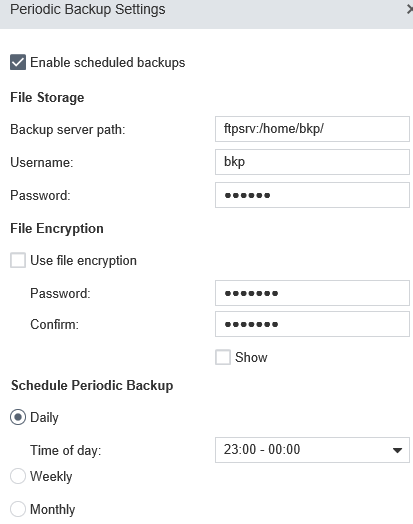
Either use an IP or a resolvable name for ftp server, ftpserv: is no good - the following works like a charm:
Hello, thanks for response.
ftpserv is resolvable hostname of my ftp server.
As to your picture, do you suggest the space between the hostname and path ?
Gui doesn't allow me to input it and suggests ftp://any_url in onscreen help but no chance to write it there, too.
Just similar input is accepted:
172.16.132.19:/home/bkp/
as on 3200 and it doesn't seem to work here
No, sorry - i just painted the middle of the hostname white... Really it is only uploads.irgendeinname.at/up/. If you use 172.16.132.19/home/bkp/ it will not work ?
Hello
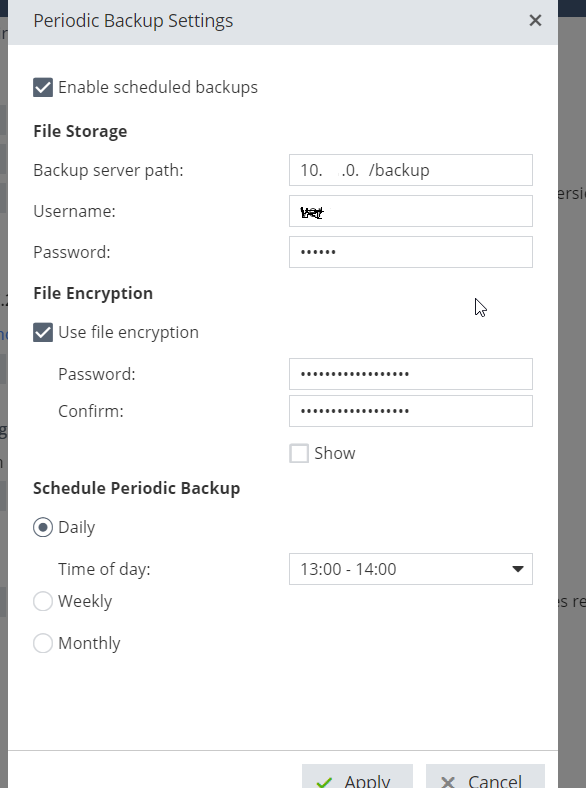
I have a similar problem, here is a printscreen of my settings 😞 but nothing stored on the following path.
Try ending with a "/".
10.x.0.x/backup/
Yes, only FTP is supported. If your FTP is listening on non-standard port you may specify it like this:
ftp://192.168.0.1:2121/backup/
Leaderboard
Epsum factorial non deposit quid pro quo hic escorol.
| User | Count |
|---|---|
| 2 | |
| 1 | |
| 1 | |
| 1 | |
| 1 | |
| 1 |
Thu 08 Oct 2026 @ 11:00 AM (EDT)
Under the Hood: Check Point SASE | Zero Trust Network Access, Step by StepFri 09 Oct 2026 @ 10:00 AM (CEST)
CheckMates Live Netherlands - Sessie 49: Maak kennis met Check Point R82.20Tue 13 Oct 2026 @ 06:00 PM (IDT)
AI Security Masters: LGTM: Bypassing an LLM Build Gate When Prompt Injection FailsThu 08 Oct 2026 @ 11:00 AM (EDT)
Under the Hood: Check Point SASE | Zero Trust Network Access, Step by StepFri 09 Oct 2026 @ 10:00 AM (CEST)
CheckMates Live Netherlands - Sessie 49: Maak kennis met Check Point R82.20Tue 20 Oct 2026 @ 04:00 PM (CEST)
EMEA: Beyond the Basics: Designing Identity Awareness for Large-Scale EnvironmentsTue 20 Oct 2026 @ 03:00 PM (EDT)
AMER: Beyond the Basics: Designing Identity Awareness for Large-Scale EnvironmentsThu 29 Oct 2026 @ 11:00 AM (PDT)
Irvine, CA: Secure the Network, the App, and the Workforce: A Hybrid Mesh & SASE BriefingAbout CheckMates
Learn Check Point
Advanced Learning
YOU DESERVE THE BEST SECURITY