- Products
- Learn
- Local User Groups
- Partners
- More
What's New in R82.10?
Watch HereWhen the Agents Attack
A Live Look at Agentic Exposure Validation
AI Security Masters E8:
Claude Mythos: New Era in Cyber Security
CheckMates Go:
CheckMates Fest
Hello,
I need to make a scheduled remote backup of my branch appliances 680, 730, 1180. all the newest version R77.20.80
I use a ftp server as a target for it, but no success, contrary to UTM 3200.
If I try to ftp directly from a shell, it works. I need not to specify a target path there, asi it uses the home dir of my unix user specified.
On a 3200 one needs to specify the complete path including trailing /
I tried all three options , no path, full path, full path with / in the GUI for 680, 730, 1180 , but no success.
I didn't find any way how to debug it , because cmd line allows usb and tftp backup only and gui the scheduled ftp only, which I consider a strange inconsistence.
I also find neither usb backup as a remote one, nor the running tftp server in the net as a safe thing.
It could lso be the schedule problem, as the config file found from the command line shows in one place the daily schedule and a also the day-of-week. ( I cannot find it at the moment)
Could you advice pls ?
Many thanks
LK
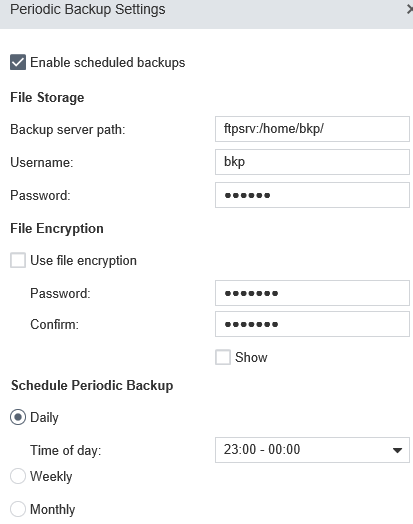
Config used in gui: (not working)
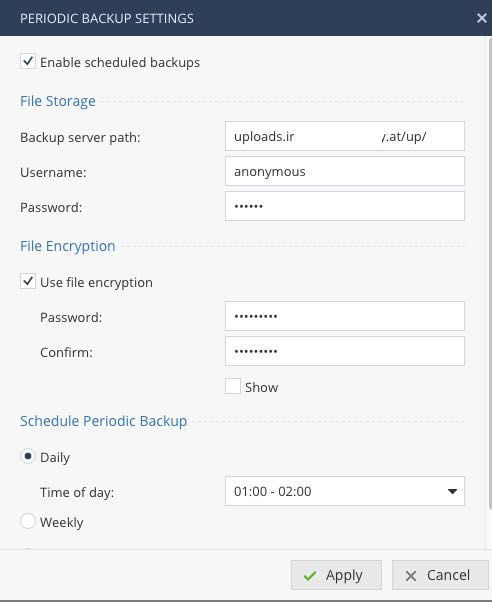
No, sorry - i just painted the middle of the hostname white... Really it is only uploads.irgendeinname.at/up/. If you use 172.16.132.19/home/bkp/ it will not work ?
Either use an IP or a resolvable name for ftp server, ftpserv: is no good - the following works like a charm:
Hello, thanks for response.
ftpserv is resolvable hostname of my ftp server.
As to your picture, do you suggest the space between the hostname and path ?
Gui doesn't allow me to input it and suggests ftp://any_url in onscreen help but no chance to write it there, too.
Just similar input is accepted:
172.16.132.19:/home/bkp/
as on 3200 and it doesn't seem to work here
No, sorry - i just painted the middle of the hostname white... Really it is only uploads.irgendeinname.at/up/. If you use 172.16.132.19/home/bkp/ it will not work ?
Hello
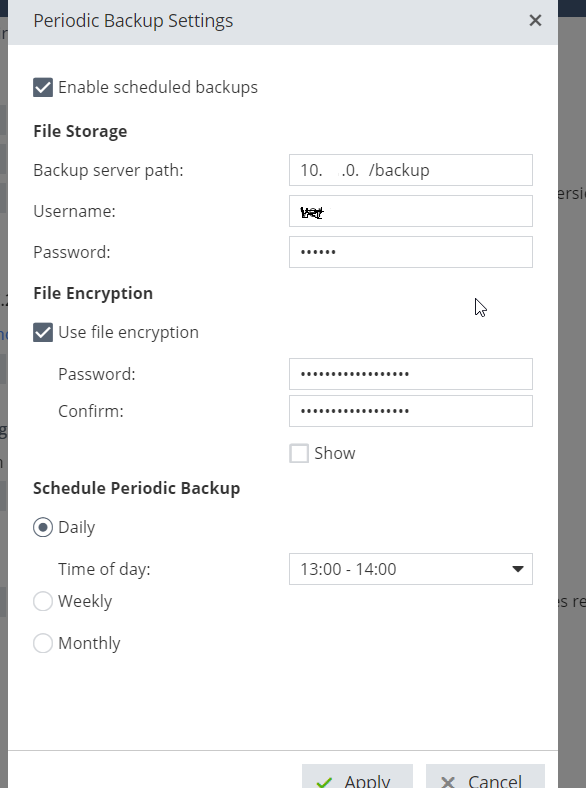
I have a similar problem, here is a printscreen of my settings 😞 but nothing stored on the following path.
Try ending with a "/".
10.x.0.x/backup/
Yes, only FTP is supported. If your FTP is listening on non-standard port you may specify it like this:
ftp://192.168.0.1:2121/backup/
Leaderboard
Epsum factorial non deposit quid pro quo hic escorol.
| User | Count |
|---|---|
| 6 | |
| 3 | |
| 2 | |
| 1 | |
| 1 | |
| 1 | |
| 1 | |
| 1 | |
| 1 | |
| 1 |
Thu 09 Jul 2026 @ 10:00 AM (CEST)
Schutz souveräner Workloads: Check Point & die AWS European Sovereign CloudThu 09 Jul 2026 @ 11:00 AM (CEST)
The Cloud Architects Series: Check Point Edge Protection SD-WAN & SASEThu 09 Jul 2026 @ 11:00 AM (EDT)
Tips and Tricks 2026 #9 - What's New with Check Point Email SecurityFri 10 Jul 2026 @ 11:00 AM (IDT)
CheckMates Live Netherlands - Sessie 48: Nieuwe Check Point Workspace SecurityTue 14 Jul 2026 @ 10:00 AM (PDT)
AI Security Masters E11: READY OR NOT: Securing the AI Enterprise 3/5 - AI Workforce SecurityThu 30 Jul 2026 @ 10:00 AM (PDT)
AI Security Masters E12: READY OR NOT: Securing the AI Enterprise 4/5 - AI GatewayThu 09 Jul 2026 @ 11:00 AM (EDT)
Tips and Tricks 2026 #9 - What's New with Check Point Email SecurityFri 10 Jul 2026 @ 11:00 AM (IDT)
CheckMates Live Netherlands - Sessie 48: Nieuwe Check Point Workspace SecurityTue 14 Jul 2026 @ 10:00 AM (PDT)
AI Security Masters E11: READY OR NOT: Securing the AI Enterprise 3/5 - AI Workforce SecurityThu 30 Jul 2026 @ 10:00 AM (PDT)
AI Security Masters E12: READY OR NOT: Securing the AI Enterprise 4/5 - AI GatewayThu 20 Aug 2026 @ 10:00 AM (PDT)
AI Security Masters E13: READY OR NOT: Securing the AI Ent 5/5 - AI Research & Threat LandscapeAbout CheckMates
Learn Check Point
Advanced Learning
YOU DESERVE THE BEST SECURITY