- Products
- Learn
- Local User Groups
- Partners
- More

Step Into the Future of
AI-Powered Cyber Security
When the Agents Attack
A Live Look at Agentic Exposure Validation
Bridge the CAASM Gap
with Exposure Management
AI Security Masters E8:
Claude Mythos: New Era in Cyber Security
CheckMates Go:
CheckMates Fest
Update-
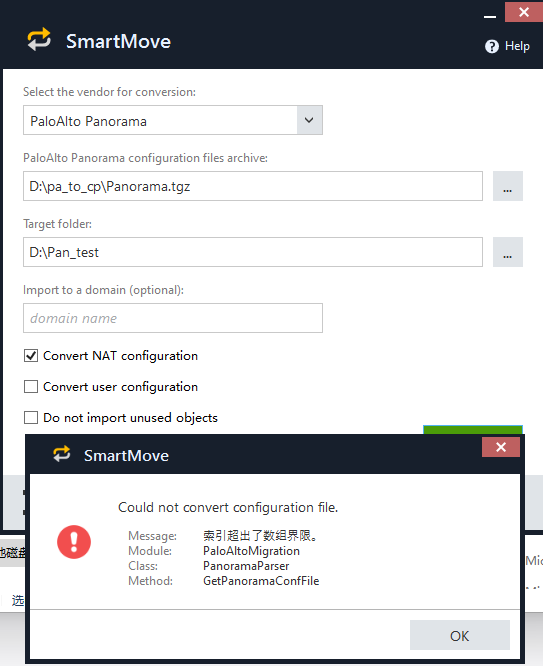
We worked offline and we found that the (PAN) Panorama outputs format was different, we updated SmartMove to support it.
Hi,
Which version do you use? can you see debug.log file?
Are you using TAP mode?
The Panorama version I am using is 10.0. The gateway version is 8.1.
I also tried to use the gateway's xml file directly to convert through SmartMove. The conversion did not report any errors, but there was no result output.
@Sann ,
Using XML form GW will not work while using Panorama.
Which version of SmartMove do you use? can you see debug.log file?
Are you using TAP interfaces?
Sorry, can you tell me what the TAP interface is?
Hello, there is no TAP interface in the customer's configuration at present. They are all ordinary physical interfaces
@the_rock - thanks 🙂
@Sann ,
Thanks , can you extract the files and send me the structure of it? you can email me privately : ofirs@checkpoint.com
I saw cases that export file was incorrect and due to it SmartMove did not able to pare the files.
if there is any way to send me the files, 100% that we will fix it much quicker .
BR,
Ofir S
I did this with Cisco 3 times and never had a problem. Not much of PAN guy (though I do know some basic things about it), but if you want to email me the file directly, happy to give it a go.
I'm really sorry, because there is customer's network information on the configuration. I can't provide it to you
thank you very much!
Update-
We worked offline and we found that the (PAN) Panorama outputs format was different, we updated SmartMove to support it.
Thanks for sharing a solution to this.
I assume the corresponding fix is this one: https://github.com/CheckPointSW/SmartMove/commit/58d249452c5ba1dcb109582dc1b9ca5aaa6e4465
Unfortunately this breaks SmartMove for a PaloAlto (8.1) config export where panorama isn't the first device in alphabetical order.
Example contents of a no longer working export file:
devfw01_111111111111.xml
devfw02_222222222222.xml
panorama_333333333333.xml
prodfw02_444444444444.xml
prodfw02_555555555555.xml
Before the code change, every file would be checked for existence of a node "panorama" until there is a match.
After the code change, the first file is assumed do be the panorama config without checking anything.
Tue 16 Jun 2026 @ 05:00 PM (CEST)
Under the Hood: Check Point SASE | Internet Access Optimization & Performance TuningThu 18 Jun 2026 @ 10:00 AM (CEST)
The Cloud Architects Series: Check Point WAF - The Next Generation of AI powered protectionTue 16 Jun 2026 @ 05:00 PM (CEST)
Under the Hood: Check Point SASE | Internet Access Optimization & Performance TuningThu 18 Jun 2026 @ 10:00 AM (CEST)
The Cloud Architects Series: Check Point WAF - The Next Generation of AI powered protectionTue 23 Jun 2026 @ 05:00 PM (CEST)
Under the Hood: Check Point Cloud Firewall | Securing all of your clouds: Art of the possibleThu 25 Jun 2026 @ 10:00 AM (PDT)
AI Security Masters E10: READY OR NOT: Securing the AI Enterprise 2/5 - AI Red TeamingAbout CheckMates
Learn Check Point
Advanced Learning
YOU DESERVE THE BEST SECURITY