



- Products
- Learn
- Local User Groups
- Partners
- More

What’s New in Agentic Network Orchestration
21 October @ 5pm CET / 11am EDT
AI Security Masters
LGTM: Bypassing an LLM Build Gate
When Prompt Injection Fails
Scaling Check Point Automation with Arodonata
CheckMates Go:
Fun Ding


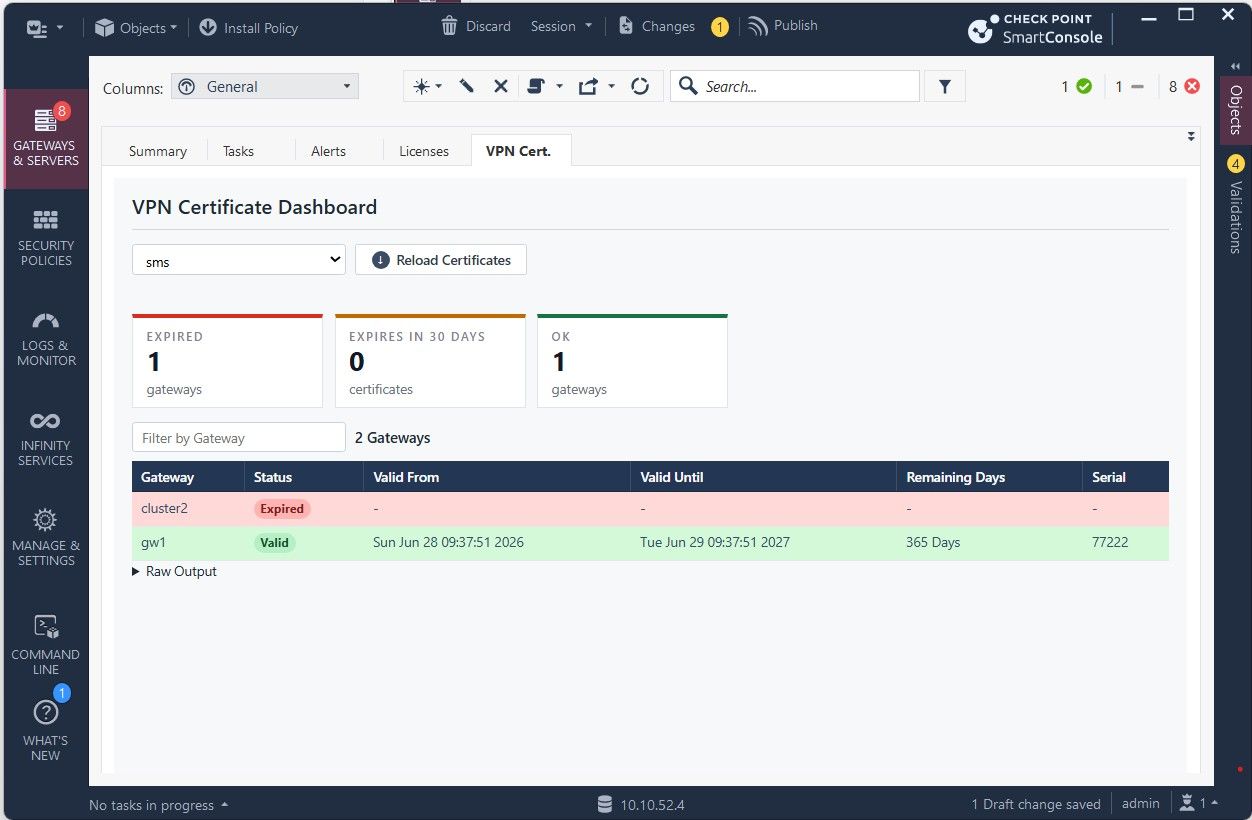
VPN Certificate Dashboard
Extension URL: https://www.checkpoint.tips/ex/cert.json
Installation: SmartConsole > Manage & Settings > Preferences > SmartConsole Extensions
Displays all VPN IKE certificates from the selected Check Point Management Server.
- including validity status
- expiration dates
- remaining lifetime
- certificate statistics
- certificate expiration alert (expired, expires in 30 days, ok)
- includes filters to search across all gateways
- shows raw output
Expired and soon-to-expire certificates are highlighted for quick identification and proactive certificate management.
Version:
1.0 2026-06-16 Initial version. Read VPN certificates using cpca_client lscert -kind IKE
1.1 2026-06-17 Added show gateways-and-servers support.
1.2 2026-06-19 Implemented automatic paging using limit and offset
1.3 2026-06-23 Fixed handling of expired certificates returned by cpca_client
1.4 2026-06-26 Improved gateway name extraction from certificate CN field.
1.5 2026-06-29 Final optimization
VPN Certificate Dashboard
Extension URL: https://www.checkpoint.tips/ex/cert.json
Installation: SmartConsole > Manage & Settings > Preferences > SmartConsole Extensions
Displays all VPN IKE certificates from the selected Check Point Management Server.
- including validity status
- expiration dates
- remaining lifetime
- certificate statistics
- certificate expiration alert (expired, expires in 30 days, ok)
- includes filters to search across all gateways
- shows raw output
Expired an

A really cool tool.
Finally, you can see all your VPN certificates at a glance and immediately see when they expire.
Great!


Do we have a way to filter VPN gateways? We currently have more than 100 VPN gateways in use, and it is difficult to work with the full list when all gateways are displayed.
---
CCSM/CCVS
@Ralf_Erzinger,
There is a "Filter by Gateway" option. Here, you can filter by gateways or clusters and display only the gateways that match the selected filter criteria.
@Ralf_Erzinger,
There is a "Filter by Gateway" option. Here, you can filter by gateways or clusters and display only the gateways that match the selected filter criteria.

HI @HeikoAnkenbrand,
I noticed the extension shows only the first 50 GWs and doesn't work with MDS.
It returns: Error: This operation is supported for MGMT only.
This is a great idea and a very useful tool.
HI @HeikoAnkenbrand,
I noticed the extension shows only the first 50 GWs and doesn't work with MDS.
It returns: Error: This operation is supported for MGMT only.
This is a great idea and a very useful tool.
Hi @Claudio_Bolcato
Currently, this only works with SMS and not with MDS.
I will migrate it to MDS within the next few days.
Thanks for the tip.
Hi @Claudio_Bolcato
Currently, this only works with SMS and not with MDS.
I will migrate it to MDS within the next few days.
Thanks for the tip.
;
@Claudio_Bolcato
I currently don't have an SMS with more than 50 certificates available for testing. I believe that "cpca_client lscert -kind IKE -stat Valid" does not return more than 50 certificates.
Could you please run the following command on your Management Server and send me the result? Then I can verify whether the issue is related to cpca_client.
cpca_client lscert -kind IKE -stat Valid | wc -l
@Claudio_Bolcato
I currently don't have an SMS with more than 50 certificates available for testing. I believe that "cpca_client lscert -kind IKE -stat Valid" does not return more than 50 certificates.
Could you please run the following command on your Management Server and send me the result? Then I can verify whether the issue is related to cpca_client.
cpca_client lscert -kind IKE -stat Valid | wc -l
;
@HeikoAnkenbrand
the command returns 550
Hi @Claudio_Bolcato,
To find the Management Server, there is a function that uses show gateways-and-servers.
If the command output contains too many entries, limit and offset must be used to retrieve all systems.
After a bit of tinkering, I added this logic to the code.
Everything should work correctly now (see screenshot).
Hi @Claudio_Bolcato,
To find the Management Server, there is a function that uses show gateways-and-servers.
If the command output contains too many entries, limit and offset must be used to retrieve all systems.
After a bit of tinkering, I added this logic to the code.
Everything should work correctly now (see screenshot).
;
Hi @Claudio_Bolcato ,
Current certificates are retrieved using cpca_client lscert -kind IKE. Unfortunately, expired certificates are not returned by this command, which is why the raw output only contains valid certificates.
To identify expired certificates, all gateways are read from the SmartConsole object database using show gateways-and-servers. If VPN is enabled on a gateway and no certificate is found via cpca_client lscert -kind IKE, the certificate is treated as expired.
Therefore, it is expected that your output may show 0.
Hi @Claudio_Bolcato ,
Current certificates are retrieved using cpca_client lscert -kind IKE. Unfortunately, expired certificates are not returned by this command, which is why the raw output only contains valid certificates.
To identify expired certificates, all gateways are read from the SmartConsole object database using show gateways-and-servers. If VPN is enabled on a gateway and no certificate is found via cpca_client lscert -kind IKE, the certificate is treated as expired.

About CheckMates
Learn Check Point
Advanced Learning

YOU DESERVE THE BEST SECURITY


