


- Products
- Learn
- Local User Groups
- Partners
- More

What’s New in Agentic Network Orchestration
21 October @ 5pm CET / 11am EDT
AI Security Masters
LGTM: Bypassing an LLM Build Gate
When Prompt Injection Fails
Scaling Check Point Automation with Arodonata
CheckMates Go:
Fun Ding


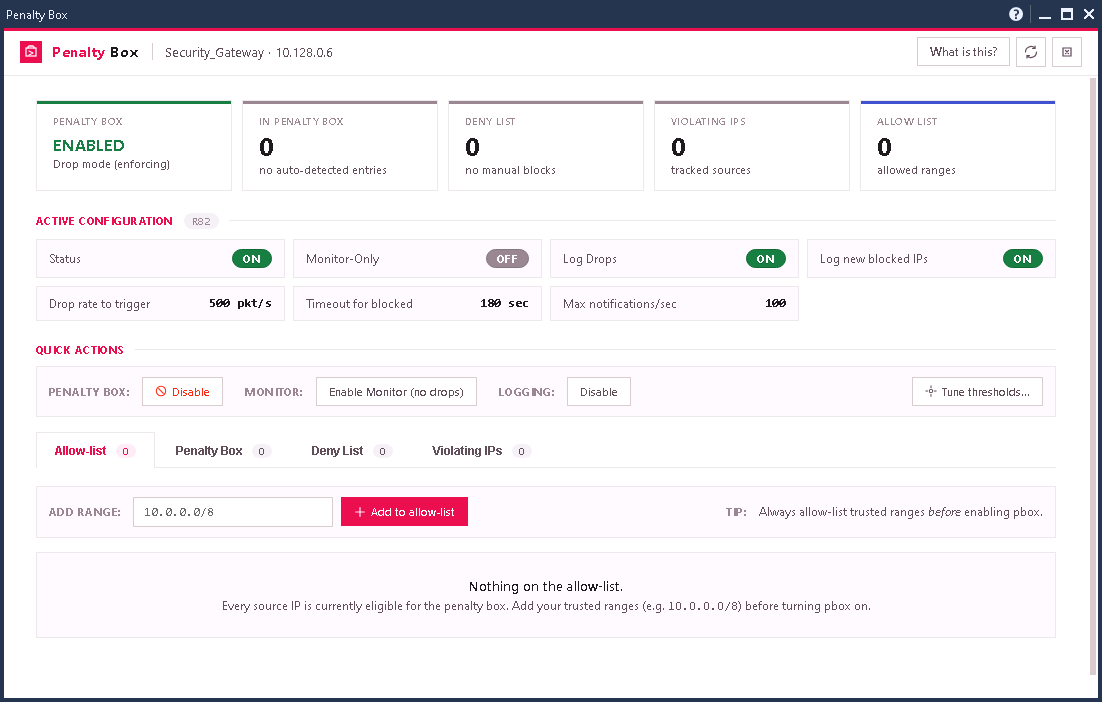
🚨 Live DoS / DDoS mitigation within SmartConsole
🚀 Supports Maestro / ElasticXL
👉 Requires R82+
SmartConsole Extension to add Penalty Box to the objects' context menu within 'Gateways & Servers'.
Extension URL: https://dannyjung.de/pbox.json
Installation: SmartConsole > Manage & Settings > Preferences > SmartConsole Extensions
🚨 Live DoS / DDoS mitigation within SmartConsole
🚀 Supports Maestro / ElasticXL
👉 Requires R82+
SmartConsole Extension to add Penalty Box to the objects' context menu within 'Gateways & Servers'.
Extension URL: https://dannyjung.de/pbox.json
Installation: SmartConsole > Manage & Settings > Preferences > SmartConsole Extensions

 Katya
Katya
 jdababne

Hi Danny,
the command to enable pbox has that changed. https://sc1.checkpoint.com/documents/R81/WebAdminGuides/EN/CP_R81_CLI_ReferenceGuide/Topics-CLIG/PTG...
on maestro vsx using clusterxl it shows as unknown for us on the enabled status even tho it is enabled and we see violating ip's listed etc.
nice work makes it easier to view then CLI.
Thanks
Frank
Hi Danny,
the command to enable pbox has that changed. https://sc1.checkpoint.com/documents/R81/WebAdminGuides/EN/CP_R81_CLI_ReferenceGuide/Topics-CLIG/PTG/SecureXL/fwaccel-dos-pbox.htm
on maestro vsx using clusterxl it shows as unknown for us on the enabled status even tho it is enabled and we see violating ip's listed etc.
nice work makes it easier to view then CLI.
Thanks
Frank
;

SK112454
ProductCluster - 3rd-party, ClusterXL, Maestro HyperScale Firewall, Scalable Chassis, SecureXL, Security Gateways, Spark Firewall, VSX (Traditional)
Penalty box is disabled by default and can be enabled/disabled using the following commands:
To enable the penalty box:
[Expert@HostName:0]# fwaccel dos config set --enable-pbox
To disable the penalty box (this is the default):
[Expert@HostName:0]# fwaccel dos config set --disable-pbox
but in the extension its using g_fwaccel dos pbox -E on
-E is no longer available.
Thanks
SK112454
ProductCluster - 3rd-party, ClusterXL, Maestro HyperScale Firewall, Scalable Chassis, SecureXL, Security Gateways, Spark Firewall, VSX (Traditional)
...;Penalty box is disabled by default and can be enabled/disabled using the following commands:
To enable the penalty box:
[Expert@HostName:0]# fwaccel dos config set --enable-pbox
To disable the penalty box (this is the default):
[Expert@HostName:0]# fwaccel dos config set --disable-pbox

About CheckMates
Learn Check Point
Advanced Learning

YOU DESERVE THE BEST SECURITY
