- Products
- Learn
- Local User Groups
- Partners
- More
MVP 2026: Submissions
Are Now Open!
What's New in R82.10?
Watch NowOverlap in Security Validation
Help us to understand your needs better
CheckMates Go:
Maestro Madness
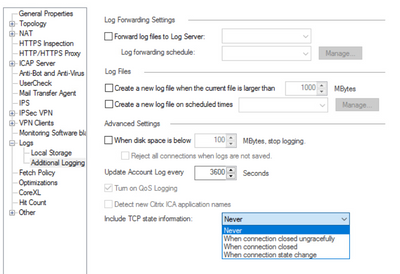
Anyone knows how about the "include TCP state information" in the logs.
Is it fully integrated with SecureXL or only F2F connection are logged here with the state?
How about the performance impact ?
Fired up one of my Gateway Performance Optimization Class lab workstations, and I can confirm that TCP state information does properly appear for connections handled in the fastpath, Medium Path (both passive & active streaming) and F2F/slowpath. Didn't try the QoS paths but imagine it would work there too.
The big caveat here is that to see certain logged Firewall-blade specific information such as NAT operations and TCP state information, in the SmartConsole you must be viewing a log of type "Connection" (diagonal line icon) and not of type "Session" (left and right arrow icon). This type of Firewall blade information will not be included in a log of type "Session", as first reported by @Vladimir.
Edit: Tested code version was R81.20 GA.
There's an SK that talks about this feature: https://support.checkpoint.com/results/sk/sk101221
I presume it is SecureXL friendly, else there'd be a note in that SK.
It presumably increases load on fwd (the logging process) since additional logs are generated as a result of this setting.
Any idea if this feature logs when connections are removed from the connections table due to timeout? I don't see mention either way in the SK.
Not directly, no. It simply reports the final state of the connection as "Established" instead of "Both FIN", even though the connection does not exist in the state table any more. This is misleading but technically correct as that was indeed the final connection state before it was removed from the state table, and the state of the TCP connection itself between the two endpoints did not actually change at that time. If you see a state of "Established" but need to determine if the connection is still present in the state table, look at the "Expire Time" and "Last Hit" items in the same log card. Enabling Accounting on the relevant rule may also help in this regard.
Also be aware that even if the TCP connection is ended by a RST sent by one of the hosts, the final connection state is still reported as "Both FIN" as if the two hosts had performed a graceful FIN, FIN-ACK, ACK. Also misleading, really wish it would say "RST" instead to clarify that one of the hosts killed the connection ungracefully. Could save the firewall a lot of blame...
Fired up one of my Gateway Performance Optimization Class lab workstations, and I can confirm that TCP state information does properly appear for connections handled in the fastpath, Medium Path (both passive & active streaming) and F2F/slowpath. Didn't try the QoS paths but imagine it would work there too.
The big caveat here is that to see certain logged Firewall-blade specific information such as NAT operations and TCP state information, in the SmartConsole you must be viewing a log of type "Connection" (diagonal line icon) and not of type "Session" (left and right arrow icon). This type of Firewall blade information will not be included in a log of type "Session", as first reported by @Vladimir.
Edit: Tested code version was R81.20 GA.
Leaderboard
Epsum factorial non deposit quid pro quo hic escorol.
| User | Count |
|---|---|
| 19 | |
| 17 | |
| 13 | |
| 8 | |
| 7 | |
| 3 | |
| 3 | |
| 3 | |
| 3 | |
| 2 |
Tue 16 Dec 2025 @ 05:00 PM (CET)
Under the Hood: CloudGuard Network Security for Oracle Cloud - Config and Autoscaling!Thu 18 Dec 2025 @ 10:00 AM (CET)
Cloud Architect Series - Building a Hybrid Mesh Security Strategy across cloudsTue 16 Dec 2025 @ 05:00 PM (CET)
Under the Hood: CloudGuard Network Security for Oracle Cloud - Config and Autoscaling!Thu 18 Dec 2025 @ 10:00 AM (CET)
Cloud Architect Series - Building a Hybrid Mesh Security Strategy across cloudsAbout CheckMates
Learn Check Point
Advanced Learning
YOU DESERVE THE BEST SECURITY