- Products
- Learn
- Local User Groups
- Partners
- More

MVP 2026: Submissions
Are Now Open!
What's New in R82.10?
10 December @ 5pm CET / 11am ET
Improve Your Security Posture with
Threat Prevention and Policy Insights
Overlap in Security Validation
Help us to understand your needs better
CheckMates Go:
Maestro Madness
I have two firewall. one is 6200 and other 1500 SMB appliance. I have created a VTI tunnel but the tunnel is not working.
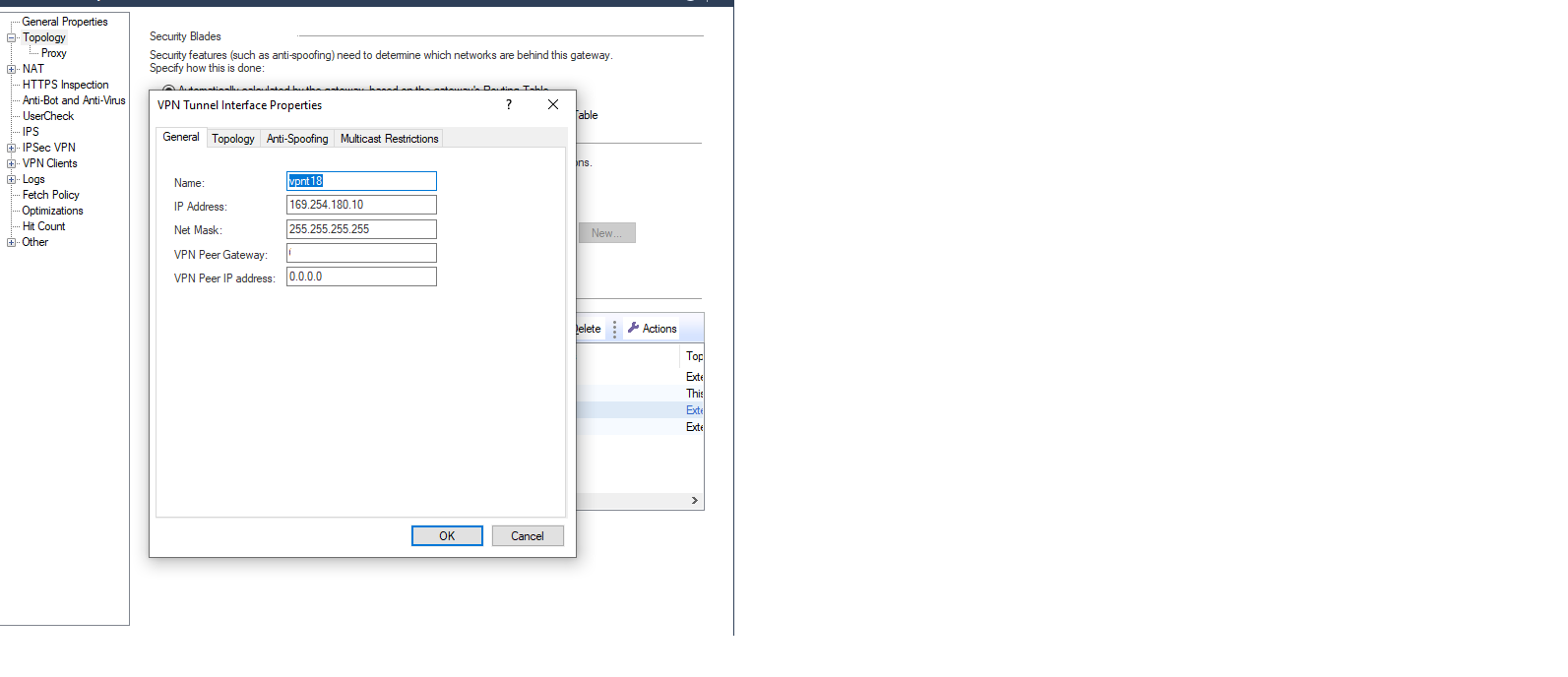
I have created simple group for vpn domain. But on SMB it can't fetch topology properly as you can see in image I have attached.
why it can't fetch the VPN reomte peer ip address?
What is the 6200 running (Version/JHF)?
What firmware is the 1500 running?
Are both of these gateways managed by the same management? (If so, what version/JHF is managing it)
You created a VTI tunnel: following what instructions, exactly?
"I have created simple group for VPN domain" ok, but where was this configured?
"Tunnel is not working"
Please provide precise troubleshooting steps taken with errors provided.
It's not clear to me if Fetch Topology should fetch the "remote IP" for the VTI peer.
You should enter that manually if it is not being fetched.
If you want to "fix" Fetch Topology, I recommend a TAC case: https://help.checkpoint.com
the 6200 series running version is R81.10 JHF 95 and 1500 series version is R81.10.05.
Both gateways are managed by separate management server. Both have running version is R81.20 JHF 10.
And 6200 series appliance are in cluster.
VTI interface topology.........
I created VTI 18. For cluster I assigned IP address.... VIP- 169.254.180.15, GW1- 169.254.180.11, GW2- 169.254.180.9
For SMB 1500 series VTI IP is 169.254.180.10
For testing purposes I run the command VPN TU TLIST and it shows NO outbound SA error.
I can't enter manually maybe it fetch automatically from the firewall.
I don't think that a TAC case is warranted for first time implementations. --- Account Managers, and Sales Engineers on your team should be able to assist, or connect you with PS for assistance.
A few points I noticed:
- Your interfaces are set to DHCP Ranges? They should be routable.
- If the SMB Device doesn't have a static IP, ensure you have some kind of DynDNS so that we can reach it reliably, otherwise tunnel will only be reliably initiated from SMB side.
- If you've followed all the steps outlined in the Admin Guide, make sure you have routes set up.. VTI's are not community based, and will require the traffic to be actually routed out that interface.
https://sc1.checkpoint.com/documents/R81/WebAdminGuides/EN/CP_R81_Gaia_AdminGuide/Topics-GAG/VPN-Tun...
https://sc1.checkpoint.com/documents/R81/WebAdminGuides/EN/CP_R81_Gaia_AdminGuide/Topics-GAG/IPv4-St...
Thanks for your support. the issue is resolved.
How did you resolve the issue?
I'm still not getting VPN peer IP address on topology page but tunnel is working.
On the VPN domain page I have All IP addresses behind Gateway to I have selected user defined. In which I have selected empty Group and then I published and install the policy and its working.
An empty encryption domain is normal for route-based VPNs.
I know that @PhoneBoy I have empty group in VPN communities on both sides but empty group is not defined on VPN domain. When I defined empty group in vpn domain and install the policy and it worked.
Leaderboard
Epsum factorial non deposit quid pro quo hic escorol.
| User | Count |
|---|---|
| 25 | |
| 20 | |
| 8 | |
| 7 | |
| 6 | |
| 6 | |
| 5 | |
| 5 | |
| 4 | |
| 4 |
Thu 04 Dec 2025 @ 02:00 PM (EST)
End-of-Year Event: Securing AI Transformation in a Hyperconnected World - AmericasFri 12 Dec 2025 @ 10:00 AM (CET)
Check Mates Live Netherlands: #41 AI & Multi Context ProtocolThu 04 Dec 2025 @ 02:00 PM (EST)
End-of-Year Event: Securing AI Transformation in a Hyperconnected World - AmericasFri 12 Dec 2025 @ 10:00 AM (CET)
Check Mates Live Netherlands: #41 AI & Multi Context ProtocolTue 16 Dec 2025 @ 05:00 PM (CET)
Under the Hood: CloudGuard Network Security for Oracle Cloud - Config and Autoscaling!About CheckMates
Learn Check Point
Advanced Learning
YOU DESERVE THE BEST SECURITY