- Products
- Learn
- Local User Groups
- Partners
- More

MVP 2026: Submissions
Are Now Open!
What's New in R82.10?
10 December @ 5pm CET / 11am ET
Improve Your Security Posture with
Threat Prevention and Policy Insights
Overlap in Security Validation
Help us to understand your needs better
CheckMates Go:
Maestro Madness
I'm going through some VSX lab configurations and working with VSX Bridge Mode. Following along the VSX Admin Guide, I created a new VS, but on the interface configuration window there's no option to configure "L3 Bridge Interface Monitoring" to enable/configure the BVI.
My VSX Cluster properties are using the Active/Active bridge mode (STP), but that shouldn't matter, right?
I'm using Multi-Domain, so the VSX Cluster is in one domain and the VS itself is in another (which shouldn't matter either).
Interestingly, the "VSX Supported Features" SK (sk79700) says "VS with bridged interface" is only R81 and higher. However, I see this was an option in the R77 documentation as well as the R80.40 documentation. Is this a documentation error?
Thanks!
I believe prior to R81, if you used L2 in a VS, it could only be L2 mode.
@PhoneBoy is correct this came in with R81
Subsequently R80.40 JHF T53 is the minimum that allows a VS to have L2 bridge interfaces and L3 interfaces on the same VS per sk101371.
Hmm, interesting. This is R80.40 JHF 158. (VSX gateways are R80.40 JHF 161). I currently am using just two interfaces on the Bridge VS, but these are VLAN trunk interfaces (eth2 and eth3) and I have a VLAN selected on each interface (and I noticed multi-bridge is in use).
So regardless, apparently an L3 "monitoring" interface (aka: BVI) isn't really available until R81 now? So the R77 and R80.x documentation for that is an error? 🙂
Can you share a link to the documentation reference in question?
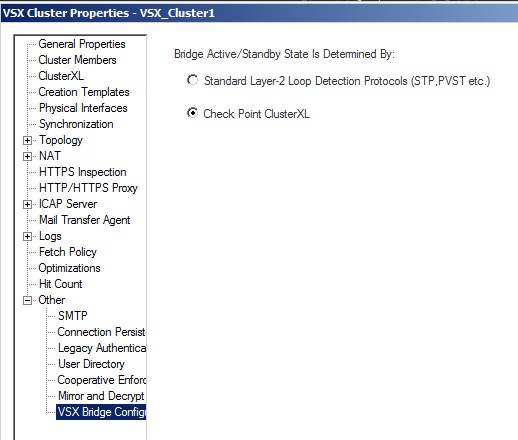
Also snippet screenshot attached.
The heading there is Active/Standby.
I'm not seeing the same option for Active/Active implying L2 only.
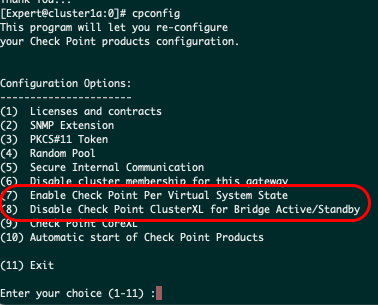
This is an area where SmartConsole could be more descriptive/helpful, and the documentation is unclear. I had to switch the VSX Cluster to "ClusterXL" for the VSX bridge configuration. That puts the VSX Cluster in Active/Standby bridge mode. By default it was STP, which I now know is Active/Active bridge mode. This is irrespective of the VSX *gateway* in cpconfig, which I also made sure was enabled for Bridge A/S mode.
Now I see L3 BVI configuration.
Sigh. Quite unclear all around.
Leaderboard
Epsum factorial non deposit quid pro quo hic escorol.
| User | Count |
|---|---|
| 25 | |
| 20 | |
| 8 | |
| 7 | |
| 6 | |
| 6 | |
| 5 | |
| 5 | |
| 4 | |
| 4 |
Fri 12 Dec 2025 @ 10:00 AM (CET)
Check Mates Live Netherlands: #41 AI & Multi Context ProtocolTue 16 Dec 2025 @ 05:00 PM (CET)
Under the Hood: CloudGuard Network Security for Oracle Cloud - Config and Autoscaling!Fri 12 Dec 2025 @ 10:00 AM (CET)
Check Mates Live Netherlands: #41 AI & Multi Context ProtocolTue 16 Dec 2025 @ 05:00 PM (CET)
Under the Hood: CloudGuard Network Security for Oracle Cloud - Config and Autoscaling!Thu 18 Dec 2025 @ 10:00 AM (CET)
Cloud Architect Series - Building a Hybrid Mesh Security Strategy across cloudsAbout CheckMates
Learn Check Point
Advanced Learning
YOU DESERVE THE BEST SECURITY