- Products
- Learn
- Local User Groups
- Partners
- More

The Great Exposure Reset
24 February 2026 @ 5pm CET / 11am EST
CheckMates Fest 2026
Watch Now!AI Security Masters
Hacking with AI: The Dark Side of Innovation
CheckMates Go:
CheckMates Fest
Hi All,
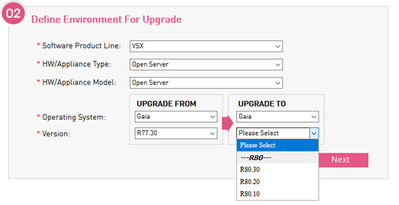
We are planning to upgrade our VSX cluster from R77.30 to R80.40. However, I'm a bit confused. When I'm using upgrade wizard, I see only R80.30 as possible version to upgrade. Is it possible to upgrade from R77.30 directly to R80.40 with CPUSE? Which image should I use?
Yes. Specifically for Open Server and VSX the valid option is only Clean Install
I don't think VSX is available for R80.40.
Since R77 VSX is part of the maintrain, there is no version since then that does not have VSX embedded. The only exception being GAIA Embedded.
Hi @shlomip ,
Big thanks for your reply!
I thoroughly read R80.40 Jumbo Hotfix sk and, especially, this: "For an Existing Security Gateway running on Open Servers, a Blink image consisting of R80.40 GA image (Take 294) and R80.40 Jumbo Hotfix is available in the Download section below. For VSX and Standalone configurations, see sk168114."
Also I took a look at sk168114 and found this: "ON a VSX environment, refer to "Minimal Effort" section in R80.40 Installation and Upgrade Guide and follow the Clean install option."
So does it mean that CPUSE upgrade is impossible for R80.40?
Do I have only one option to follow Clean install option in "Minimal Effort" section? Will Clean install with CPUSE transfer all config to new version?
I've worked with VSX since around 2006, including several years as a VSX specialist in Check Point's call center. Personally, I wouldn't use CPUSE to upgrade VSX. The clean install process is the same as the process to replace a failed cluster member with the addition of 'vsx_util upgrade' on the management. Local config won't be transferred between the members, but VSX generally doesn't have a whole lot of that (and you should be backing it up anyway in case a member fails). Interface and routing config is pushed down from the management, and will be pushed to the new member. It works and gives you a chance to practice replacing a failed member so if it happens, you know everything will go exactly how you expect. Here's the general process:
Yes. Specifically for Open Server and VSX the valid option is only Clean Install
Hi @Bob_Zimmerman and @shlomip ,
Many thanks for your answers!
I understood that Clean Install is only one valid option for upgrade VSX to R80.40. Also it's clear that Clean Install is preferable from many points of view.
However, I was thinking about CPUSE upgrade because I would like to perform Zero Downtime or even MVC upgrade. Keeping connectivity and rapid upgrade are vital in my case. If I went Clean Install it would make the upgrade process much more complicated.
So maybe I might go with CPUSE upgrade from R77.30 to R80.30 as it's a valid option for R80.30
A "Zero Downtime" upgrade is just rebuilding one member at the new version, pushing policy, then shutting down the second member. That's what the VSX clean install method gets you.
CPUSE doesn't seem to have anything to do with MVC. You just need to get a member to R80.40. It will go to Ready state because it sees an older CCP version. Enable cross-version sync with 'cphaconf mvc on', wait a few minutes, then you should be good to fail over. It sounds just like the old "Connectivity Upgrade" or "Full Connectivity Upgrade" methods, just with a different command. It's definitely possible to do this with a clean install.
Hi @shlomip,
I have one more question and maybe you can help me.
How can I reach VSX at OpenServer after Clean Install, if I don't have access to server hardware management console?
Depends on how you do the clean install. Most clean install methods I know of involve either being physically at the machine (with a burned disc or thumb drive), or having access to the server's LOM.
My memory is a "clean install" done with CPUSE leaves a little of the configuration in place (mostly which interface is for management, what IP it has, and the default route). I would try this in a VM several times before trying it for real on a remote system.
Leaderboard
Epsum factorial non deposit quid pro quo hic escorol.
| User | Count |
|---|---|
| 53 | |
| 41 | |
| 15 | |
| 13 | |
| 12 | |
| 11 | |
| 11 | |
| 10 | |
| 10 | |
| 8 |
Thu 19 Feb 2026 @ 03:00 PM (EST)
Americas Deep Dive: Check Point Management API Best PracticesTue 24 Feb 2026 @ 11:00 AM (EST)
Under The Hood: CloudGuard Network Security for Azure Virtual WANThu 19 Feb 2026 @ 03:00 PM (EST)
Americas Deep Dive: Check Point Management API Best PracticesTue 24 Feb 2026 @ 11:00 AM (EST)
Under The Hood: CloudGuard Network Security for Azure Virtual WANAbout CheckMates
Learn Check Point
Advanced Learning
YOU DESERVE THE BEST SECURITY