- Products
- Learn
- Local User Groups
- Partners
- More
AI Security Masters E7:
How CPR Broke ChatGPT's Isolation and What It Means for You
Blueprint Architecture for Securing
The AI Factory & AI Data Center
Call For Papers
Your Expertise. Our Stage
Good, Better, Best:
Prioritizing Defenses Against Credential Abuse
Ink Dragon: A Major Nation-State Campaign
Watch HereCheckMates Go:
CheckMates Fest
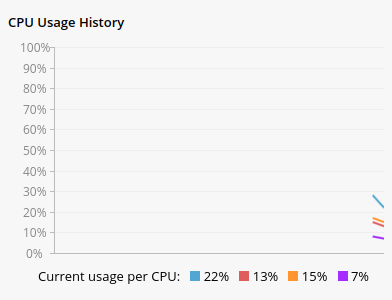
We are currently using a Quantum Spark 1800 Security Gateway SMB and have configured SNMP traps to alert us whenever the CPU utilization exceeds 90%. However, when I monitor the CPU load via the WebUI (Cores have around 20%) , I observe something that seems inconsistent with the alerts we receive from SNMP traps. Attached is a screenshot showing the CPU load, indicating 4 cores. See attached photo for reference.
Using the OID for procUsage (1.3.6.1.4.1.2620.1.6.7.5.1.5), we receive a single value, which I assume represents an average across the cores, but I'm not entirely sure. Furthermore, by querying another OID for multiProcUsage (1.3.6.1.4.1.2620.1.6.7.5.1.5.1-12), we obtain 12 different values, which leads me to believe these represent individual cores and possibly virtual threads.
Additionally, when using the 'cpuview' command through SSH (see attached photo), it indicates there are "10 core_xl" and "2 other." This information has left me a bit puzzled, as I haven't been able to find details in any datasheet regarding the processor used in my device, including the number of cores and threads it supports.
Could someone please help clarify how the CPU utilization is reported and how to interpret these SNMP OID values? Moreover, any insights into understanding the processor specifications for the Quantum Spark 1800 would be greatly appreciated, as we seek to better manage and respond to these high CPU utilization alerts.
We are currently using a Quantum Spark 1800 Security Gateway SMB and have configured SNMP traps to alert us whenever the CPU utilization exceeds 90%. However, when I monitor the CPU load via the WebUI (Cores have around 20%) , I observe something that seems inconsistent with the alerts we receive from SNMP traps. Attached is a screenshot showing the CPU load, indicating 4 cores. See attached photo for reference.
Using the OID for procUsage (1.3.6.1.4.1.2620.1.6.7.5.1.5), we receive a single value, which I assume represents an average across the cores, but I'm not entirely sure. Furthermore, by querying another OID for multiProcUsage (1.3.6.1.4.1.2620.1.6.7.5.1.5.1-12), we obtain 12 different values, which leads me to believe these represent individual cores and possibly virtual threads.
Additionally, when using the 'cpuview' command through SSH (see attached photo), it indicates there are "10 core_xl" and "2 other." This information has left me a bit puzzled, as I haven't been able to find details in any datasheet regarding the processor used in my device, including the number of cores and threads it supports.
Could someone please help clarify how the CPU utilization is reported and how to interpret these SNMP OID values? Moreover, any insights into understanding the processor specifications for the Quantum Spark 1800 would be greatly appreciated, as we seek to better manage and respond to these high CPU utilization alerts.
We are currently using a Quantum Spark 1800 Security Gateway SMB and have configured SNMP traps to alert us whenever the CPU utilization exceeds 90%. However, when I monitor the CPU load via the WebUI (Cores have around 20%) , I observe something that seems inconsistent with the alerts we receive from SNMP traps. Attached is a screenshot showing the CPU load, indicating 4 cores. See attached photo for reference.
Using the OID for procUsage (1.3.6.1.4.1.2620.1.6.7.5.1.5), we receive a single value, which I assume represents an average across the cores, but I'm not entirely sure. Furthermore, by querying another OID for multiProcUsage (1.3.6.1.4.1.2620.1.6.7.5.1.5.1-12), we obtain 12 different values, which leads me to believe these represent individual cores and possibly virtual threads.
Additionally, when using the 'cpuview' command through SSH (see attached photo), it indicates there are "10 core_xl" and "2 other." This information has left me a bit puzzled, as I haven't been able to find details in any datasheet regarding the processor used in my device, including the number of cores and threads it supports.
Could someone please help clarify how the CPU utilization is reported and how to interpret these SNMP OID values? Moreover, any insights into understanding the processor specifications for the Quantum Spark 1800 would be greatly appreciated, as we seek to better manage and respond to these high CPU utilization alerts.

The reason you get 12 different values for the multiProcUsage is because the 1800 has 12 cores.
This is further evidenced by the fact you have 10 core_xl cores and 2 SND ones 🙂
Quantum Spark appliances all use ARM-based processors.
We don't disclose the exact processors used in our appliances.
The reason you get 12 different values for the multiProcUsage is because the 1800 has 12 cores.
This is further evidenced by the fact you have 10 core_xl cores and 2 SND ones 🙂
Quantum Spark appliances all use ARM-based processors.
We don't disclose the exact processors used in our appliances.
I had thought that the processor has 4 cores as shown in the WebUI and can handle up to 12 threads. But in any case, thank you for the response. I will monitor all 12 values. Since the SNMP trap is triggered as soon as any from 12 core/thread reaches the set limit, which is on a daily basis, som much false-positive alarms. Thank you.
Did you end up opening TAC case for it?
Best,
Andy
Did you end up opening TAC case for it?
Best,
Andy