- Products
- Learn
- Local User Groups
- Partners
- More
MVP 2026: Submissions
Are Now Open!
What's New in R82.10?
10 December @ 5pm CET / 11am ET
Announcing Quantum R82.10!
Learn MoreOverlap in Security Validation
Help us to understand your needs better
CheckMates Go:
Maestro Madness
Hello everyone,
I have been trying to setup a VPN between a Checkpoint R80.30 Cluster and Azure Virtual Network Gateway following sk101275 .
I am trying with a very standard IKEv1 Policy Based IPsec tunnel.
Private subnets behind Azure (10.10.0.0/21 and 10.20.0.0/21)
Private subnets behind Azure (172.30.0.0/24, 172.30.102.0/24, 172.30.24.0/24 etc.) (around 30 subnets)
I have specified the exact remote subnets for each side.
Made sure Phase1 and Phase2 parameters match.
The VPN seems to get established immediately. The Azure side shows as Connected and Checkpoint sees the Tunnel state as up. On checkpoint I run "vpn tu" and can see Phase1 and Phase2 SAs established.
I have a security policy allowing the traffic between the subnets.
Problem is we can't pass traffic.
When I try sending ICMP from a IP behind the checkpoint 172.30.0.51 to 10.10.2.4 I get a Reject log with the following info:
Reject Category: IKE Failure
VPN Failure: IKE
Encryption failure: Error occurred
Also I believe after a few minutes the tunnel flaps and gets re-established. I noticed that twice in around 20min.
When I filter for the IP I am trying to ping.
When I filter for remote peer public IP
I can provide more information if needed.
Thanks!
I was able to sort this out using Route Based IKEv2 VPN
You’ll need to do some deeper debugs.
See: https://supportcenter.checkpoint.com/supportcenter/portal?eventSubmit_doGoviewsolutiondetails=&solut...
Thanks, I went through the document but not sure how this is relevant to the issue I am facing.
Okay I manged to fix this using Route Based IKEv2 VPN.
My goal now is to route traffic from my Remote Access VPN to that new Azure VPN. Is that possible?
I have added the subnet that is behind Azure to the VPN community for Remote access, so now when I connect to Client VPN I get a route for the subnet that is behind Azure in my local route table.
Is that the only thing that needs to be done?
When I initiate traffic from my VPN user pool to network behind Azure I get a log for the traffic arriving from Remote Access VPN, but no log for the traffic afterwards being sent over the Azure VPN tunnel. Is there any way I can confirm if it actually is being sent correctly?
Thanks!
The Azure side of the VPN will also need to know about the Office Mode subnet (i.e. it needs a route back).
I believe an fw monitor will show the traffic going towards the Azure VPN endpoint and back.
Thanks
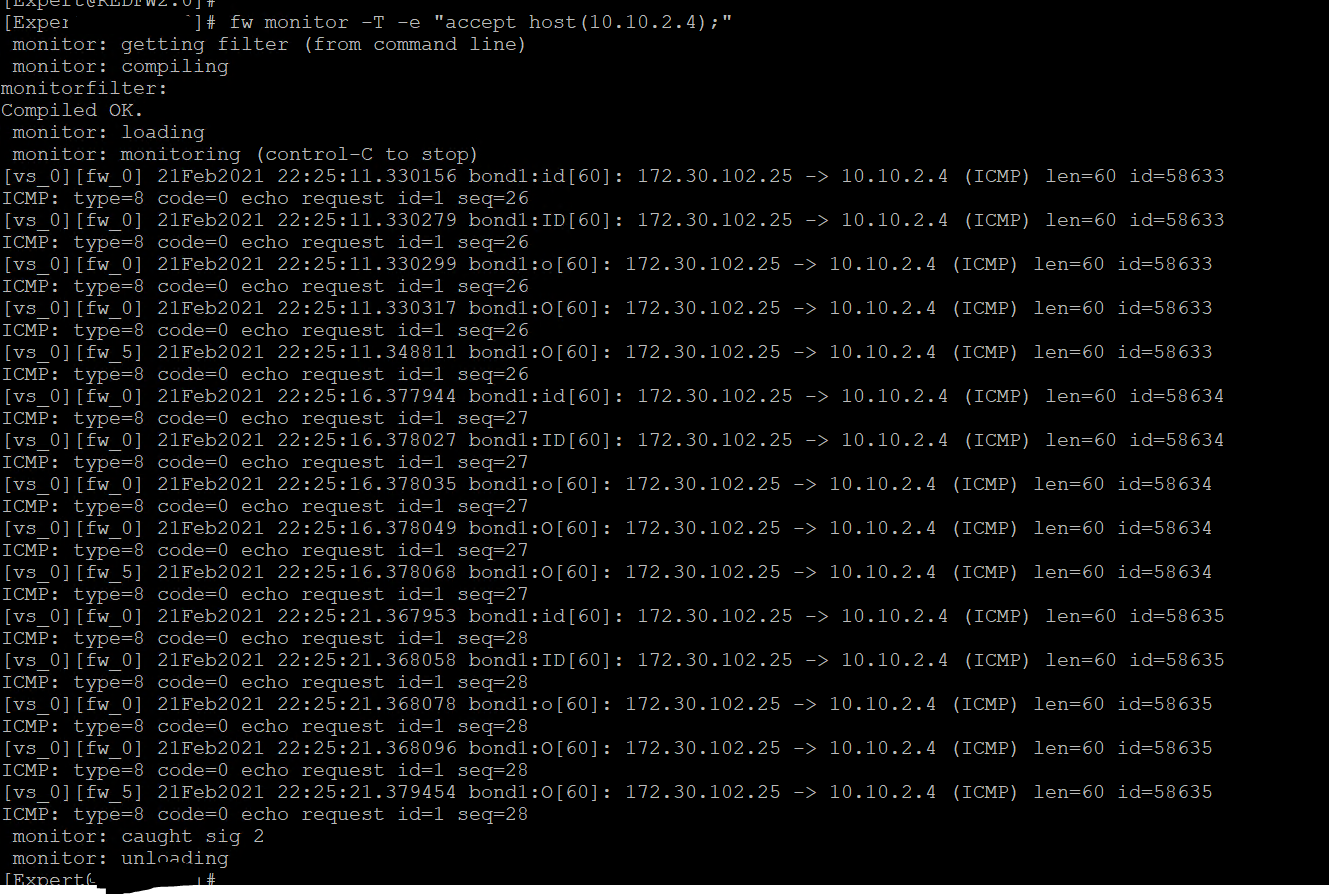
I ran an Ping from my laptop connected to remote VPN (laptop IP: 172.30.102.25) towards host in Azure (10.10.2.4) while running fw monitor.
Attached is the output. I don't expect ICMP to go through, just doing it to test the routing.
I'm still not sure if the traffic is passing through the VPN or not.
I was able to sort this out using Route Based IKEv2 VPN
Leaderboard
Epsum factorial non deposit quid pro quo hic escorol.
| User | Count |
|---|---|
| 21 | |
| 20 | |
| 16 | |
| 8 | |
| 7 | |
| 3 | |
| 3 | |
| 3 | |
| 3 | |
| 3 |
Fri 12 Dec 2025 @ 10:00 AM (CET)
Check Mates Live Netherlands: #41 AI & Multi Context ProtocolTue 16 Dec 2025 @ 05:00 PM (CET)
Under the Hood: CloudGuard Network Security for Oracle Cloud - Config and Autoscaling!Fri 12 Dec 2025 @ 10:00 AM (CET)
Check Mates Live Netherlands: #41 AI & Multi Context ProtocolTue 16 Dec 2025 @ 05:00 PM (CET)
Under the Hood: CloudGuard Network Security for Oracle Cloud - Config and Autoscaling!About CheckMates
Learn Check Point
Advanced Learning
YOU DESERVE THE BEST SECURITY