- Products
- Learn
- Local User Groups
- Partners
- More

What's New in R82.10?
10 December @ 5pm CET / 11am ET
Improve Your Security Posture with
Threat Prevention and Policy Insights
Overlap in Security Validation
Help us to understand your needs better
CheckMates Go:
Maestro Madness
Hello,
I'm wondering if there is any way how to install a company ssl wildcard certificate for the firewall SAML portal in order to avoid browser security warnings. There is a post where it is indicated this works but there is no how to listed.
Thank you for your help,
Juraj
Hello PhoneBoy,
Thank you for the response!
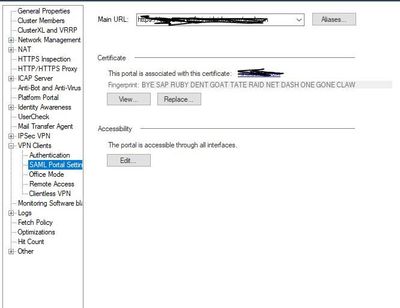
For SAML authentication the certificate is being uploaded here.
The primary concern was how to introduce a company wildcard already signed certificate (*.domain.com) to the firewall.
I only found sk69660 describing a procedure starting with CSR and sending it to the 3rd part CA for signing etc.
But there is a way how to bypass CSR and proceed with already signed certificate.
we had a *x509.cer certificate with a *.key (private key)
first step was to rename *x509.cer to *x509.crt
make sure that the CRT file has the full certificate chain up to a trusted root CA.
second step was to combine *x509.crt with *.key
this step is documented in sk69660
[Expert@gw]# cpopenssl pkcs12 -export -out Final_cert_name.p12 -in *x509.crt -inkey *.key
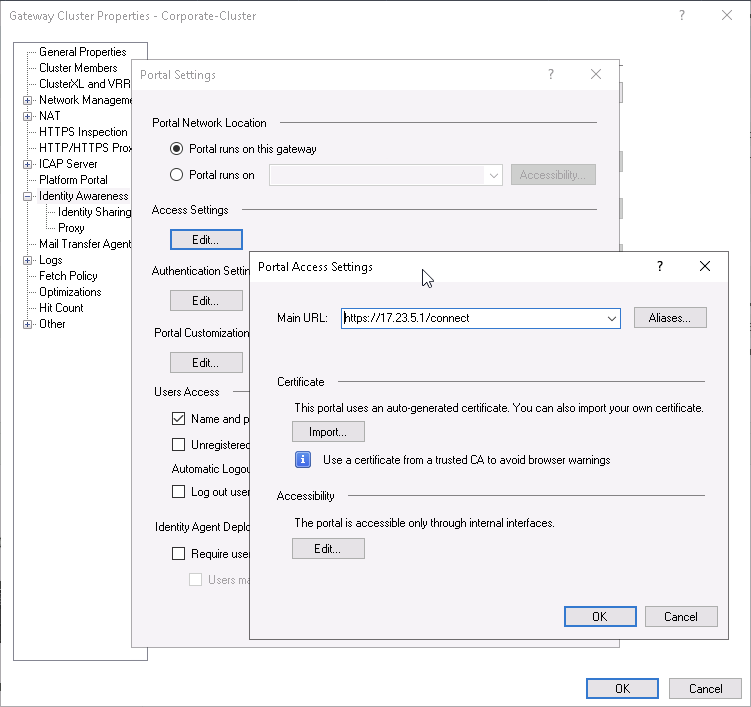
Then the last step is just to upload it to the portal settings according to your picture or the other picture.
All worked like a charm.
Thanks,
Juraj
Pretty sure this is where you configure it:
Hello PhoneBoy,
Thank you for the response!
For SAML authentication the certificate is being uploaded here.
The primary concern was how to introduce a company wildcard already signed certificate (*.domain.com) to the firewall.
I only found sk69660 describing a procedure starting with CSR and sending it to the 3rd part CA for signing etc.
But there is a way how to bypass CSR and proceed with already signed certificate.
we had a *x509.cer certificate with a *.key (private key)
first step was to rename *x509.cer to *x509.crt
make sure that the CRT file has the full certificate chain up to a trusted root CA.
second step was to combine *x509.crt with *.key
this step is documented in sk69660
[Expert@gw]# cpopenssl pkcs12 -export -out Final_cert_name.p12 -in *x509.crt -inkey *.key
Then the last step is just to upload it to the portal settings according to your picture or the other picture.
All worked like a charm.
Thanks,
Juraj
Ah, didn't know you were referring to the the SAML portal for Remote Access.
But yes, this makes sense: the cert you import needs to have the full certificate chain included and in the correct format.
Hello Juraj and PhoneBoy,
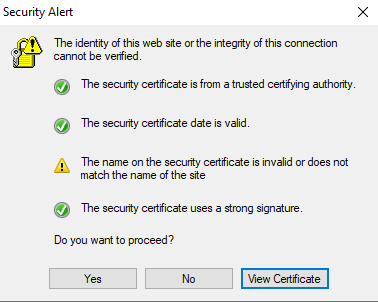
Following this post I was able to successfully import the wildcard certificate of our company *.domain.com. I have a DNS record for vpn.domain.com resolving to the firewall's external IP address. When creating the site I receive the warning message, which I have to Trust, stating that the presented certificate name *.domain.com differs from the site name vpn.domain.com. There is also a security alert appearing everytime the Secure Remote VPN client is started - leading to multiple complains from employees.
When I open the Main URL in a browser https://vpn.domain.com/saml-vpn it redirects to https://<firewal_external_ip>/saml-vpn/Access, which most probably causes the observed security alert.
Is there a way to replace the redirect url without recreating the IDP object?
Found the issue. It seems that the MULTIPORTAL_HOSTNAME variable in /opt/CPshrd-R81/conf/multiportal/httpd-conf/saml-vpn/httpd.conf keep the IPv4 address, instead of vpn.domain.com FQDN. The issue was fixed by manually editing the value.
Hello Bro,
As I know, when SAML has never been imported a certificate at all, the "import" button will be available.
If it has been imported, a "replace" will be available.
If so, how do we take out the certificate? The issue here is that the company doesn't want to extend the certificate expired anymore. Just want to delete not replace. Is there a solution to delete it?
Thanks bro.
This will most likely require GUIdbedit to remove from the relevant gateway object.
It will be a process similar to this for the HTTPS Inspection certificate: https://support.checkpoint.com/results/sk/sk92870
However, that's just a guess and you may to want consult with TAC for the exact steps: https://help.checkpoint.com
Leaderboard
Epsum factorial non deposit quid pro quo hic escorol.
| User | Count |
|---|---|
| 21 | |
| 18 | |
| 7 | |
| 6 | |
| 6 | |
| 6 | |
| 6 | |
| 5 | |
| 5 | |
| 4 |
Wed 03 Dec 2025 @ 10:00 AM (COT)
Última Sesión del Año – CheckMates LATAM: ERM & TEM con ExpertosThu 04 Dec 2025 @ 12:30 PM (SGT)
End-of-Year Event: Securing AI Transformation in a Hyperconnected World - APACThu 04 Dec 2025 @ 03:00 PM (CET)
End-of-Year Event: Securing AI Transformation in a Hyperconnected World - EMEAThu 04 Dec 2025 @ 02:00 PM (EST)
End-of-Year Event: Securing AI Transformation in a Hyperconnected World - AmericasWed 03 Dec 2025 @ 10:00 AM (COT)
Última Sesión del Año – CheckMates LATAM: ERM & TEM con ExpertosThu 04 Dec 2025 @ 12:30 PM (SGT)
End-of-Year Event: Securing AI Transformation in a Hyperconnected World - APACThu 04 Dec 2025 @ 03:00 PM (CET)
End-of-Year Event: Securing AI Transformation in a Hyperconnected World - EMEAThu 04 Dec 2025 @ 02:00 PM (EST)
End-of-Year Event: Securing AI Transformation in a Hyperconnected World - AmericasAbout CheckMates
Learn Check Point
Advanced Learning
YOU DESERVE THE BEST SECURITY