- Products
- Learn
- Local User Groups
- Partners
- More
MVP 2026: Submissions
Are Now Open!
What's New in R82.10?
Watch NowOverlap in Security Validation
Help us to understand your needs better
CheckMates Go:
Maestro Madness
Hello,
Today I attempted to install R80.20 smart management server on an open server. It was full of fail.
I get the installation menu, I select the with ACPI + VGA install and the installer starts.. it then repeatedly attempts to mount a cdrom (?) and then fails.
The ISOmorphic installer for R80.20 worked fine for direct upgrade of the 3000 series devices I'm installing today (no problem at all, seamless). I used the latest isomorphic version available and the latest R80.20 iso.
Open server installations (using the iso) have succeeded already using VMware workstation etc, this was my first attempt on a physical machine (default dell workstation with no trimmings). I disabled the CDROM in the bios.. it failed claiming it couldn't find it.
I will post the screenshots when I return from site.
Anyone else having this issue? (I will likely attempt install again with a dvd at a later date).
Iain.
Moving this to Appliances and Gaia.
Screenshots will probably be helpful.
Just to verify, what Dell appliance is it?
Is it one that is on the HCL?
And are you installing the Security Management ISO or the Gateway ISO?
Beside of the HCL, which you probably should check. How do you provide the iso file to the system? Per iDrac? USB Stick?
is booting from USB allowed and enabled in BIOS?
in bios settings you‘d just to have to change the order, when and where to boot from.
Cheers
Just don't use bare metal installation, especially for Management Server. It's better to use free ESXi.
Ok everyone, I'm home from site.
I'm relatively confident the issue is with the installation scripts (probably hard-coding mounting a CD/DVD). I don't think the hardware being different is going to make the boot methodology change. The box itself isn't a HCL qualified dell server, but I seriously doubt it'l make any difference to the installation scripts attempting to mount a CD/DVD.
The VMware installations are likely working fine because the ISO installation method in VMWare mounts via an emulated CD/DVD player.
Can someone else just do a quick check of a baremetal install using latest ISOmorphic and latest R80.20 managemet ISO to see if they can replicate? (perhaps QA was only done using virtualbox / vmware and not baremetal for R80.20).
I will probably end up running this on a the free ESXi hypervisor in the end.
-----------------------------
I'll try and make this as clear as I can.
Booting from the R80.20 Management (T101) ISO image (created with the latest ISOmorphic) via a known good USB stick.
I get a good bootloader, select options for either with ACPI + VGA or without ACPI + VGA (I believe it's 11 or 12).
Loader successfully boots the kernel and executes the Installer with the ncurses front end. Immediately afterwards I see attempts to mount the CD-ROM which fail, then the main console reports failed installation.
Here are the screenshots:
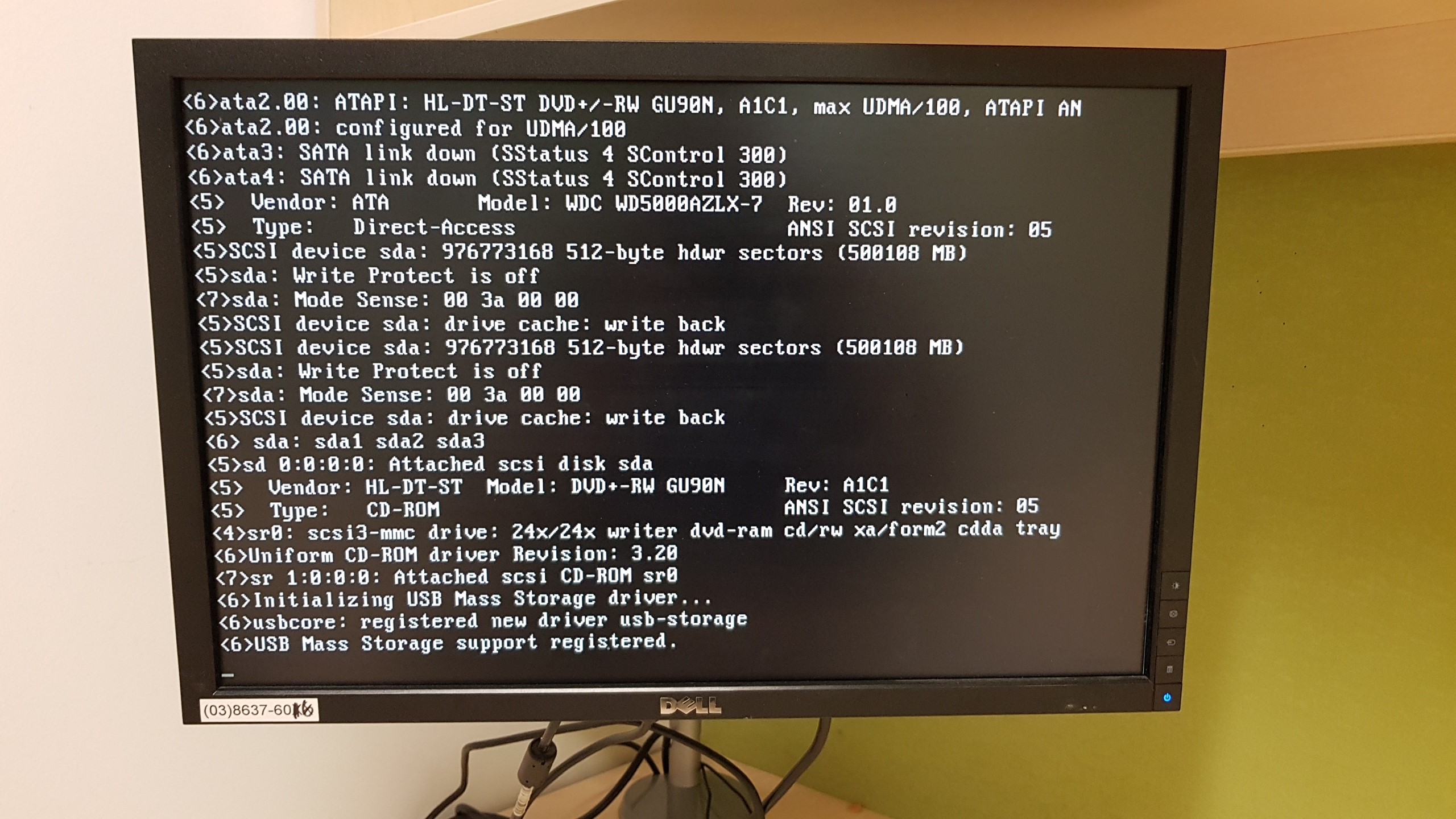
Normal post from tty1 (ALT-F2). DIsk found, usb-storage loaded..
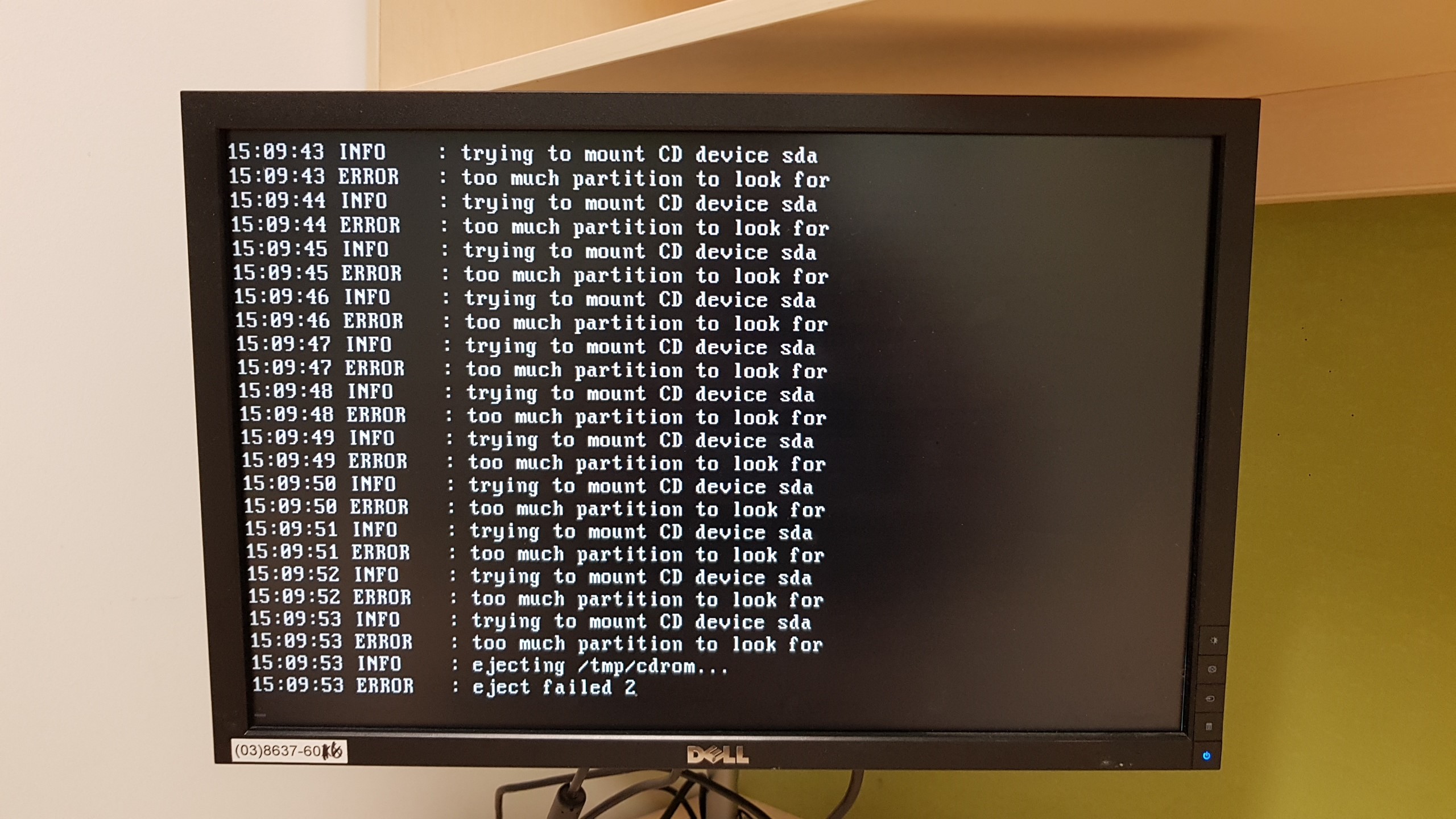
From tty2 (ALT-F3) - for some reason trying to mount a CD device (?).
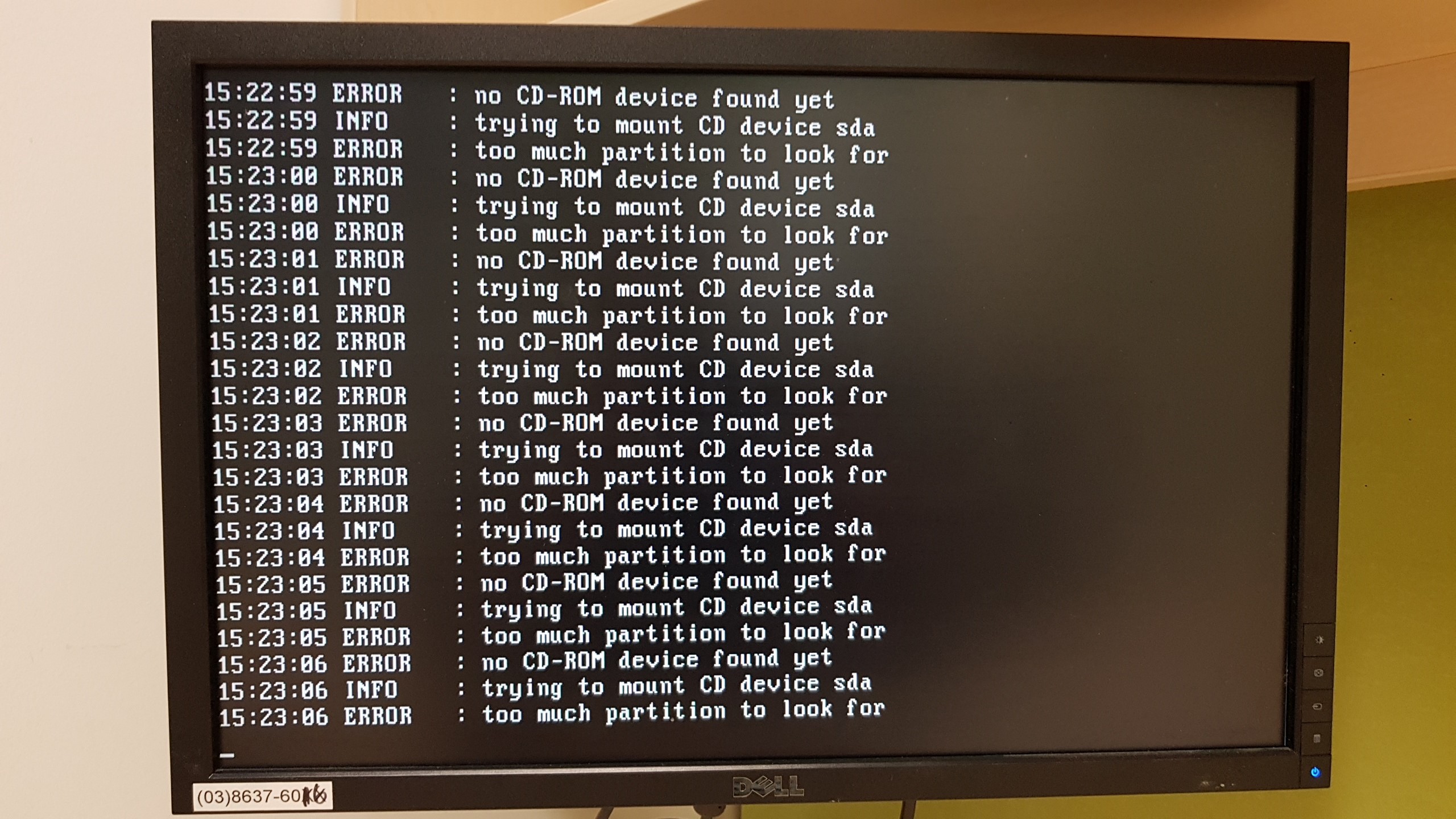
This is a new boot with the DVD device disabled in the bios. CD device sda?
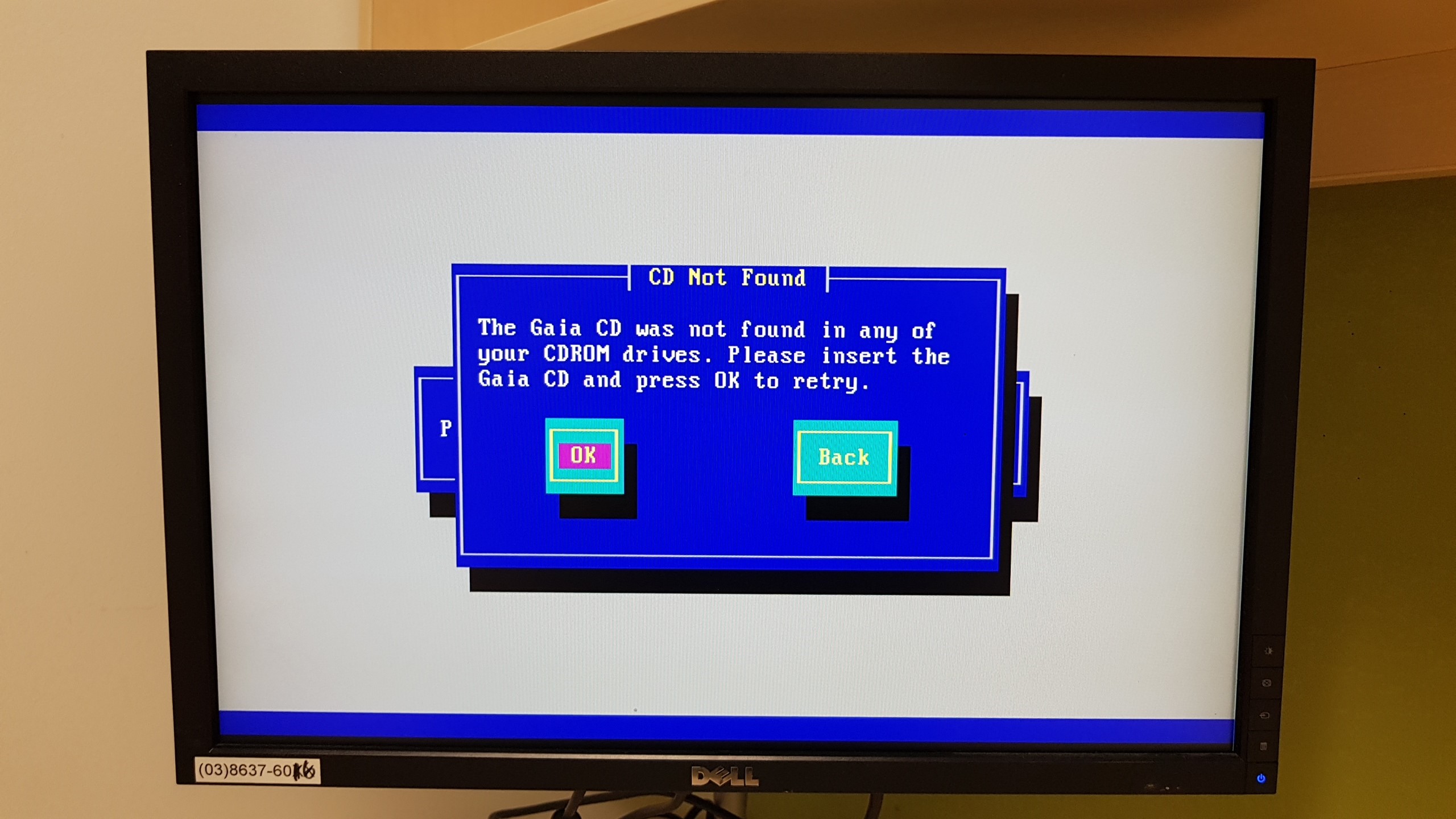
Here is the final error on main console (tty1 / ALT-F1).
I ran into this exact same issue a year ago with R8.10 when the customer bought a Dell Power T130 which is a low end tower desktop server and wanted to run Checkpoint management on it. I could not convince them to buy proper HCL hardware so I dug deep into a solution.
What I discovered is that certain Dell servers only support USB 3.0 hardware and the Gaia installation media only has drivers for USB 2.0. The solution was, I had them buy a $60 USB 2.0 card for the T130, after that, the isomorphic install completed without issue.
This appears to be an issue on the following line of Dell low end servers Dell R230, R330, T30, T130, T330. I discovered this by finding a thread on Dell support where people were having issues installing Windows server 2008 on this same hardware for the same reasons. Dell support was suggesting all kinds of complicated procedures to inject USB 3.0 drivers into the Server 2008 installation procedure and one guy commented that he just installed a USB 2.0 card and all was good. I tried the same trick and it worked with GAIA!
Al
Leaderboard
Epsum factorial non deposit quid pro quo hic escorol.
| User | Count |
|---|---|
| 21 | |
| 20 | |
| 19 | |
| 8 | |
| 7 | |
| 3 | |
| 3 | |
| 3 | |
| 3 | |
| 3 |
Fri 12 Dec 2025 @ 10:00 AM (CET)
Check Mates Live Netherlands: #41 AI & Multi Context ProtocolTue 16 Dec 2025 @ 05:00 PM (CET)
Under the Hood: CloudGuard Network Security for Oracle Cloud - Config and Autoscaling!Fri 12 Dec 2025 @ 10:00 AM (CET)
Check Mates Live Netherlands: #41 AI & Multi Context ProtocolTue 16 Dec 2025 @ 05:00 PM (CET)
Under the Hood: CloudGuard Network Security for Oracle Cloud - Config and Autoscaling!Thu 18 Dec 2025 @ 10:00 AM (CET)
Cloud Architect Series - Building a Hybrid Mesh Security Strategy across cloudsAbout CheckMates
Learn Check Point
Advanced Learning
YOU DESERVE THE BEST SECURITY