- Products
- Learn
- Local User Groups
- Partners
- More

MVP 2026: Submissions
Are Now Open!
What's New in R82.10?
Watch NowOverlap in Security Validation
Help us to understand your needs better
CheckMates Go:
Maestro Madness
Can someone help explain to me how FTP works through a Checkpoint firewall? Specifically in this case, how Active mode FTP works given the following scenario:
Single FW rule that allows my internal systems to access internet servers over default FTP service/protocol. No other rules exist for this.
It is my understanding that in Active mode FTP, the process is (at a high level)
1) The client first initiates traffic from a random source port to tcp/21 on the FTP to issue CONTROL commands. This traffic is bound and allowed via the rule defined above.
2) Over this control session, the client issues a POST command informing the server what local port the client will be listening on for the DATA traffic. This is usually a random port.
3) The FTP server then initiates a NEW session from local source port tcp/20 to the destination port established by the client in step #2. Data proceeds to transfer over this session.
Here is where I get lost. I have validated at the client via a packet capture, this process occurring, but I don't understand how the Checkpoint is 1) allowing this traffic to pass given I have no rules in place to specifically allow this new session/traffic, and 2) the client has no external NAT.
In my packet capture I see the server set up the session as listed above, but the Checkpoint firewall does not even log this traffic in my logs. The only traffic I see is the tcp/21 control traffic. I can only assume something is happening under the covers to allow this. Do all firewalls do this or is this special to certain ones like Checkpoint?
Most firewalls watch the PORT command on port 21 and automatically allow the required data connection.
In other words, the firewall is doing more than just allowing a TCP connection on port 21.
If NAT is required, the firewall will usually translate the PORT command “on the fly” to something that will work.
None of this is unique to Check Point, practically every firewall on the market does this, given how old and well understood the FTP protocol is.
you can find the explanation of this behaviour her What is the difference between Active FTP and Passive FTP connection?
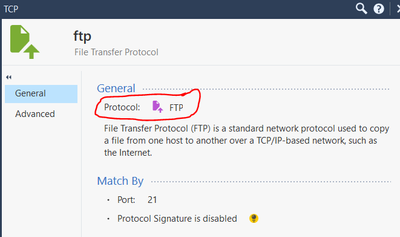
As described by @PhoneBoy this automatism does only work if you use the service TCP/21 with protocol type set to FTP in your rulebase.
You can check this, create a new service TCP/21 with protocol type "none" and you see the drops for the ftp-data connections.
Wolfgang
Apologize for necropost/replying, but I wanted to revisit this. I originally asked about active FTP. I assume this works for passive FTP as well where random ports are involved?
Anyway I have a remote ftp system using passive FTP but they are using a non-standard control port (tcp 31). I show there is a built in service called ftp-pasv configured with a protocol of the same name, but it is only configured for tcp 21.
As such I'm trying to create a custom service to use tcp 31, but in my protocol options I only have an option for FTP, not FTP-PASV. Can I just use FTP in this case? I assume ftp-pasv is handled differently and that's why Checkpoint has different built in services for each.
Anyway, if I can't use protocol FTP, is my only other option to create a custom service surrounding the expected ports to be used by passive FTP and simply add those to the rule as well?
There is a long answer to your question, but I prefer short one, which is yes. If custom port has to be used, your only option is pretty much what you described...create custom service, give that port number and make sure its included in the rule. Is this guarantee it would work? Not always, but its a requirement, so if it fails, then we would need to run some captures, preferably tcpdump and or fw monitor.
Leaderboard
Epsum factorial non deposit quid pro quo hic escorol.
| User | Count |
|---|---|
| 19 | |
| 17 | |
| 14 | |
| 8 | |
| 7 | |
| 3 | |
| 3 | |
| 3 | |
| 3 | |
| 2 |
Tue 16 Dec 2025 @ 05:00 PM (CET)
Under the Hood: CloudGuard Network Security for Oracle Cloud - Config and Autoscaling!Thu 18 Dec 2025 @ 10:00 AM (CET)
Cloud Architect Series - Building a Hybrid Mesh Security Strategy across cloudsTue 16 Dec 2025 @ 05:00 PM (CET)
Under the Hood: CloudGuard Network Security for Oracle Cloud - Config and Autoscaling!Thu 18 Dec 2025 @ 10:00 AM (CET)
Cloud Architect Series - Building a Hybrid Mesh Security Strategy across cloudsAbout CheckMates
Learn Check Point
Advanced Learning
YOU DESERVE THE BEST SECURITY