- Products
- Learn
- Local User Groups
- Partners
- More
MVP 2026: Submissions
Are Now Open!
What's New in R82.10?
10 December @ 5pm CET / 11am ET
Announcing Quantum R82.10!
Learn MoreOverlap in Security Validation
Help us to understand your needs better
CheckMates Go:
Maestro Madness
Hello
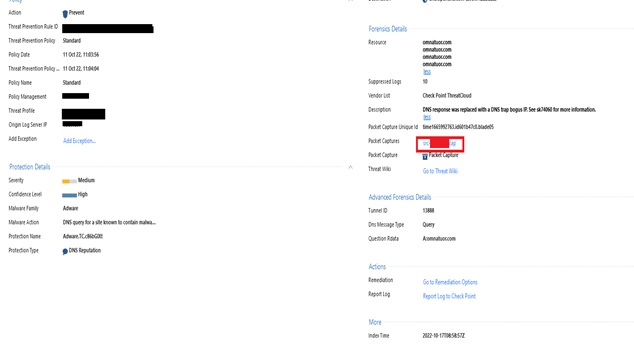
I have a problem with Checkpoint Firewall (R81.10).
When I'm trying to check the monitoring in the Logs section/ When I click on Packet Captures, which I made to open with Wireshark, the message "the file "time1665992763.cap" does not exist.
Please help me...
Enes.
You need to download the file before Wireshark can open it. Opening the link with Wireshark will not work. Download the capture file first.
Thank you for your reply.
When I offer the mouse near packet captures, the possibility of saving is not given, but only open directly. Therefore, I have configured the .cap format to be opened with Wireshark. But even with Wireshark I'm getting the error that I described in the previous post . Is there any other possibility in the checkpoint to save the capture not in this way but in another way?
Thank you.
Enes
I have double-checked, you should be able to save the capture. Here is the quote from Threat Prevention Admin guide:
You can capture network traffic. The content of the packet capture provides a greater insight into the traffic which generated the log. With this feature activated, the Security Gateway sends a packet capture file with the log to the Log Server. You can open the file, or save it to a file location to retrieve the information a later time.
This is odd, it should actually allow you download. Please check if the file mentioned in the logs actually exists on the log server. Look into sk120773 for the location, then search by name. In case of the old captures, they may be cleaned already.
If the file does exist, but you cannot query it from the SmartConsole, please open a TAC case
It is possible that only one packet capture (the latest one) is available for that particular protection and the old one you are attempting to access has rolled off. How many subsequent packet captures for the same protection are going to be saved will vary depending upon whether the packet capture was taken for an IPS ThreatCloud Protection, a Core Protection/Activation, or an Inspection Setting and whether the capture was called for in the Track column of the Threat Prevention policy, the settings of the protection itself, or no capture was called for in the configuration at all but the firewall automatically saved a packet capture upon the latest triggering of that protection by default, but older ones for that protection are not retained.
In some cases a packet capture will not be available in the logs when it seems there should be; this can be caused in the following situations stated in the R81 Known Limitations:
• The detection occurred in the Check Point ThreatCloud (i.e. not locally on the gateway due to its own cache)
• The DeepScan engine portion of the firewall made the determination
• The connection was SSL/HTTPS encrypted by the firewall
What is the specific protection name, and do you have a packet capture set in the Track field of the TP rule matching the protection, the "capture packets" checkbox set on the protection itself, or both?
We have the version of protection within our infrastructure on premises , we do not have it in the cloud.
Thank you for your reply...
If you have MDPS configured on the gateway you are not able to download captures from SmartConsole.
This is a bug and not solved.
Leaderboard
Epsum factorial non deposit quid pro quo hic escorol.
| User | Count |
|---|---|
| 24 | |
| 20 | |
| 8 | |
| 7 | |
| 6 | |
| 5 | |
| 5 | |
| 5 | |
| 4 | |
| 4 |
Fri 12 Dec 2025 @ 10:00 AM (CET)
Check Mates Live Netherlands: #41 AI & Multi Context ProtocolTue 16 Dec 2025 @ 05:00 PM (CET)
Under the Hood: CloudGuard Network Security for Oracle Cloud - Config and Autoscaling!Fri 12 Dec 2025 @ 10:00 AM (CET)
Check Mates Live Netherlands: #41 AI & Multi Context ProtocolTue 16 Dec 2025 @ 05:00 PM (CET)
Under the Hood: CloudGuard Network Security for Oracle Cloud - Config and Autoscaling!Thu 18 Dec 2025 @ 10:00 AM (CET)
Cloud Architect Series - Building a Hybrid Mesh Security Strategy across cloudsAbout CheckMates
Learn Check Point
Advanced Learning
YOU DESERVE THE BEST SECURITY